The above data is required to use Workstatus’s ROI calculator.
How often should ROI be reviewed?
ROI can be reviewed regularly to track progress.
Good practice:
Review monthly to see short-term gains
Review quarterly to understand patterns
Review yearly to measure long-term impact
Track improvements in time, cost, and work quality
Regular review ensures consistent growth and smarter planning over time.
FAQs
What is an ROI Calculator?
An ROI calculator is a tool that measures the return on investment by comparing the cost of an investment with the financial gains it generates. It provides a percentage result that shows how much return you earn for every dollar spent.
Who can benefit from using an ROI Calculator?
Business owners, managers, project leaders, financial analysts, and even startups can benefit from using an ROI calculator. It helps anyone who wants to evaluate project profitability, compare investment options, or justify expenses with clear data.
What’s the difference between ROI and payback period?
ROI measures the overall profitability of an investment as a percentage.
Payback period measures how long it takes to recover the initial investment.
ROI shows total return, while payback period shows time to breakeven.
How accurate are the ROI results?
The accuracy of ROI results depends on the quality of input data. If all costs, revenues, and assumptions are captured correctly, the ROI calculator provides a reliable estimate. However, since future returns may vary, results should be seen as informed estimates rather than guarantees.
As the world becomes increasingly connected and technology-enabled, it’s no surprise that governments are taking action to ensure fair labor practices.
The EU Time Tracking Law is one such effort, requiring companies to accurately track employee time and implement robust record-keeping systems.
If you’re an organization operating within the EU, keeping up with these regulations is necessary rather than just an option.
In this post, we’ll explore how to stay compliant as an employer so you can keep your business running smoothly while adhering to legal requirements.
This blog will be going to cover:
The basics of the EU Time Tracking Law
Why was the EU time tracking law required?
What is the 48-hour EU rule?
Tips for making your time-tracking system more efficient and effective
So if you are an international business operating in the European Union, check out this blog to stay on top of the latest time-tracking regulations.
Let’s get started by understanding:
What Is The EU Time Tracking Law?
The EU Time Tracking Law, also known as the EU Working Time Directive, is a legal framework implemented by the European Union to:
Regulate working hours
Ensure employee health and safety
Promote employee well-being across member states
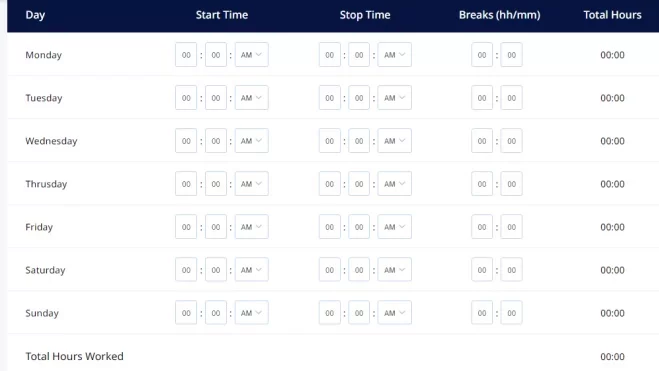
The law requires employers to track and document the working hours of their employees, including:
Regular hours
Overtime
Rest periods and breaks
The main objective of the EU Time Tracking Law is to:
Prevent excessive working hours
Protect employee rights and healthy work-life balance
By accurately recording & monitoring working hours, the law aims to:
Prevent employee exploitation
Minimize the risk of burnout
Ensure that employees receive adequate rest and leisure time
Under the law, employers are obligated to provide employees with:
Sufficient breaks and rest periods
Limit the maximum number of working hours per week
Compensate employees for any overtime worked
Additionally, employers must maintain comprehensive records of employee’s working hours, which may be subject to inspection by labor authorities to ensure compliance.
Why Was The EU Time Tracking Law Required?
The EU Time Tracking Law, also known as the EU Working Time Directive, was required for several reasons:
Protecting Employee Rights:
The law was implemented to safeguard the rights of employees. It establishes limits on working hours to:
Prevent employee exploitation
Promote a healthy work-life balance
Protect workers from excessive demands by employers
Preventing Health And Safety Risks:
Excessive working hours & inadequate rest periods can lead to:
Fatigue
Stress
Negative physical and mental health impacts
The law aims to mitigate these risks by setting working hours and mandating rest breaks, promoting workplace safety and employee well-being.
Ensuring Fair Compensation:
The law ensures that employees are fairly compensated for their work by requiring accurate time tracking and documentation of working hours.
It addresses concerns about unpaid overtime and supports the principle of fair remuneration for employees’ efforts.
Promoting Work-Life Balance:
The law recognizes the importance of work-life balance for employees’ well-being and quality of life.
Setting limits on working hours & promoting adequate rest periods encourages employers to create an environment that supports work-life balance.
Harmonizing Regulations Across The EU:
The law helps harmonize working time regulations across European Union member states.
It establishes a common framework that provides consistency and clarity for employers and employees operating in different countries within the EU.
Now that we have an understanding of the objectives of the EU Time Tracking Law.
Let’s take a look at some:
Key Provisions And Requirements For EU Time Tracking Law
Mandatory Time Tracking For All Employees:
All employers within the European Union must implement a system for tracking the working hours of their employees.
This includes tracking regular working hours, overtime, and additional hours.
Documentation And Reporting Obligations:
1. Employers must maintain accurate and comprehensive records of employees’ working hours. The records should include:
Start and end times
Breaks
Rest periods
Any overtime worked
2. Documentation should be organized and accessible for potential inspection by labor authorities.
Limitations On Maximum Working Hours:
The law establishes maximum limits on working hours for employees.
The exact limit may vary by country, but it generally ranges between 40 to 48 hours per week.
Employers must ensure that employees working hours do not exceed the prescribed limits.
Rest And Break Requirements:
1. The law mandates specific rest and break periods for employees
2. It may include requirements for daily rest periods e.g.
Minimum 11 hours of uninterrupted rest between shifts
Weekly rest period
Minimum 24 consecutive hours off per week
Rest breaks during working hours
3. Employers must ensure that employees receive these required rest periods and breaks.
Handling Of Overtime And Compensation:
If an employee works beyond normal working hours, it is considered overtime.
The law outlines regulations for compensating employees for overtime, such as:
Increased pay rates
Granting time off in lieu
Employers must accurately track and record overtime hours worked and ensure proper compensation is provided.
Now let’s understand:
What Is The 48-Hour Eu Rule?
The 48-hour EU rule, also known as the 48-hour working week, refers to a provision outlined in the EU Working Time Directive.
It limits the maximum number of working hours an employee can be required to work in a week, set at 48 hours.
This rule applies to most employees across the European Union, with some exceptions and variations allowed in certain circumstances and sectors.
Key points regarding the 48-hour EU rule include:
Maximum Working Hours:
The rule states that an employee’s working hours, including overtime, should not exceed an average of 48 hours per week over a reference period.
This average is usually calculated over four months but can vary based on national legislation or collective agreements.
Opt-Out Provision:
An opt-out provision in the directive allows individual employees to voluntarily choose to work longer than 48 hours per week.
However, this must be a voluntary decision the employee makes without any pressure or negative consequences from the employer.
Exceptions And Variations:
Certain sectors, such as healthcare, transport, emergency services, and some industries with seasonal work, may have specific provisions or variations regarding the 48-hour EU rule.
National legislation and collective agreements can also provide additional rules and exceptions within the framework of the directive.
Benefits Of EU Time Tracking Law For Both Employers And Employees
Now let’s take a look at:
The Impact Of EU Time Tracking Law On Employers And Employees: Challenges And Solutions
Implementation And Adoption Of Time-Tracking Systems:
One of the primary challenges for both employers & employees is the successful implementation and adoption of time-tracking systems.
Employers may face resistance from employees who are unfamiliar with such systems or may be concerned about their privacy.
On the other hand, employees may find it difficult to adapt to the new tracking processes, leading to potential disruptions in their workflow.
Workstatus generates accurate timesheets based on the tracked time, making it easier for employers and employees to review and validate the hours worked.
This helps in ensuring transparency and fairness in the payment process.
3) Support 24/7:
Workstatus offers round-the-clock support to assist employers and employees with any issues or questions regarding the time-tracking system.
This ensures that users can access timely support and resolve any challenges arising during the software’s implementation or usage.
Privacy And Data Protection Considerations:
The EU Time Tracking Law requires employers to collect and process employee work hours data.
This raises privacy and data protection concerns for both employers and employees.
Employers need to ensure that they handle & store the data securely, while employees need reassurance that their personal information will be completely protected.
1) Silent Mode:
Workstatus provides a feature that allows employers to monitor employees’ activities without intruding on their privacy.
This addresses the privacy concerns of employees while still enabling employers to ensure productivity and compliance.
2) Dashboard And Reporting:
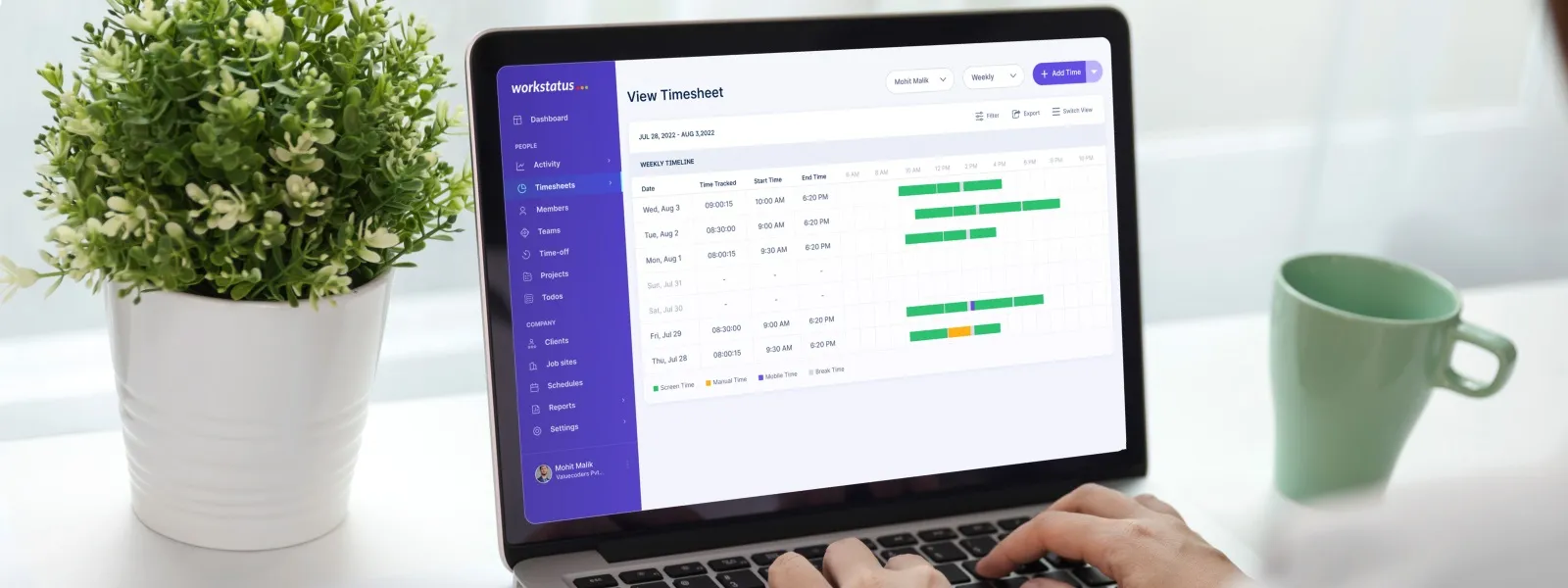
Workstatus offers a comprehensive dashboard and reporting system that allows employers to monitor and analyze employee productivity and working hours.
This helps manage remote and flexible work arrangements effectively, enabling employers to make data-driven decisions and employees to understand their performance clearly.
Monitoring And Managing Remote And Flexible Work Arrangements:
Monitoring and managing employee productivity and working hours can be challenging with the rise of remote and flexible work arrangements.
Employers may find it difficult to track and verify the hours worked by remote employees accurately.
On the other hand, employees may face increased scrutiny and pressure to constantly prove their productivity, leading to potential stress and burnout.
1) Mobile Time Tracking:
Workstatus’s mobile app allows employers to track their teams’ time and work activities on the go.
This is particularly useful for remote and flexible workers working from different locations.
It ensures that their time is accurately tracked, regardless of their physical location.
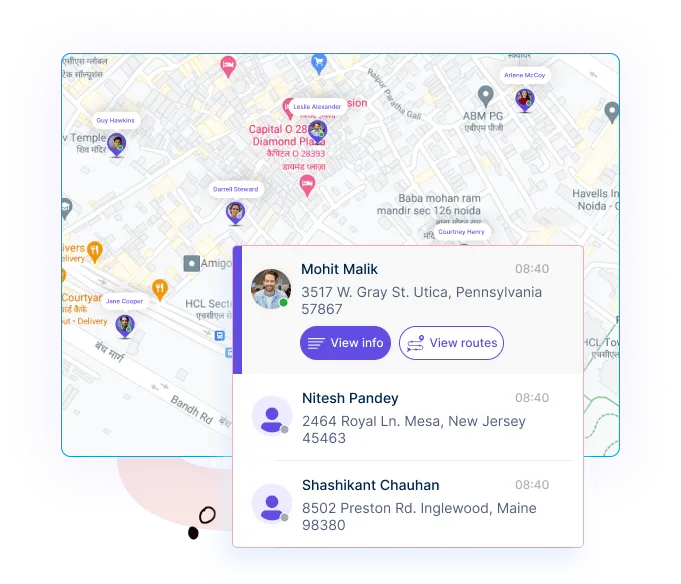
2) GPS Tracking:
For employees who work in field-based roles, Workstatus provides GPS tracking features.
This allows employers to monitor the location and movement of employees, ensuring compliance and safety in industries such as delivery services or field sales.
So these were the challenges and the solutions to manage time tracking with the EU Time Tracking Law in mind.
Implementing a time-tracking software such as Workstatus is a great way to overcome these challenges and ensure compliance with the law.
Next Step
In conclusion, the EU Time Tracking Law has introduced important regulations to ensure fair labor practices and protect workers’ rights.
To stay compliant as an organization, it is crucial to prioritize accurate and transparent time-tracking methods.
One effective solution that can help streamline your time-tracking processes is Workstatus.
With its user-friendly interface and comprehensive features, Workstatus offers an efficient and reliable way to monitor and record employee working hours.
By implementing Workstatus as your time-tracking solution, you can ensure compliance with the EU Time Tracking Law while enhancing productivity and accountability within your team.
Take the next step towards compliance and efficiency.
Incorporate Workstatus into your time-tracking practices today.
Compliance with labor laws demonstrates an employer’s commitment to ethical business practices and employee well-being.
Calculating Work Hours With Workstatus
Workstatus is your go-to solution for accurate work hour calculation.
With its user-friendly Time Calculator feature, you can effortlessly track and calculate work hours, ensuring transparency and efficiency in your time tracking process.
Let’s explore how to calculate work hours using Workstatus:
Step 1: Enter your Start Time
When using Workstatus, you will begin by entering your start time.
Time Calculator supports the 24-hour clock format, allowing for precise time entry.
Simply input the hour and minute of your start time to get started.
For example, if you started work at 9:30 AM, you would enter it as 09:30.
Here are a few examples of start time entries:
08:00 (8:00 AM)
14:45 (2:45 PM)
21:15 (9:15 PM)
Step 2: Enter your End Time
Next, you will enter your end time.
Like the start time, the end time is recorded using the 24-hour clock format.
Input the hour and minute of your end time to calculate your work hours accurately.
For instance, if you finished work at 5:45 PM, you would enter it as 17:45.
Here are a few examples of end time entries:
16:30 (4:30 PM)
20:15 (8:15 PM)
09:45 (9:45 AM)
Step 3: Click Calculate
Once you have entered both your start and end times, it’s time to click the “Calculate” button.
Our Time Calculator will instantly process the information and provide calculated work hours.
Considering any break or overtime rules you have set, it takes the difference between the start and end times to give you an accurate representation of your work hours.
The Time Calculator ensures you can conveniently track your work hours precisely. It eliminates the following challenges from your workflow:
Manual calculations
Payroll errors
Compliance issues
Whether you need to calculate work hours for payroll, project tracking, or personal record-keeping, Workstatus’s Time Calculator covers you.
Example Calculation
Let’s walk through a sample calculation using Workstatus’s Time Calculator:
Start Time: 09:00 AM
End Time: 05:30 PM
Step 1: Enter your Start Time
In this example, we enter the start time as 09:00.
Step 2: Enter your End Time
We input the end time as 17:30.
Step 3: Click Calculate
After clicking the “Calculate” button, the Time Calculator processes the information and provides the result.
Interpretation of the Result:
The calculated work hours will be displayed as 8 hours and 30 minutes. It means the employee worked 8 hours and 30 minutes on this workday.
Calculating Breaks and Overtime
Accurately calculating breaks and overtime is crucial for effective work-hour management.
With Workstatus, you can calculate breaks and overtime effortlessly, ensuring compliance, fair compensation, and efficient time tracking.
Here’s how Workstatus can help:
Calculating Breaks:
Step 1: Enter Start and End Times: Using Workstatus’s Time Tracker, record the start and end times of an employee’s work shift. The system captures the precise duration of work hours.
Step 2: Set Break Duration: Specify the length of the break period, such as 30 minutes or 1 hour, based on your company’s policies or legal requirements.
Step 3: Automatic Break Deduction: Workstatus automatically deducts the specified break duration from the total work hours.
Calculating Overtime:
Step 1: Define Overtime Threshold: Determine the threshold at which overtime applies, such as exceeding 8.5 hours in a workday or 42 hours in a workweek.
Step 2: Automatic Overtime Calculation: Once the total work hours are recorded, Workstatus automatically identifies any hours that qualify as overtime based on the defined threshold.
Step 3: Overtime Compensation: With the overtime hours accurately calculated, you can use this information to determine the additional compensation owed to employees.
Let Workstatus streamline your work-hour management process, reduce errors, and ensure compliance with labor laws.
Communicate the expectations regarding punctuality and adherence to scheduled work hours.
Define Grace Periods
Specify a grace period for clock-ins and clock-outs.
Workstatus lets you define the acceptable time range within which employees can clock in or out without being considered late or early.
Enable GPS and Geofencing
GPS and geofencing capabilities ensure employees clock in from designated work locations.
Geofencing restricts clock-ins and clock-outs to specified areas, preventing time theft and ensuring accurate location-based tracking.
Account for Breaks
Determine how breaks should be recorded.
Workstatus enables you to track break times separately, ensuring accurate calculation of work hours excluding break durations.
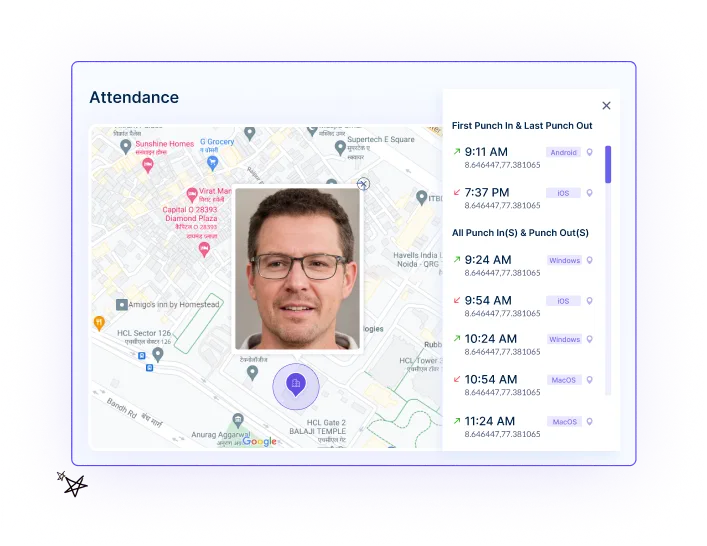
Enable Photo Capture
Require employees to take a photo when clocking in or out through Workstatus.
It helps prevent buddy punching and ensures that the aligned individuals accurately record their work hours.
Enforce Clock-Out Reminders
Clock-out reminders prompt employees to clock out at the end of their scheduled work hours.
It helps prevent unintentional overtime and ensures accurate tracking of work hours.
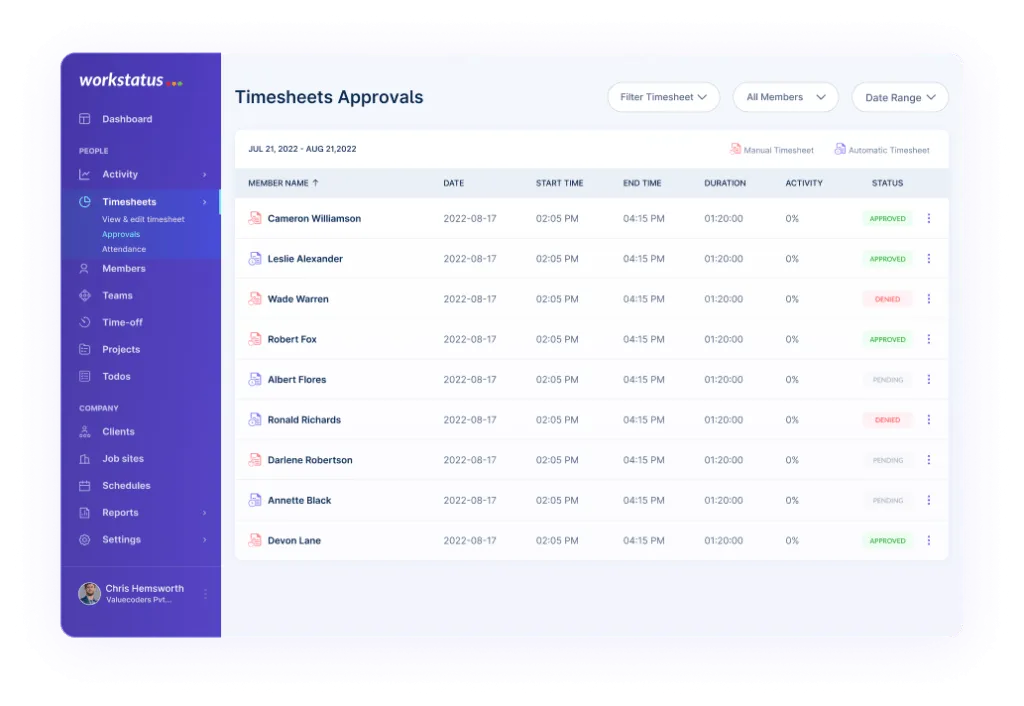
Review and Approve Work Hours
Regularly review and approve work hours recorded by employees.
Online timesheets with Workstatus provide an overview of each employee’s recorded hours, allowing you to verify their accuracy before processing payroll.
Custom Requirements and Support
Tailoring Workstatus to Your Needs.
Our dedicated team offers personalized setup, ongoing support, and custom features to ensure Workstatus aligns perfectly with your organization.
From training and onboarding to integration capabilities and custom reporting, we are committed to meeting your unique work-hour management requirements.
Closing Thoughts
In conclusion, Time Clock Calculator can significantly improve work-hour management.
With accurate time tracking, automated calculations, and labor laws compliance, Workstatus ensures employees fair compensation.
Simplify your workflow, enhance productivity, and foster a healthy work-life balance with a comprehensive time clock solution.
Q. How does Workstatus track work hours for hourly employees?
Ans. Workstatus tracks work hours for hourly employees by capturing their start and end times through the Time Clock feature, enabling accurate time recording.
Q. Can Workstatus accommodate different time clock rules for overtime calculation?
Ans. Yes, Workstatus allows customization of time clock rules to align with your specific overtime policies, ensuring accurate overtime hours and compensation calculation.
Q. Can employees manually adjust their work hours in Workstatus?
Ans. Yes, employees can manually adjust their work hours in Workstatus if there is a need for corrections or if they need to account for any missed clock-ins or clock-outs.
In today’s evolving professional landscape, freelancing & consulting have become attractive career paths for many individuals.
With the freedom to opt for their projects & work on their terms, freelancers & consultants enjoy the flexibility & independence that traditional employment often fails to provide.
However, determining the right hourly rate to charge for their services can be a daunting task.
Setting an appropriate hourly rate is crucial for freelancers and consultants as it reflects their expertise and value and ensures a sustainable income.
Charging too little may lead to financial strain, while charging too much could deter potential clients. Striking the right balance requires careful consideration of various factors, such as:
Experience
Industry standards
Market demand
Regional variations
An average hourly rate calculator is invaluable to simplify this process and empower freelancers and consultants in their pricing decisions.
This blog introduces and explores the benefits of utilizing the average hourly rates calculator, helping professionals establish fair and competitive rates for their services.
So without any further ado, let’s get started by understanding.
What Are Hourly Rates?
Hourly rates refer to the amount of money a freelancer or consultant charges for their services per hour of work.
It is a common pricing method used in the gig economy, where professionals offer their expertise on a project-by-project basis rather than being employed full-time by a single company.
How To Calculate Average Hourly Rates
To calculate average hourly rates, follow these steps:
Step 1: Determine Total Hours Worked
Calculate the total number of hours worked during a specific period. This can be done by tracking the time spent on each client project or reviewing timesheets.
Example: Let’s say a consultant worked 100 hours in a month.
Step 2: Calculate Total Earnings
Calculate the total earnings received during the same period. This includes all payments received from clients for the services rendered.
Example: The consultant earned $5,000 in the month.
Step 3: Divide Total Earnings by Total Hours Worked
Divide the total earnings by the hours worked to find the average hourly rate.
Example: $5,000 / 100 hours = $50 per hour
Step 4: Consider Overhead Expenses
If applicable, subtract any overhead expenses incurred during the period. These expenses may include costs such as:
Software subscriptions
Marketing expenses
Office space rental
Example: Let’s assume the consultant had $500 in monthly overhead expenses.
Step 5: Adjusted Average Hourly Rate
Recalculate the average hourly rate by considering the overhead expenses. Subtract the total overhead expenses from the total earnings and divide it by the total hours worked.
Average hourly rates and salaries are two different compensation methods commonly used in various industries.
While salaries are fixed annual or monthly payments, average hourly rates are based on the number of hours worked.
In a nutshell:
Average Hourly Rates:
Based on the number of hours worked
Provide flexibility and can vary from project to project or client to client
Often used by freelancers, consultants, and part-time workers
Calculated by dividing total earnings by the number of hours worked
Salaries:
Fixed annual or monthly payments
Provide stability and predictability in income
Commonly used for full-time employment
Negotiated based on job responsibilities, qualifications, and experience
Let’s take a look at an example to better understand the concept.
Example 1:
Imagine a freelance graphic designer who charges an average hourly rate of $50. They work 20 hours per week and earn $1,000 for that week.
On the other hand, a full-time graphic designer with a fixed annual salary of $60,000 earns approximately $1,154 per week (considering a 52-week year).
Example 2:
A consultant charges an average hourly rate of $150. They work on various projects throughout the year and accumulate 1,000 billable hours.
Conversely, an employee in a similar consulting role may have a fixed annual salary of $120,000, which does not change based on the number of hours worked.
Now let’s take a look at
How hourly rates are commonly used in freelance and consulting work
Hourly rates play a crucial role in freelance and consulting work, providing a flexible and transparent way to bill clients for services rendered.
Here’s how hourly rates are commonly used in these professions:
Pricing Structure
Hourly rates are the foundation for pricing freelance and consulting services.
Professionals determine their desired hourly rate based on:
Expertise
Experience
Overhead costs
Income goals
This rate becomes the basis for estimating project costs and negotiating client contracts.
Time Tracking
Freelancers and consultants typically track their time on each project using time-tracking tools or software.
By accurately logging the hours worked, they can provide clients with detailed reports and ensure fair billing based on the time invested.
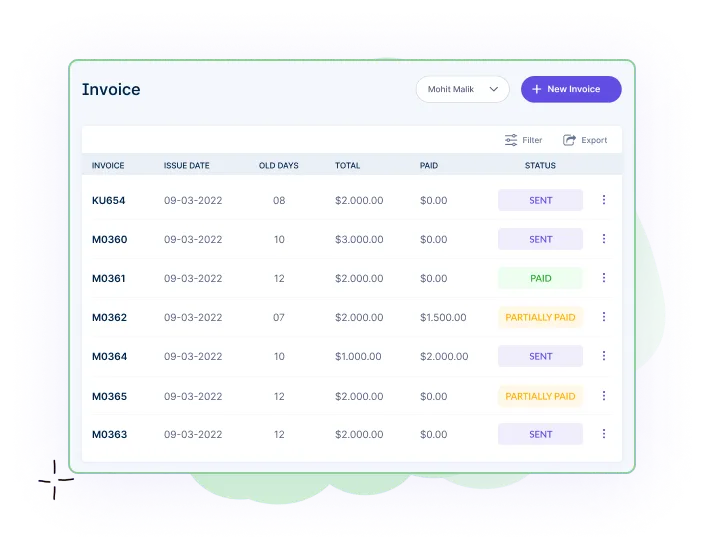
Billing and Invoicing
Hourly rates directly influence the billing process. Freelancers and consultants calculate the total billable amount by multiplying their hourly rate by the number of hours worked.
Then invoices are generated and sent to clients for payment, clearly stating the following:
Hours worked
The rate applied
Additional expenses incurred
Flexibility and Adaptability
Hourly rates allow freelancers and consultants to take on different projects and adjust their workload.
They can accommodate clients with varying budgets and work on shorter-term engagements, allowing for a diverse portfolio and the ability to adapt to changing market demands.
Comparative Analysis
Hourly rates also enable professionals to compare their rates with industry benchmarks and competitors.
By researching prevailing rates in their field, freelancers and consultants can assess whether their rates are competitive and adjust as necessary to stay in line with market standards.
Now let’s take a look at
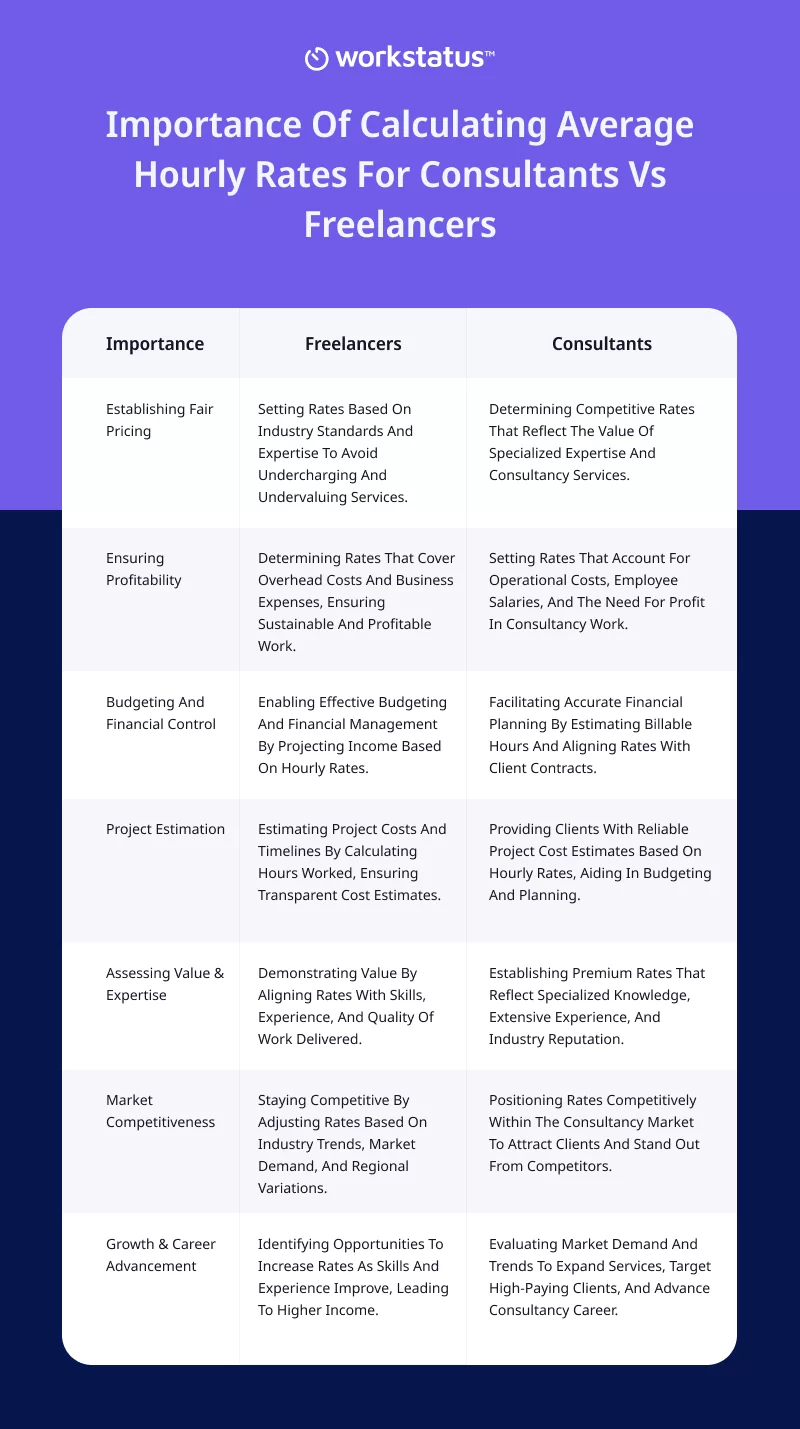
Importance Of Calculating Average Hourly Rates For Consultants Vs. Freelancers
Now let’s understand
How To Use The Average Hourly Rates Calculator
Step 1: Accessing The Calculator
Begin by accessing the Average Hourly Rates Calculator through the provided link (Live Link when Calculator will be published)
Step 2: Inputting Your Experience And Expertise
On the calculator webpage, locate the “Experience and Expertise” section
Choose the appropriate option from the dropdown menu that best represents your level of experience, such as “Beginner,” “Intermediate,” or “Expert”
This selection helps determine the baseline for calculating your average hourly rate
Step 3: Selecting The Industry
Move to the industry selection section on the calculator interface
Choose your specific industry or field of expertise from the available dropdown menu or input field options
This step is crucial as it helps account for industry standards and market demand when calculating the average hourly rate
Step 4: Entering Geographic Location
Proceed to the geographic location section
Enter your specific geographic location in the provided input field, such as your:
City
State
Country
Geographic location plays a role in determining the average hourly rates due to variations in living costs and market dynamics across different regions.
Step 5: Including Overhead Expenses and Desired Income
Then, move to the section where you can include your overhead expenses.
Enter the details for running your freelance or consulting business, such as:
Equipment costs
Software subscriptions
Marketing expenses
Office space
Step 6: Include No. Of Hours You Will Work Per Day
Enter the specific number of hours you intend to work in a typical day in the provided input field
This input helps determine the total hours worked per week or month, which is crucial for accurately calculating the average hourly rate
Step 7: Calculating The Average Hourly Rate
Click on the “Calculate” button to generate your average hourly rate
The Calculator will process the inputs provided and present the calculated rate based on the provided factors
The result will be displayed as an hourly rate figure
Tips For Optimizing Hourly Rates For Consultants & Freelancers
To optimize your hourly rates as a consultant or freelancer, consider the following tips:
Building A Solid Professional Portfolio
Invest time and effort in creating a comprehensive professional portfolio that showcases your:
Best Work
Skills
Achievements
You should always include:
Case studies
Client testimonials
Examples of successful projects
To demonstrate your expertise and attract higher-paying clients.
Regularly update your portfolio with new projects and accomplishments to stay relevant and competitive.
Demonstrating Value and Expertise
Communicate the unique value you bring to clients and highlight your expertise in your niche or industry.
Emphasize the outcomes and benefits clients can expect from working with you, showcasing how your services can solve their problems or improve their business.
Use client success stories or quantifiable metrics to showcase the impact of your work and justify higher rates.
Continuous Learning and Skill Enhancement
Stay updated with:
Industry trends
Technologies
Best practices
To enhance your skills and expand your knowledge.
Invest in professional development opportunities such as:
Attending workshop
Conferences
Online courses to upgrade your expertise
By staying ahead of the curve, you can position yourself as an expert and justify charging higher rates based on your up-to-date knowledge and skills.
Regularly Reassessing & Adjusting Rates Based On Market Trends
Stay informed about market trends and industry standards for consulting or freelance services. Periodically assess your rates and compare them to your competitors to ensure they are competitive.
Consider adjusting your rates based on factors like:
Increased experience
Additional services offered
Changes in market demand
Using Time Tracking Software To Get Paid Accurately
Implement a reliable time-tracking software solution like Workstatus to track the time spent on client projects accurately.
Workstatus is a time-tracking and productivity-monitoring software that helps businesses and professionals efficiently manage their time, track work hours, and improve productivity.
It offers a range of features designed to streamline time tracking, project management, and team collaboration.
Here’s how it helps:
Precise Time Measurement
Workstatus enables you to track and record the time dedicated to each task or project. It eliminates the guesswork & provides a reliable record of your working hours.
Transparent Billing
You can provide transparent billing to your clients by accurately tracking your time.
The software generates detailed reports outlining the hours worked and activity levels project completed.
This transparency enhances trust and reduces disputes regarding billing accuracy.
By analyzing historical data from previous projects, you can make better-informed estimates for future tasks and projects.
This helps you provide accurate quotes to clients and avoid potential financial losses from underestimating project scope.
Productivity Monitoring
Time tracking software provides insights into your productivity and efficiency.
By reviewing your tracked hours and analyzing the time spent on different tasks, you can identify areas where you excel in making better profits.
Streamlined Invoicing
Time tracking software often integrates with invoicing systems, making the billing process more streamlined.
You can generate invoices directly from the software, including the tracked hours and rates, and send them to clients efficiently.
This automation saves time and reduces administrative burdens.
Don’t let valuable billable hours slip away.
Join Workstatus and ensure precise payments for your work.
Start Free Trial Today
By following these tips, consultants and freelancers can:
Optimize their hourly rates
Position themselves as valuable professionals
Ensure fair compensation for their expertise and services
Conclusion
Calculating and determining your average hourly rate is crucial for freelancers and consultants to ensure fair and accurate payment for their services.
To simplify this process and enhance financial precision, utilizing the Average Hourly Rates Calculator and Free Time Card Calculator is highly recommended.
The Average Hourly Rates Calculator provides a comprehensive tool to factor in various elements, such as:
Experience
Expertise
Industry
Geographic location
Overhead expenses
Competition
By inputting these details, you can obtain a calculated average hourly rate that:
Reflects your worth
Aligns with market standards
Helps you stay competitive
The Free Time Card Calculator also enables you to accurately track and record your working hours on specific projects.
This tool can precisely:
Measure your billable time
Maintain transparency with clients
Generate reliable reports or invoices for seamless billing
Incorporating these tools into your freelance or consulting practice can:
Enhance your financial accuracy
Streamline payment processes
Optimize your professional success
FAQs
Q: Can I adjust my average hourly rate over time?
A: Yes, it is recommended to regularly reassess and adjust your average hourly rate based on:
Market trends
Changes in your experience or expertise
The overall value you bring to clients
Staying flexible allows you to remain competitive and adapt to evolving circumstances.
Q: Should I solely rely on the average hourly rate when pricing my services?
A: While the average hourly rate is an important factor, it should not be the sole determinant of your pricing. Consider other factors like the:
The complexity of the project
The client budget
The value you bring to the table
Use the average hourly rate as a starting point and adjust it based on these additional considerations.
Q: Can I use the average hourly rate calculator for different industries?
A: Yes, many average hourly rate calculators are flexible and can be used across different industries.
These calculators often provide industry-specific options and adjustments to ensure accurate rate calculations based on the field of expertise.
Do you constantly find yourself scrambling to meet deadlines or struggling to prioritize tasks?
If yes, then you are not alone.
Did You Know?
Statistics show that only 18% of individuals can effectively manage their time, while the majority of 82% find it challenging to do so without any medium.
These statistics define that a larger community needs assistance managing its time.
Enter time tracking software, your new go-to partner, to help you better manage your time.
Whether you’re a freelancer, business owner, or just want to better manage your time, time tracking software is a valuable tool to help:
Optimize productivity
Enhance project management
Improve overall efficiency
In this guide, we will delve into the following topics:
Core concepts of time-tracking software
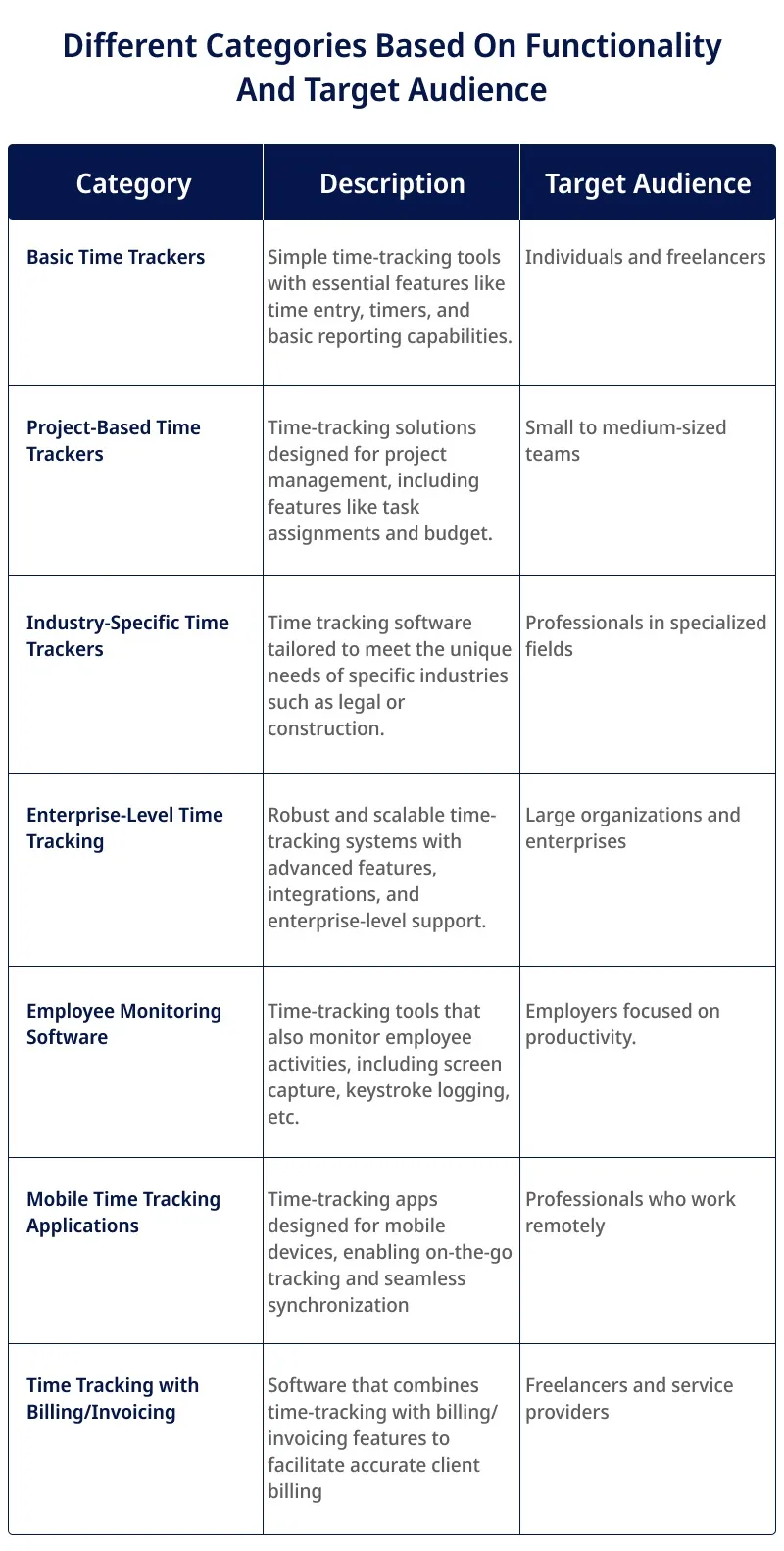
Different categories based on functionality and target audience
Key Features
Benefits of using Time Tracking Software
Challenges that can be addressed with Time Tracking Software
Best Time Tracking Software Solution
Future Trends in Time Tracking Software
By the end of this guide, you will be able to:
Understand the importance of time-tracking software
Choose the best time-tracking software for you
Make the most out of your time with time-tracking software
So, without any further ado, let’s get started with our
Understanding Time Tracking Software
Time-tracking software is a digital tool designed to help individuals and businesses track and monitor the time spent on various:
Tasks
Projects
Activities
It provides an automated way of recording and organizing time spent on every task, allowing users to effectively manage their schedules.
This software offers a range of features and functionalities to allow users to:
The primary goal of time-tracking software is to provide an accurate and transparent record of time spent on various activities. This data can be utilized for various purposes, including:
Client billing
Project estimation
Employee performance evaluation
Time management
Statistics Showing Why Businesses Are Moving Towards Time Tracking Software
1) Automated time tracking has the potential to eliminate unproductive time and recover over $666,400 in annual wages.
2) Companies that incorporate time tracking with payroll management systems experience a 44% reduction in payroll processing errors.
3) Employers face an estimated loss of $11 billion annually due to time theft; Time Tracking software can help employers identify and prevent theft by providing an accurate, real-time view of employee hours.
4) Multi-tasking without time-tracking can decrease productivity by 45%
These statistics show that time-tracking software can be a valuable tool for businesses of all sizes to improve efficiency and maximize profits.
Now let’s take a look at
Different Categories Based On Functionality And Target Audience:
Now let’s take a look at
Key Features of Time Tracking Software
Time Entry and Tracking:
Time tracking software enables users to log and track their working hours easily and accurately. It allows individuals to record time spent on specific tasks, projects, or activities manually or through automated timers.
This feature provides a clear and transparent record of time usage, aiding in:
Accurate project estimation
Client billing
Employee performance evaluation
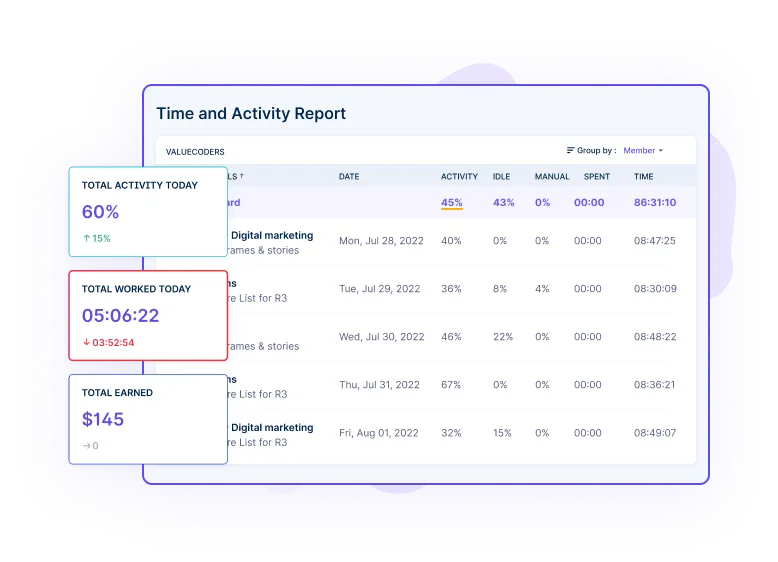
Productivity Tracking:
Time-tracking software often includes productivity-tracking features that help individuals and teams monitor their efficiency and output.
It provides insights into:
Time spent on productive vs. unproductive activities
Identify total hours worked
Total activity today
This feature enables users to optimize their work habits and enhance overall performance.
Employee Activity Monitoring:
Some time tracking software includes employee activity monitoring capabilities, allowing managers to monitor and track the activities of team members.
It helps managers ensure accountability, identify bottlenecks, and optimize resource allocation.
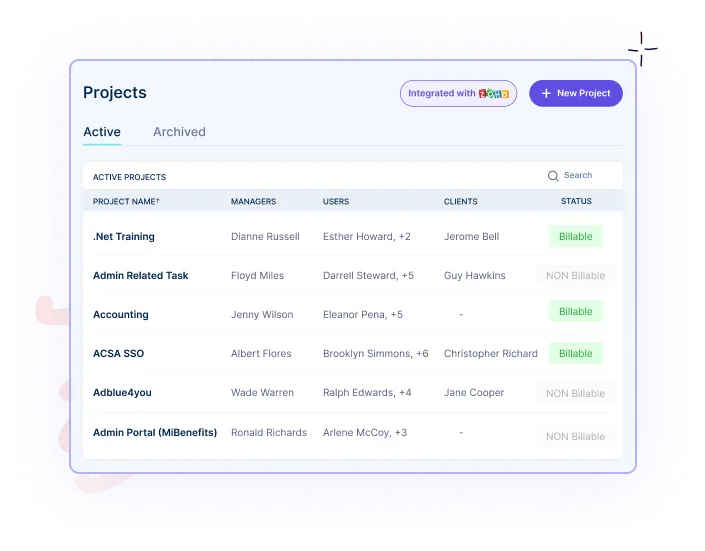
Project and Task Management:
Time-tracking software often includes project and task management functionalities. It enables users to:
Create and manage projects
Assign tasks to team members
Set deadlines
Track progress
This feature facilitates effective:
Project planning
Task allocation
Collaboration among team members
Improving overall project management efficiency.
Reporting and Analytics:
Reporting and analytics features in time tracking software allow users to generate detailed reports and analyze time-related data. Users can:
Access visualizations
Charts
Graphs
That provides insights into time distribution, project timelines, and employee performance. This feature helps make:
Data-driven decisions
Identify productivity trends
Optimize time management strategies
Integration with Other Tools:
Many time-tracking software solutions offer integration capabilities, allowing users to connect and sync their time-tracking data with other tools and software they use.
This integration may include:
Project management tools
Calendar applications
Accounting software
Communication platforms
Which streamlines workflows, eliminates data duplication, and enhances overall productivity.
Mobile and Desktop Applications:
Time-tracking software is often available as mobile and desktop applications, providing flexibility and accessibility.
Mobile apps allow users to track time on the go using their smartphones or tablets, while desktop applications offer comprehensive detailed time tracking and management features.
This dual availability ensures that users can track time regardless of location or device.
Team Collaboration Features:
Some time-tracking software includes collaboration features to facilitate communication and teamwork among team members. It may offer:
Shared project spaces
Task assignment capabilities
Commenting options
Real-time notifications
These features promote effective collaboration, streamline communication, and enhance team productivity.
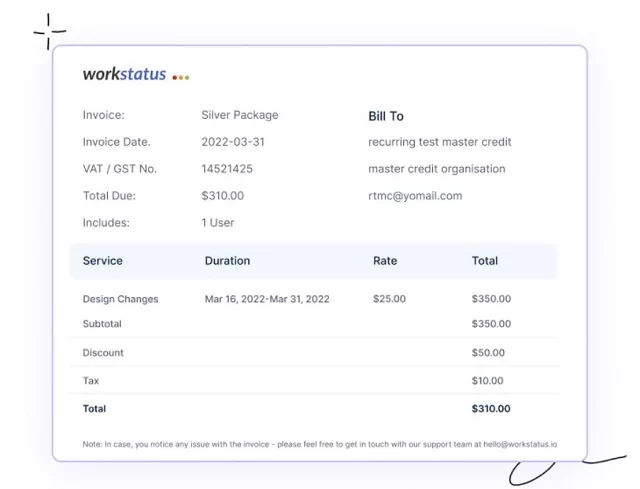
Billing and Invoicing Capabilities:
Many time-tracking software solutions include billing and invoicing functionalities. This feature enables users to generate accurate invoices based on:
Tracked time
Project rates
Client details
It simplifies the billing process, reduces manual errors, and ensures transparent and timely client invoicing.
Central Dashboard:
The central dashboard feature provides users with a consolidated view of their:
Time-tracking data
Project status
Performance metrics
This feature gives users a comprehensive overview of their time-related activities, facilitating efficient time management and decision-making.
As we are now familiar with the different categories and features of time-tracking software, it’s now time to take a look at
From Chaos to Control: How Time Tracking Software Solves Organizational Challenges
Challenge 1: Inaccurate Time Tracking
Without time-tracking software, organizations face the challenge of inaccurate time tracking. This can lead to unreliable data on time spent on various tasks and projects.
Manual tracking methods are prone to human errors, resulting in skewed productivity analysis and incorrect billing.
Solution 1: Automatic Time Tracking
Time tracking software offers the solution of automatic time tracking. By leveraging technology, the software can track time in the background based on:
Computer activity
Application usage
GPS location
This eliminates the need for manual input and ensures more accurate time-tracking data.
Challenge 2: Lack of Visibility and Accountability
Organizations without time-tracking software often struggle with limited visibility into employee activities and a lack of accountability.
Monitoring individual and team progress becomes challenging, leading to difficulties in:
Identifying bottlenecks
Addressing productivity issues
Assigning responsibility
Solution 2: AI-powered Reports
Time-tracking software equipped with AI-powered reporting capabilities can solve the challenge of visibility and accountability.
The software can generate detailed reports that offer insights into:
Individual and team productivity
Task completion rates
Project progress
These reports give managers a clear overview of work, identify areas for improvement, and hold employees accountable for their tasks.
Stop guessing and start tracking!
Try Workstatus and make data-driven decisions for your organization.
The absence of time-tracking software can result in inefficient project management. Without accurate data on time spent on each task, project managers struggle to:
Time-tracking software with integrated project management features addresses the challenge of inefficient project management.
These features allow project managers to:
Create and assign tasks
Set deadlines
Track progress
Allocate resources based on real-time time tracking data
This streamlines;-
Project workflows
Improves collaboration
Enhances overall project efficiency.
Challenge 4: Poor Time Allocation and Prioritization
Organizations without time-tracking software may face difficulties in proper time allocation and task prioritization.
Without a clear understanding of how time is spent, it becomes challenging to identify which tasks take up excessive time or receive insufficient attention.
Solution 4: Task Allocation
Time tracking software offers the solution of task allocation. It allows users to assign specific tasks to individuals or teams and set estimated time budgets.
By tracking the time spent on each task, the software provides visibility into whether tasks are completed within the allocated time. This helps optimize time allocation and ensure proper task prioritization.
Challenge 5: Inaccurate Billing & Payroll
Inaccurate billing and payroll can be a significant challenge without time-tracking software.
Manual time tracking methods may lead to errors in client invoicing, resulting in financial losses or strained client relationships.
Similarly, payroll calculations may be flawed without accurate time data, leading to incorrect employee compensation.
Solution 5: Accurate Invoicing with Real-time Tracking
Time tracking software addresses the challenge of inaccurate billing and payroll through accurate invoicing with real-time tracking.
The software can generate invoices based on tracked time, ensuring clients are billed accurately for the work done.
Additionally, it can integrate with payroll systems, automatically calculating employee wages based on real-time time tracking data, eliminating errors in payroll processing.
Now let’s take a look at
Factors to Consider when Choosing Time Tracking Software:
Budget Considerations:
Evaluate the cost of the time-tracking software, including:
Upfront fees
Subscription plans
Any additional charges
Consider the value and features offered to the cost.
Ensure that the software aligns with your budget without compromising essential functionalities.
Scalability and Flexibility:
Assess whether the software can scale as your business grows.
Consider the ability to:
Add more users
Handle increased data volume
Accommodate changing needs
Look for flexibility in customization options and the software’s ability to adapt to evolving business requirements.
User-Friendliness and Ease of Implementation:
Consider the software’s user interface and intuitiveness.
Evaluate how easy it is to navigate, track time, and generate reports.
Assess the implementation process, including:
Setup
Data migration
Training requirements
Integration Capabilities With Existing Tools:
Determine if the time-tracking software can integrate with your business’s other tools or software, such as:
Project management systems
Accounting software
Calendar applications
Seamless integration automates data entry, streamlines workflows, and improves efficiency.
Security and Data Privacy:
Evaluate the software’s security measures and data protection protocols.
Ensure the software employs encryption, secure data storage, and access controls to safeguard sensitive information.
Ensure compliance with relevant data privacy regulations to protect your business and client data.
Customr Support and Training Options:
Assess the level of customer support provided by the software vendor.
Look for available support channels, response times, and the vendor’s reputation for customer service.
Evaluate the availability of training resources, such as:
Documentation
Tutorials
Webinars
To ensure proper onboarding and user adoption.
Now let’s take a look at a time-tracking software solution that can meet these considerations:
Introducing Workstatus- The one-stop Time Tracking Solution
Workstatus is a top-notch time-tracking software enabling companies to monitor employee time usage and productivity effectively.
This digital time management software offers comprehensive metrics on employee performance, including hours worked, task-specific time allocation, daily productivity levels, overtime hours, and more.
With its intuitive dashboard, management gains a holistic view of employee performance, facilitating informed workflow management and decision-making.
Tracking healthcare professionals’ time spent on patient care and administrative tasks
Managing staff scheduling and ensuring adequate coverage
Complying with regulatory requirements and documentation
Analyzing data to improve patient care, resource allocation, and operational efficiency
Future Trends In Time Tracking Software
Time-tracking software is continually evolving, and several future trends are expected to shape its development. Here are some anticipated trends in time-tracking software:
Artificial Intelligence (AI) Integration:
Time-tracking software will likely incorporate AI capabilities, enabling more advanced automation and intelligent decision-making. AI algorithms can:
Analyze time-tracking data
Identify patterns
Provide insights into productivity trends
Optimize resource allocation
This integration of AI would enhance the accuracy and efficiency of time-tracking processes.
Wearable Technology Integration:
With the rise of wearable devices, the integration of time-tracking software with such technology is expected to increase.
Wearable devices can capture and track employees’ activities and movements, providing real-time data on their:
Tasks
Breaks
Overall productivity
This integration would provide a more seamless and unobtrusive method of time tracking.
Advanced Analytics and Predictive Insights:
Future time-tracking software is expected to offer advanced analytics features beyond basic reporting.
It may include predictive analytics algorithms that analyze historical data to forecast:
Future project timelines
Resource requirements
Potential bottlenecks
These future trends in time-tracking software aim to improve accuracy, efficiency, and user experience, empowering organizations and individuals to manage time effectively.
Next Step
In conclusion, time-tracking software is essential for individuals and businesses, offering numerous benefits such as:
Increased productivity
Improved project management
Accurate billing
By automating the tracking process, these software solutions provide valuable insights into how time is spent, enabling users to optimize their efficiency and make informed decisions.
Whether you’re a:
Freelancer
Team manager
Business owner
Incorporating time-tracking software into your workflow can greatly enhance your productivity and success.
As your next step, you can opt for Workstatus, the platform that stands out as a leading time-tracking software, offering a user-friendly interface, robust features, and seamless integration options.
By leveraging Workstatus’s powerful capabilities, businesses can streamline operations, improve team collaboration, and make data-driven decisions.
FAQs
Q: How does time-tracking software work?
Time-tracking software typically operates by allowing users to start and stop a timer to track the duration of their activities.
It may offer additional features, such as:
Task categorization
Project management
Reporting
Integration with other tools
Some software may use manual input, while others automatically track time-based on computer usage or GPS location.
Q: Is time-tracking software suitable for individuals or teams?
Time-tracking software can be beneficial for both individuals and teams.
Individuals can use it to monitor their productivity and manage their time efficiently.
Teams can benefit from shared visibility into time spent on projects, facilitating collaboration and enabling better project planning.
Q: Is time-tracking software secure?
Time-tracking software providers prioritize the security of user data. Look for software that offers:
Data encryption
Secure connections (HTTPS)
Data backup options
It is also essential to review the software provider’s privacy policy and terms of service to ensure your data is protected.
Don't let time slip away.
Start tracking and optimizing your work hours with Workstatus.
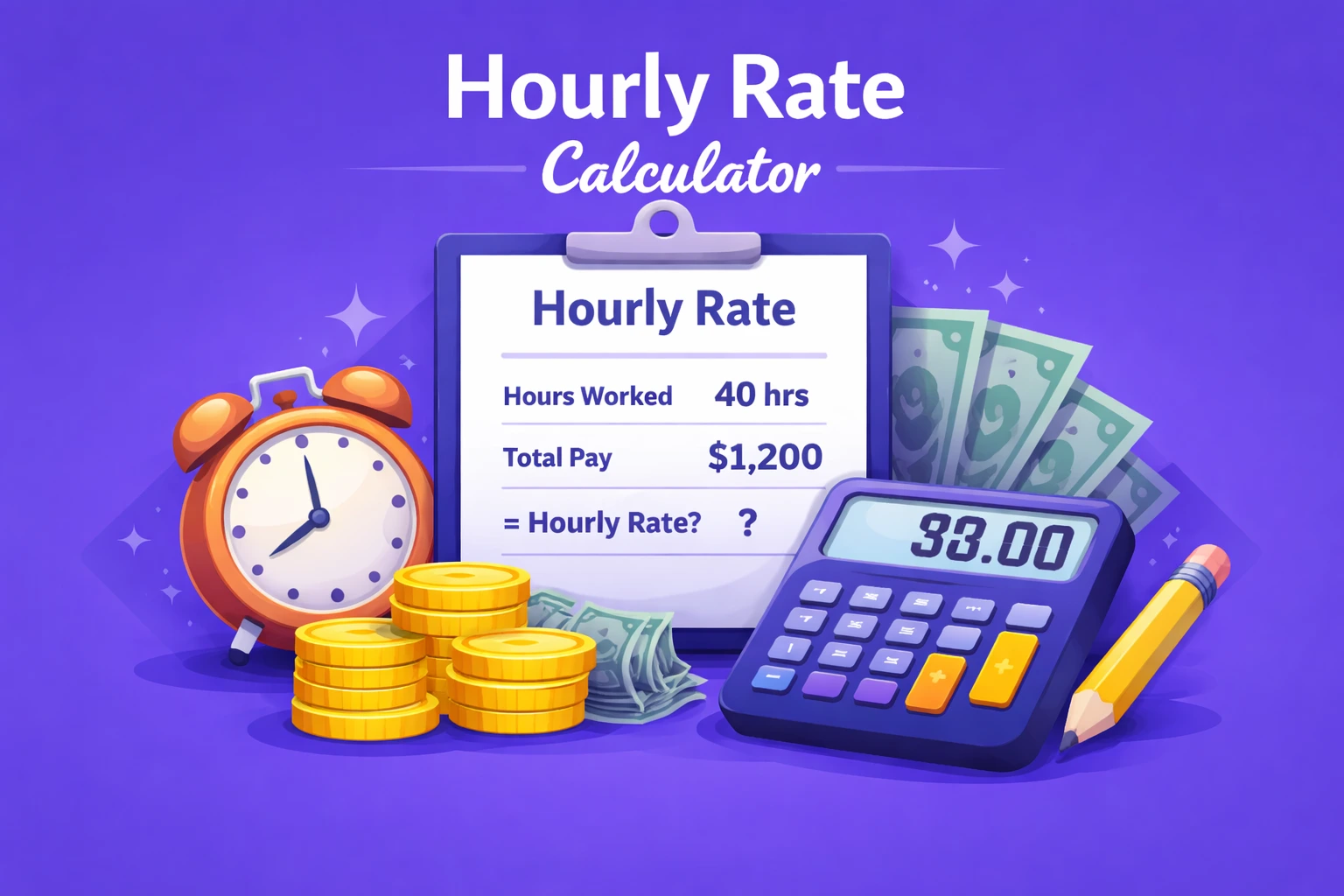
An Hourly Rate Calculator shows the right pay rate by dividing total earnings by hours worked
It makes payment clear and accurate.
It helps to:
Calculate fair hourly pay
Avoid confusion in wages
Keep payroll simple and transparent
Understand the cost of work per hour
Support better budgeting and planning
Why is calculating an hourly rate important?
Knowing an hourly rate ensures fair payment and smooth project planning.
It helps to:
Pay employees or freelancers correctly
Estimate project costs in advance
Prevent undercharging or overpaying
Show clear value of time and work
Improve financial transparency
Who can use the Hourly Rate Calculator?
An hourly rate calculator is useful for anyone working with hourly work or time-based billing.
Helpful for:
Freelancers
Agencies
Small and large businesses
HR and payroll teams
Project managers handling budgets
What is the difference between an hourly rate and a salary?
The key difference is how payment is calculated.
For Hourly Rate, payment is based on the number of hours worked
Salary is fixed for the month or year, regardless of hours
Main points:
Hourly employees are paid for every extra hour
Salaried employees receive the same pay even if hours vary
Hourly pay can change based on workload, salary stays stable
When is hourly pay more suitable?
Hourly pay works best when work hours or workload change often.
Suitable for:
Part-time staff
Freelancers
Contractors
Project-based roles
Shift and field workers
Seasonal or temporary work
It ensures payment matches actual time spent.
When is salary pay more suitable?
Salary works best when work hours and responsibilities stay steady.
Suitable for:
Full-time permanent roles
Management or leadership roles
Office positions with fixed schedules
Job duties that don’t change daily
Salary gives more stability and predictable income.
What are the pros and cons of hourly pay?
Pros:
Pay increases with extra hours worked
Clear link between time and earnings
Good for flexible work schedules
Cons:
Monthly income may vary
No guaranteed fixed pay
Workload changes may affect earnings
What are the pros and cons of salary pay?
Pros:
Stable and predictable income
Easier long-term financial planning
Often includes benefits like leave or insurance
Cons:
Extra hours may not increase pay
Hard to track actual workload value
May lead to longer work hours without extra earnings
FAQs
Ques. How do I determine my optimal hourly rate using the free calculator?
Ans. Enter your start time, end time, and break hours, and Workstatus will instantly calculate your optimal hourly rate based on those inputs.
Ques. Can I adjust the inputs if my financial situation or requirements change?
Ans. Absolutely! The calculator allows you to modify the inputs quickly whenever needed.
Simply update your entries, and the calculator will recalculate your optimal hourly rate accordingly.
Ques. Can the calculator be used for different types of businesses and industries?
Ans. Yes, the free hourly rate calculator is designed to be versatile and applicable to various companies and industries.
Some of the industries are listed below:
Accounting
Architects & Engineer
Consultant
Design
Healthcare
Landscaping
Real Estate
Agency
Attorney
Construction
Ecommerce
Janitorial
Manufacturing
Software Development
Experience the Power of Productivity
Make your team 40% more efficient. Set up your account in just 2 minutes!
Top 3 reasons to trust Workstatus
AI-powered Insights
Silent or Visible Tracking
Automated Timesheet
5.0
4.3
4.5
4.7
THANK YOU!
Your registration was successful. As a next step, we've sent you an email to confirm your email address. Once confirmed, you will be good to login & use the system.
Start Your 7-Day Free Trial
Supercharge Your Team's Productivity!
Get a 7-day free FULL FEATURE trial of Workstatus now. Boost efficiency, accountability, and results – anytime, anywhere.










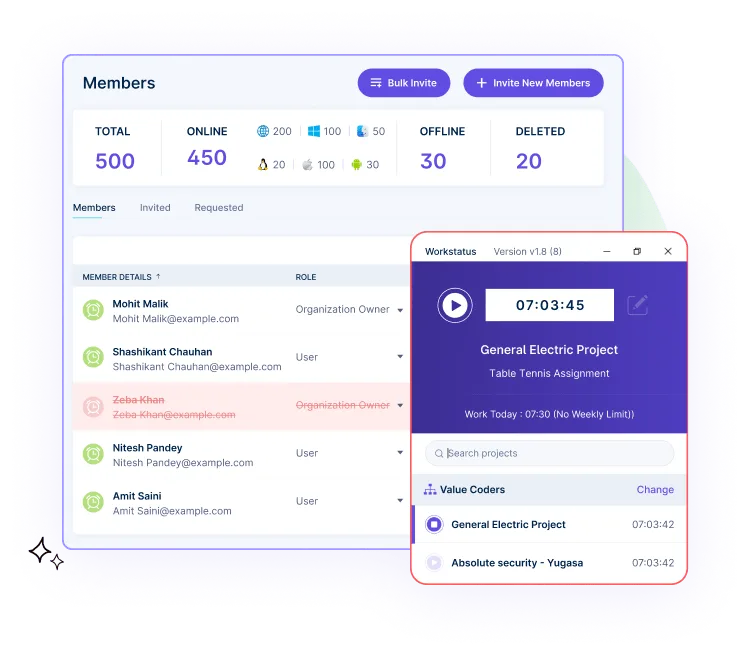

 Time-tracking software often includes productivity-tracking features that help individuals and teams monitor their efficiency and output.
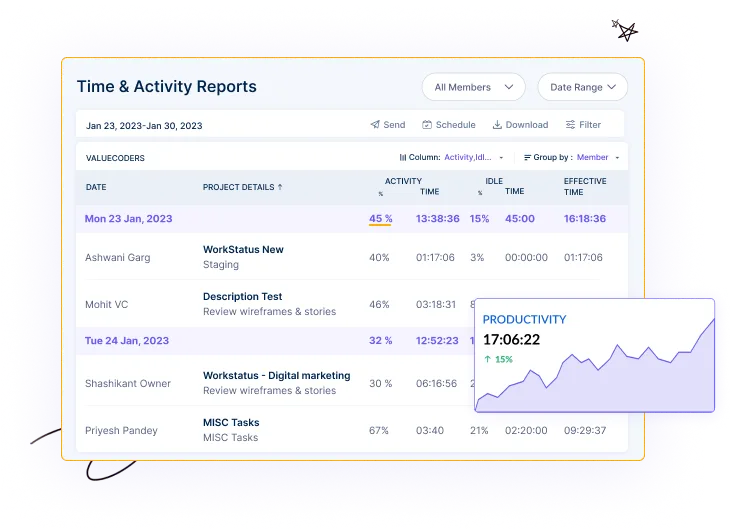 Some time tracking software includes employee activity monitoring capabilities, allowing managers to monitor and track the activities of team members.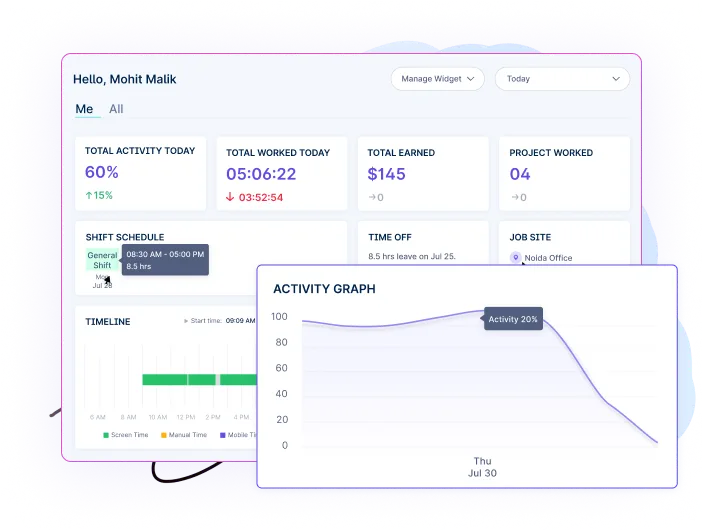
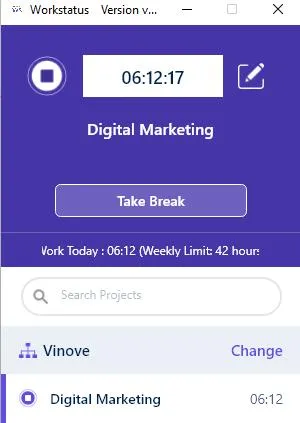
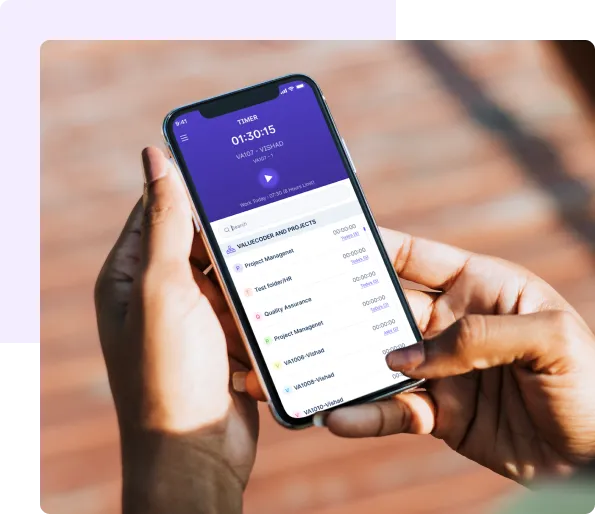 Time-tracking software is often available as mobile and desktop applications, providing flexibility and accessibility.
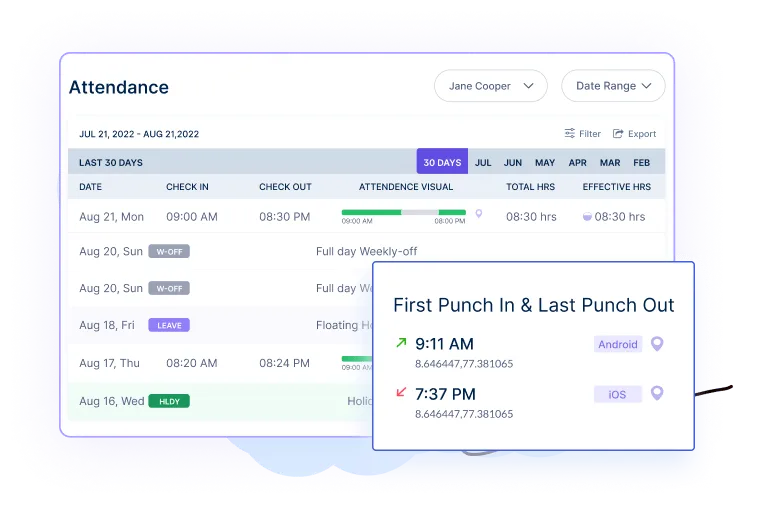
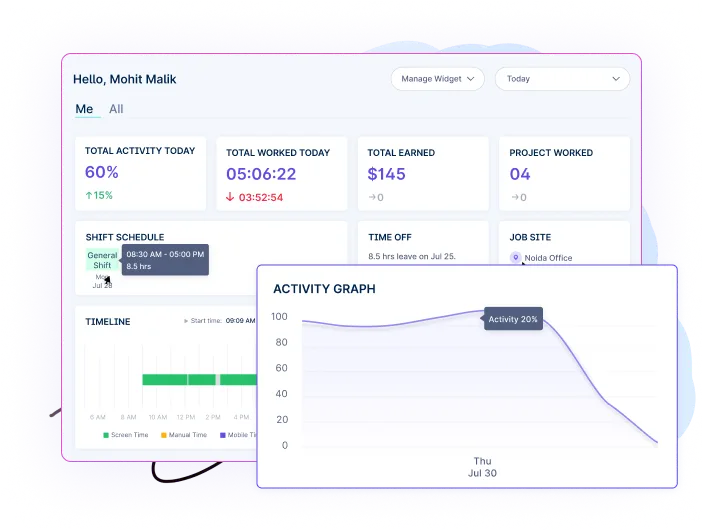 The central dashboard feature provides users with a consolidated view of their: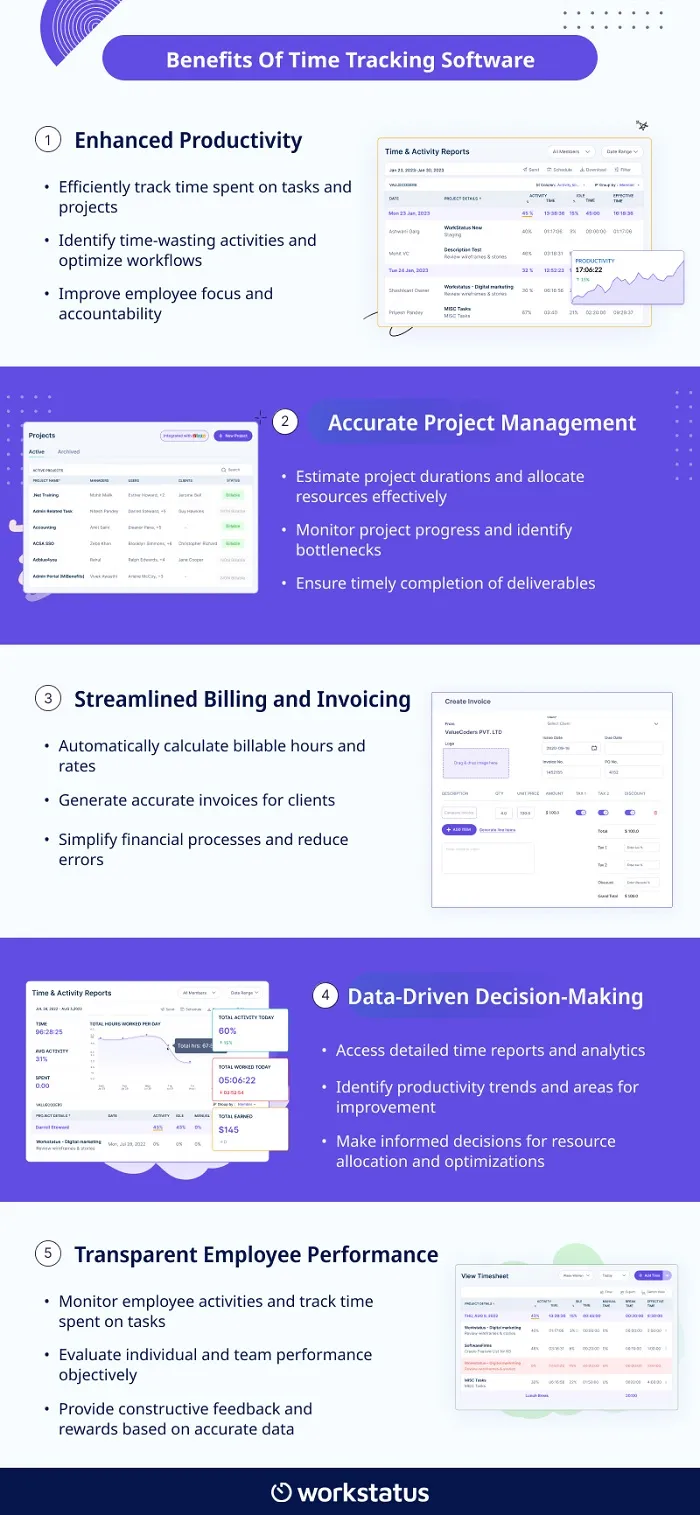
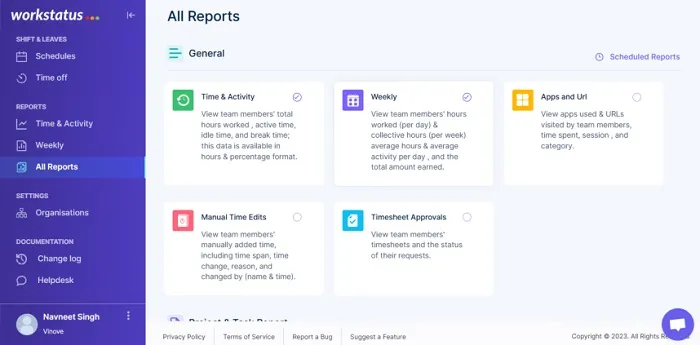 Time-tracking software equipped with AI-powered reporting capabilities can solve the challenge of visibility and accountability.
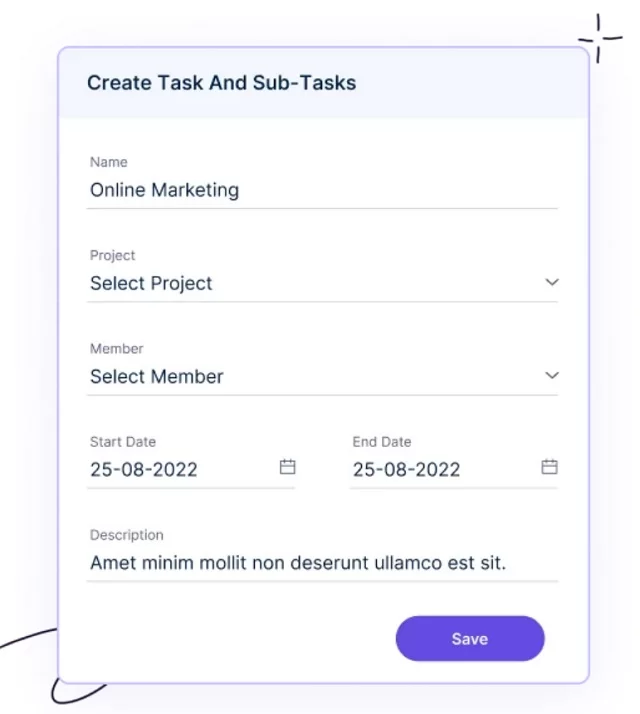 Time tracking software offers the solution of task allocation. It allows users to assign specific tasks to individuals or teams and set estimated time budgets.

 Time-tracking software can benefit the
  In the
  Time-tracking software can support