Table of Contents
Taking on more projects may seem like a good way to grow your service business. But what happens when your team does not have enough time to handle the work?
Without a clear understanding of your team’s actual capacity, you may face several challenges, like:
- Unnecessary hiring costs and extra training time
- Uneven workloads that leave some employees overworked
- Employee burnout due to constant work pressure
- Delayed projects and missed deadlines
This is why capacity planning for service teams matters.
It helps you understand how much work your team can handle with the people and time available.
In this guide, you will learn how to plan workloads and make better hiring decisions. You will also learn how to take on new projects without overloading your team or affecting work quality.
What Capacity Planning Means for a Service Business
Capacity means the amount of work your team can complete within a given period.
Capacity planning helps you compare your team’s available time with the work your clients expect you to deliver.
Let’s understand this with an example.
Suppose you run a digital marketing agency with 8 employees. Each person works 40 hours a week. This gives your team 320 working hours in total.
However, your team cannot spend all 320 hours on client projects. They also need time for meetings, internal tasks and other activities.
Here is how your actual capacity may look:
| Work activity | Hours per week |
| Total working hours (8×40) | 320 |
| Team meetings + Client calls | 30 |
| Internal tasks + Reporting | 25 |
| Training + Admin work | 15 |
| Leave and unplanned absence | 10 |
| Available hours for client work | 240 |
Now, suppose your agency has client projects that require 280 hours of work every week.
| Capacity Details | Hours |
| Available client work hours | 240 |
| Client work required | 280 |
| Capacity gap | 40 |
This means your team has 40 fewer hours than the work your clients expect. You may need to adjust deadlines, move tasks or hire additional people.
This is where capacity planning helps. It shows you how much work your team can actually handle before you accept another project.
It is also different from resource allocation:
- Capacity planning answers: Can our team handle this work?
- Resource allocation answers: Who will do the work and when?
You need to understand your team’s capacity before assigning work.
According to Dayshape’s 2026 research, 55% of professional services firms are unable to take on, postpone or refuse work due to capacity issues.
A clear capacity plan helps you see how much time your team actually has. This makes it easier to accept the right projects, plan hiring and avoid putting too much work on your employees.
Why Service Teams Struggle With Capacity
Service teams often have more work to do than the time available. Sometimes they take on too many projects.
At other times, employees have free hours but no work assigned to them. Both situations affect project delivery and business costs.
Here are some common reasons why service teams struggle with capacity planning:
- Managers do not know how many hours employees can spend on client work
- Teams accept more work than they can finish within the given time
- New client tasks disturb existing plans and delay other projects
- Some employees have too much work while others have very little
- Businesses hire more people without checking if their current team can handle the extra work
- Managers find out about delays or employee overload when problems have already started
When these issues continue, it becomes difficult to manage daily work and plan future projects.
Employees may feel burnout because of too many tasks. Other team members may have unused working hours. Managers spend more time resolving issues instead of work planning.
This also makes it difficult to decide whether to accept a new project or hire more people.
Not sure whether you should hire more people, move work between existing employees or fix the way your team works?
Listen to our podcast, Hire, Reshuffle, or Fix? How to Solve Team Capacity Problems, to understand how to identify the real problem and choose the right next step for your team.
Capacity Looks Different Across Service Teams
Before you plan, you need to know your work unit.
A work unit is the main thing your team delivers. For an IT services firm, it is usually a client project. For a BPO, it is often a shift or client account.
Your work unit decides how you count capacity. It also tells you which warning signs to watch.
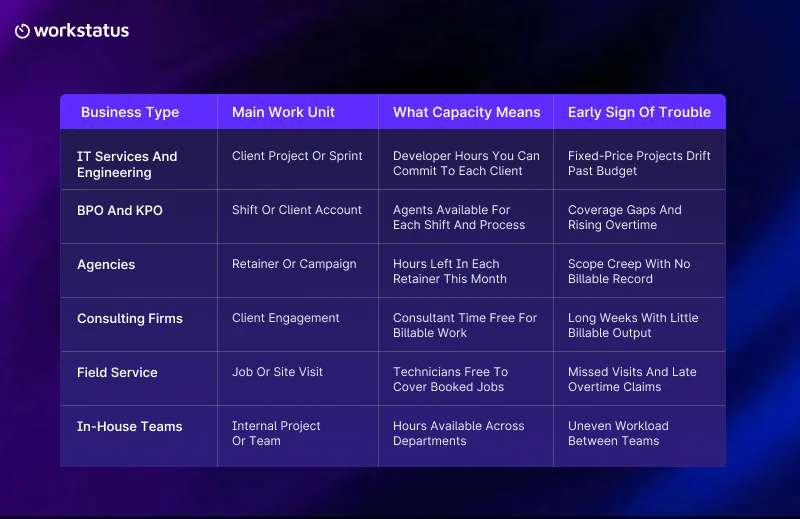
This is why many agency owners want to have capacity planning software for agencies to track how much time is left on each retainer.
With your work unit defined, you can create a plan.
How to Create a Sustainable Capacity Plan
There are 5 steps to creating a capacity plan.
1. Account for Actual Hours Available
Start by calculating how many hours each person has available based on their contract. Then subtract time that never goes to client work:
- Planned leave and public holidays
- Internal meetings
- Training and admin tasks
What remains is your real capacity.
Step 2: Understand Where Time Goes Today
Use a tool to measure how much time is spent on client work.
If you have many people in the field, using workforce capacity planning software will help to track this across your different shifts and locations.
This gives you a baseline. You compare every future week against it.
Step 3: Map Upcoming Demand
Next, list the work coming your way:
- Confirmed client work
- Likely deals in your pipeline
- Repeat work from retainers or ongoing accounts
Note the expected hours and skills for each item.
Step 4: Compare and Decide
Now hold your capacity against demand. Each result points to a clear action:
- Demand is higher – You may need extra hands or a later deadline.
- Demand is lower – You can chase new work or train your team.
- Demand is close – Protect a buffer.
- Demand stays high – Consider hiring when your team’s available capacity consistently falls short of demand.
A buffer is spare time you hold back for surprises. Think of sick days or an urgent client request.
Step 5: Review Every Week
Plans age quickly. Compare planned hours with actual hours each week. Then adjust before small gaps turn into missed deadlines.
Where Workstatus Fits Into Your Planning
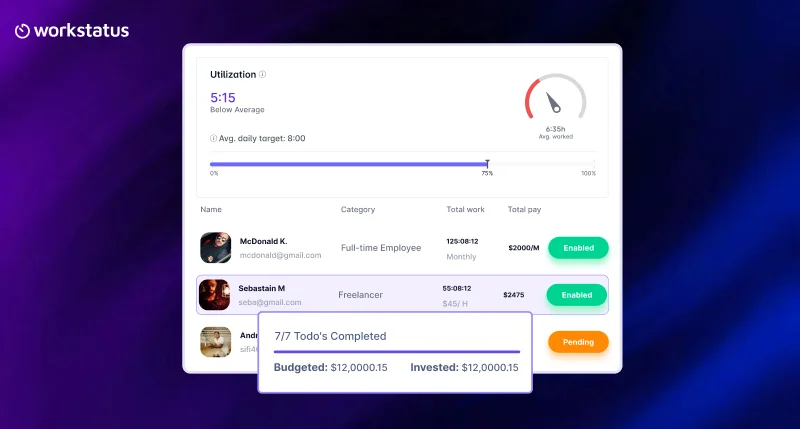
Capacity planning works best when you know how your team spends its time. Workstatus is a Work Intelligence Platform that connects time, productivity and project data to show how work gets done and what your team delivers.
With Workstatus, you can:
- Know how much time your team has for client work
- Identify overworked employees and those with available time
- See how many hours each client project needs
- Compare planned work with actual hours to find delays and unused time
- Understand your team’s workload before adding more people
- Measure billable utilization to see how much time goes into paid client work
- Check utilization patterns to understand how employees spend their working hours
Bring Capacity Intelligence Into Your Planning
Workstatus gives you a clear view of team capacity. Use this information to plan projects and share workloads fairly. You can also make better hiring decisions without putting extra pressure on your existing team.
How You Know Your Capacity Plan Works
Good plans show results you can measure. Watch these signals over time:
- Planned vs. actual hours – The gap between your plan and reality. A shrinking gap means better planning.
- Billable utilization – The share of paid hours spent on billable client work. Steady growth means less wasted time.
- Overtime trend – Falling overtime shows your team carries a fair load.
- Buffer usage – How often surprises eat into your spare time. Steady usage means your buffer fits your team.
- On-time delivery – More projects finish on schedule when plans match reality.
Review these signals together each week. One shared view saves you from building reports by hand.
Conclusion
Strong capacity planning for service teams starts with honest hours.
Your team has a fixed number of hours each week. How you plan them decides whether clients stay happy and margins stay healthy.
The method stays simple:
- Know your work unit.
- Measure true availability.
- Do this to assess the demand.
- Review the plan weekly.
Try starting with a single team or client account. Try running the plan for 4 weeks. Compare the number of hours planned with the hours actually taken.
The smaller the difference, the more confident you will be to say yes to new pieces of work.
FAQs
1. How often should service teams review capacity?
Ans. Review your team’s capacity every week to keep up with changing workloads and project needs. Weekly checks help you spot employees with too much work and identify those with available hours. This gives you time to adjust workloads before deadlines get affected.
2. How do you calculate available team capacity?
Ans. Start by adding the total working hours of all employees. Then subtract time spent on meetings and internal tasks as well as leave and other non-client work. The remaining hours show how much time your team can actually spend on client projects. This gives you a more realistic view of available capacity.
3. How do you plan capacity across several client accounts?
Ans. Start by checking how much time each client account needs and how many employees are available to handle the work. Then combine these details to understand the total workload across all accounts. This helps you find schedule clashes and avoid assigning the same employees to multiple projects at the same time.
4. When should you hire instead of moving work around?
Ans. Consider hiring when your team’s workload stays higher than its available hours for several weeks or planning cycles. First, check if you can share work better or adjust project deadlines. If your existing team still cannot handle the demand without working extra hours, hiring may be the right choice.
5. How do you plan capacity for shift-based teams?
Ans. Plan by shift and client account instead of by project. Check agent availability for each shift before you accept a new volume.