
Table of Contents
Month-end arrives. Payroll shows one number. The invoice shows a smaller one. Nobody in the room can explain the difference.
That difference is not a mystery. It is the space between total hours and billable hours, and it decides your margin every single month.
This guide breaks down billable hours vs non billable hours and total hours worked.
You will learn what each one measures, how to turn them into a utilization figure and what changes once the record becomes something you trust.
Because the goal is not simply to track more hours. It is to know where those hours went, which ones generated revenue, and which ones consumed your capacity.
What Are Billable Hours?
Billable hours are hours a client agrees to pay for.
The work sits inside a signed scope. It maps to a project. It appears as a line on an invoice.
What usually counts:
- Building or reviewing a client deliverable
- Running a discovery or requirements session
- Fixing a defect covered by the contract
- Joining a client status call
- Testing work the client has approved
A quick test keeps this simple. Ask whether the client would pay for that hour if they saw it itemized. A yes makes it billable.
What Are Non-Billable Hours?
Non-billable hours are hours your business absorbs. Your team still works them. No client funds them.
What usually counts:
- Internal standups and sprint planning
- Hiring and onboarding
- Training and upskilling
- Proposal writing and sales support
- Rework caused by an internal miss
- Admin work such as timesheets and expense filing
None of this is waste. Training lifts delivery quality. Proposals win the next contract.
Trouble starts when non-billable time adds up quietly.
As per the Microsoft Work Trend Index, employees using Microsoft 365 hit an interruption roughly every two minutes during core hours, which stacks up to around 275 a day.
Every one of those pulls attention off work a client is funding.
What Are Hours Worked?
Hours worked is your total paid time. Some teams call it total hours. It means the same thing.
It holds everything your team does in a week. Client work and internal work both sit inside it.
Hours worked = Billable hours + Non-billable hours
Almost every company knows this total because payroll depends on it. Very few know how it splits.
That missing split is where margin leaks without anyone raising a flag.
Billable Hours vs. Non-Billable Hours vs. Hours Worked
Here is how the three line up.
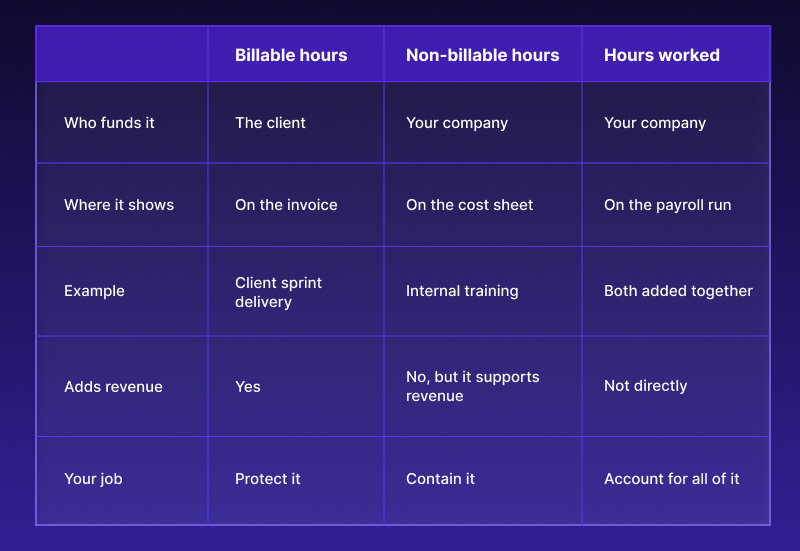
Reading billable hours vs non billable hours is not about pushing internal time to zero.
It is about balance. Know the ratio. Watch it move. Act early when it drifts.
What Is Billable Utilization?
Billable utilization shows what share of your paid time earns revenue. It is the number that links daily effort to monthly income.
Billable utilization = (Billable hours ÷ Hours worked) × 100
Run it with real figures. A developer logs 40 hours in a week and spends 28 of them on client projects.
28 ÷ 40 = 0.70
Multiply by 100 to reach 70% billable utilization.
Plenty of teams begin with a spreadsheet or a basic billable hours calculator to get a first read. That works for one person. It falls apart at 30 people across eight projects, because the inputs arrive late and nobody believes them.
Now compare your number against the market.
As per SPI Research and its 2026 Professional Services Maturity Benchmark, billable utilization across professional services firms fell to 66.4% in 2025.
That is the lowest reading in the history of the survey. It also sits far below the 75% mark SPI Research treats as healthy.
How Do Billable Hours Affect Project Profitability?
Every unbilled hour still costs you a salary. You just never recover from it.
Revenue leakage is the plain name for this. It means work your team delivered that never reached an invoice. As per SPI Research, the industry average landed at 4.5% in 2025.
On a firm billing $2 million a year, that 4.5% equals $90,000. Your team earned it. The record never captured it.
The same benchmark shows how thin the margin cushion has become. Project margins reached a five-year high of 37.7%, yet only 17.2% of firms hit their full annual margin target.
A short worked example:
Take a ten-person delivery team. Everyone works 40 hours a week, so you have 400 hours in play.
- 268 hours reach client work, giving you 67% utilization
- Your average rate is $50 an hour
- The week earns $13,400
Now recover five points by capturing time that already happened but never got logged.
- Utilization moves to 72%
- You gain 20 billable hours a week
- That adds $1,000 a week and roughly $52,000 a year
Nobody stayed late. The record simply got accurate.
How Workstatus Helps You Track Billable and Non-Billable Hours
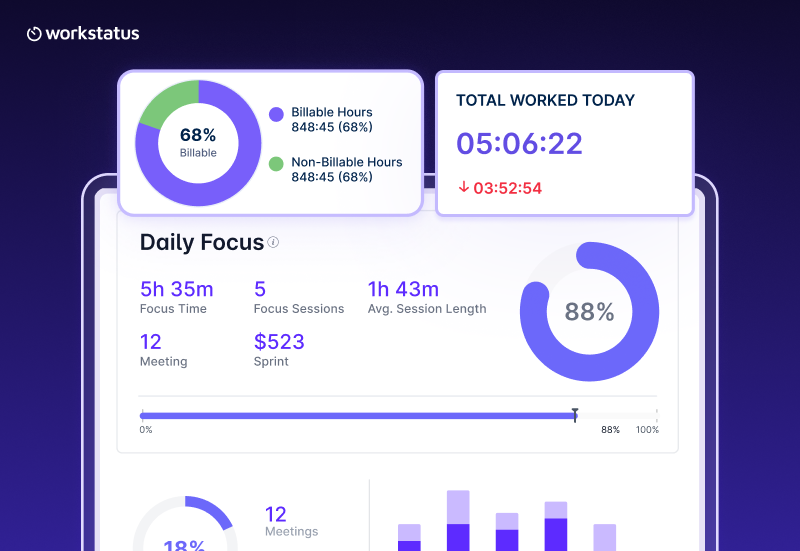
The problem in most firms is not effort. It is evidence. People deliver all week and then rebuild the week from memory on Friday.
Workstatus captures the record while work happens and turns it into numbers you can act on.
Hours record themselves. Automatic time tracking logs work as it happens, so nobody reconstructs a week from memory. You get a first-hand record instead of a guess.
Every hour gets linked. Each hour attaches to a project, a client or a task. That attribution lets software track billable hours vs non billable hours without anyone sorting rows.
Capacity becomes visible. Resource utilization tracking shows the billable share per person and per project. You see who has room for more client work and who sits close to overload.
Patterns replace snapshots. Employee productivity tracking shows how a week actually distributes, so you can spot the meeting load or rework eating into client hours.
Hours connect to outcomes. As a Work Intelligence Platform™ , Workstatus answers what the work earned, not only that the work happened.
How a week runs
- Capture: Hours record as the work happens
- Attribute: Each hour attaches to the right client or project
- Verify: A manager clears exceptions before the week closes
- Approve: Approved time becomes the one agreed record
- Output: That record feeds both the invoice and the utilization report
Because one record drives billing and reporting, your invoice and your margin report never contradict each other. When a client questions a line item, the detail sits right there.
This is also what makes it realistic to track billable hours across many projects at once. The effort holds steady whether you run three projects or thirty.
Closing Thoughts
Hours are the raw material of a service business. Handle them loosely and margin drains quietly.
Two things are worth carrying forward:
- Billable hours vs non billable hours is a ratio you manage, not a fight you win
- Utilization is the bridge between daily effort and monthly revenue
Try one thing this week. Pick a recent project and check whether you can prove where every paid hour went.
If that takes more than a few minutes, your hours are telling a story you cannot read yet. Start there.
FAQs
1. What are billable hours?
Ans. Billable hours are the time spent on work that can be charged to a client. These hours are usually linked to specific projects, tasks, or services.
2. What are non-billable hours?
Ans. Non-billable hours are time spent on work that cannot be directly charged to a client. This can include meetings, administration, training, or internal tasks.
3. How to Calculate Billable Hours?
Ans. Billable hours are calculated by adding the time spent on client work that can be charged. For example, 6 hours of client work means 6 billable hours.
4. How does Workstatus track billable and non-billable hours?
Ans. Workstatus tracks employee time across projects, tasks, and activities. This helps businesses clearly separate billable, non-billable, and total hours.
5. How can accurate time tracking improve invoicing?
Ans. Accurate time tracking helps businesses invoice clients based on actual work completed. It also reduces billing errors, missed hours, and client disputes.
6. What percentage of hours should be billable?
Ans. The ideal billable percentage depends on the business, role, and type of work. Many service businesses aim for around 70–80% of working hours to be billable.
7. How can businesses increase billable hours without increasing employee workload?
Ans. Businesses can increase billable hours by reducing unnecessary meetings, manual work, and other time-consuming tasks. Better time tracking also helps identify where non-billable time is being lost.
8. What is the difference between billable time and billable utilization?
Ans. Billable time is the actual number of hours spent on client work. Billable utilization is the percentage of available working time spent on billable activities.