
Table of Contents
A $50K client is not always more profitable than a $30K client. Revenue tells you what a client pays you. It says nothing about what it costs you to serve that client.
Every engagement pulls time from your firm in ways the invoice never shows. Delivery work. Client management. Rework. Internal coordination. Waiting. Add all of that together to find the true cost of a client.
This article walks you through a simple client profitability analysis so you can work that number out for each engagement and see where your margins disappear.
Revenue Doesn’t Tell You What a Client Really Costs
Two clients can sign the same contract and behave nothing alike.
Look at the difference in capacity:
- Client A: $40K revenue and 250 hours consumed
- Client B: $40K revenue and 400 hours consumed
Same money in. A very different amount of your firm is gone.
That difference matters because billable utilization fell to 66.4% in 2025, the lowest level in SPI Research’s survey history. It shows how much paid capacity can sit outside directly billable work.
Three numbers matter here, and firms often treat them as one:
- Revenue is what the client agrees to pay.
- Delivery cost is what the client consumes in team time.
- Contribution is what stays with the firm after you pay for that time.
The client who takes more capacity is not automatically your better client. Often it is the opposite. Your real consulting client cost sits in the capacity an engagement consumes, not in the contract value.
The Hidden Costs of Servicing a Client
So the question becomes simple. Where does the extra capacity actually go? Most firms count the hours they invoice. The expensive hours usually sit somewhere else.
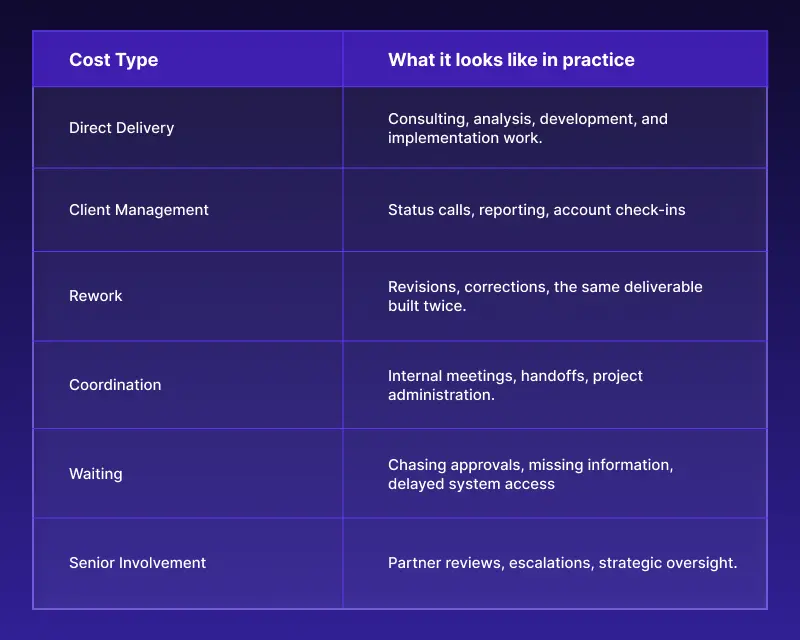
Notice how much of this never reaches an invoice. Your client billing software captures what you invoice. It does not capture what the engagement consumed.
You still pay your team for every one of those hours. So the cost lands on your firm rather than on the client.
How to Calculate the True Cost of a Client
Once you know which costs to count, the calculation is the easy part. The calculation itself stays simple.
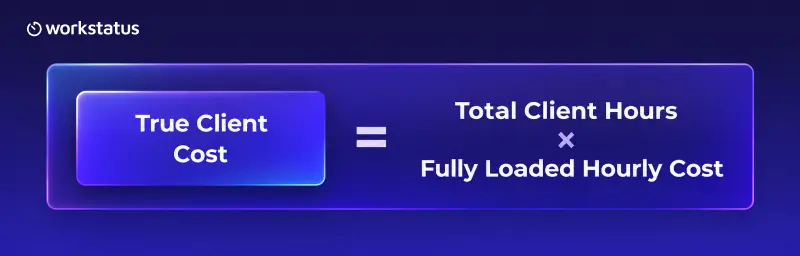
Total Client Hours means everything the engagement consumed. Billable time plus non-billable time. Then management plus rework plus coordination plus waiting.
Fully loaded hourly cost means more than salary. It includes benefits and the overhead you carry to keep that person delivering. Use the loaded figure, or your cost will look better on paper than it does in the bank.
A billable hours calculator gives you part of this picture. It only counts the time you invoice, so the rest stays hidden.
Here is how it plays out:
- Client revenue: $30,000
- Total hours consumed: 300
- Fully loaded cost: $60 per hour
- True client cost: $18,000
- Contribution: $12,000
That last line is the number to manage. Not the $30,000. Your own loaded rate will differ by staff mix, so run the calculation with your firm’s number rather than this one.
The Metrics That Reveal Client Profitability
One client’s cost is useful on its own. Comparing clients is where you make the decisions. You do not need a long dashboard. You need six numbers you can compare across every client.
These six numbers form the base of any client profitability analysis you run.
- Revenue per client
- Total hours consumed
- True client cost
- Contribution, or gross margin on the engagement
- Effective hourly revenue
- Non-billable client time
Effective hourly revenue does most of the work:
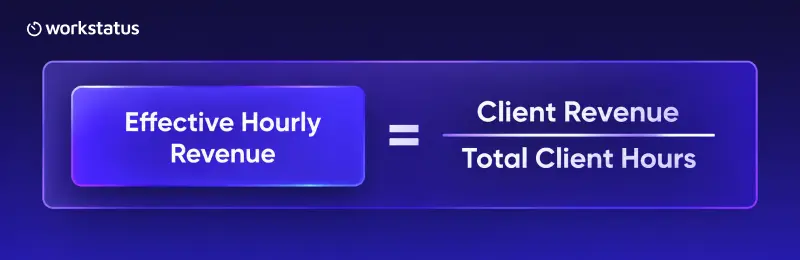
This is where big accounts get exposed. A $50K client at 650 hours earns you less per hour than a $35K client at 240 hours. The larger logo looks better in a pipeline review and performs worse in your accounts.
Consulting project profitability shows up the moment you divide revenue by the hours the work actually took.
Where Client Costs Start Reducing Margins
The numbers tell you which clients cost too much. They do not tell you why. The same causes show up across most professional services firms:
- Scope creep that nobody logs as extra work
- Excessive revision rounds
- Too many meetings on a single engagement
- Slow client approvals that stall your team
- Heavy senior involvement on routine delivery
- Poor handoffs that force people to redo discovery
- Excessive internal coordination
- Hours you log late, log wrong, or never attach to a client
These extra hours are not unusual. Project overruns averaged 10.7% in 2025, down from 11.3% in 2024 but still above SPI Research’s 10% threshold.
Every item on that list adds hours to the engagement without adding anything to the contract. That is the whole mechanism. Cost rises quietly while revenue stays fixed.
Each cause on that list chips away at consulting firm profitability in a way your invoice never records.
The financial impact can add up quickly. Professional-services firms experienced about 4.5% revenue leakage in 2025, meaning some of the value created during delivery is never fully captured as revenue.
Project management software for consultants tracks tasks and deadlines well. It rarely tells you what those tasks cost you to deliver.
How Workstatus Turns Client Cost Into a Running Number
You can run this analysis once with a spreadsheet and a free afternoon. Running it every month is the hard part.
Here is why the number drifts:
- Your team logs hours late, so the totals change after you close the sheet
- Non-billable client work sits in calendars and inboxes instead of the timesheet
- Rework and coordination hours land against no client at all
- Each partner keeps a slightly different version of the same file
To trust the number monthly, the work record has to hold together from the moment work starts to the moment you report on it.
This is the job of time intelligence software. It keeps the record complete from capture through to output.
Workstatus follows that path in six steps:
- Capture. Your team records time as the work happens instead of from memory on Friday evening.
- Attribute. Every hour attaches to a named work unit. For your firm, that unit is the client engagement.
- Verify. Managers see the gaps and exceptions before bad data hardens.
- Resolve. Someone fixes the missing entry or the wrong engagement code while people still remember the week.
- Approve. A manager or partner signs off the record, so your firm keeps one approved version instead of four spreadsheets.
- Output. That approved record feeds your contribution and utilization view for every client.
Utilization simply means how much of your paid capacity goes to client work. It only means something when the underlying record is complete.
The benefit is straightforward. You stop rebuilding the audit and start watching the number move. Project intelligence software turns that record into a live view of which engagements earn their keep.
A Simple Client Profitability Audit
Start here before you change anything about how you price or staff. A client profitability analysis works best when you repeat it, not when you run it once.
You can run this audit on a spreadsheet to get your first answer. Run it on your Workstatus record to get the same answer next month without rebuilding it.
- Step 1. Select your 5 to 10 largest clients.
- Step 2. Calculate total hours spent on each one, including all non-billable time.
- Step 3. Apply your fully loaded labor cost.
- Step 4. Compare true cost against client revenue.
- Step 5. Identify the single biggest source of excess cost on each engagement.
- Step 6. Take one corrective action and measure again next month.
Each approved record also gives you proof of work when a client questions an invoice. Your scorecard will look something like this:
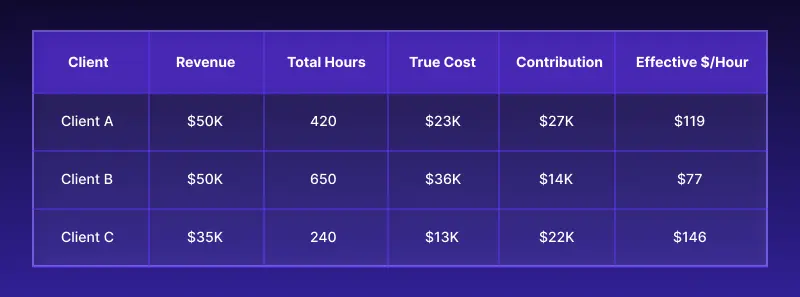
Client A and Client B pay you the same amount. Client A returns almost twice the contribution. Client C pays the least and earns you the most per hour. Nobody in your firm sees that from a revenue report.
Conclusion
Revenue is where the conversation starts. It is not where it ends. Every client consumes delivery capacity beyond what you invoice. Once you can see that capacity by engagement, you can price better and staff better.
Then you can decide which relationships deserve more of your firm. The most valuable client is not always the one who pays the most. It is the one who creates the most value against what it costs you to serve.
Pick your top five clients this week and run the numbers. One honest client profitability analysis will change how you price your next engagement.
One month of honest hours will tell you more than a year of revenue reports. If your firm runs 25 or more people, book a guided evaluation to see how your engagements would look inside Workstatus.
FAQ
1. How do you calculate the true cost of a client?
Ans. Multiply total client hours by your fully loaded hourly cost. Total hours means every hour the engagement consumed, so include management time, rework, coordination, and waiting alongside billable delivery.
2. How to tell if a client is profitable
Ans. Compare client revenue against true client cost to find your contribution. Then divide revenue by total hours to get effective hourly revenue, which shows whether the engagement earns its keep against your other clients.
3. What is a good profit margin for a consulting firm?
Ans. Set your target against your own historical contribution by engagement, not against an industry figure that assumes a different staff mix. The more useful question is which clients sit below your firm’s average and why.
4. How to identify unprofitable clients
Ans. Rank your largest clients by effective hourly revenue rather than by contract value. The accounts at the bottom usually share the same causes, so look for scope creep, heavy revision rounds, and slow approvals that stall your team.