Table of Contents
Say an agent works a 9-hour shift. You pay for all 9 hours. But you can bill the client for only 7. Those 2 hours are a cost you never get back.
Now picture that across every agent and every shift. That’s where BPO margin quietly leaks. Most teams don’t spot it until month-end, when the numbers don’t add up.
It doesn’t have to stay hidden. With Workstatus, you can match each paid shift to the right client account as the work happens. So you catch lost hours early instead of finding them after billing closes.
In this guide, you’ll learn:
- What paid hours and billed hours really mean
- What the gap costs you in real money
- Where lost hours usually hide
- How to measure the gap
- How to turn more paid hours into billed hours
Let’s start with the basics.
What are Paid Hours?
Paid hours are all the hours you pay your team for. They form the cost side of your business. In a BPO, paid hours usually cover the full shift.
That includes time on client work. It also includes time when no client work happens. Paid hours often include:
- Time spent handling calls, chats, or tickets
- Team huddles and briefings
- Training and coaching sessions
- Breaks that your policy pays for
- Waiting time between tasks
- System downtime
A simple example: Person X works a nine-hour paid shift on a customer support account. You pay them for all nine hours.
Client work or not, you pay for every hour. Paid hours show your costs, not your earnings.
What are Billed Hours?
Billed hours are the hours you charge a client for. They form the revenue side of your business. A client pays only for the time your contract allows you to bill.
That time also needs a clean record behind it. Billed hours usually include:
- Productive time on the client’s process
- Time your contract marks as billable
- Time you can attribute to the right client account
- Time a manager has verified and approved
Back to Person X: Out of their nine-hour shift, maybe seven hours count as billable work on the client account. Those seven hours become billed hours. The other two hours stay a cost to you.
Here is a useful term. Billable utilization is the part of paid time you can bill to a client.
For example: Say you pay for 10 hours and bill 8. Your billable utilization is 80%. The higher this number goes, the more of your payroll comes back as revenue.
Comparison: Paid Hours vs Billed Hours
Paid hours show what you spend. Billed hours show what you earn. This table puts them side by side.
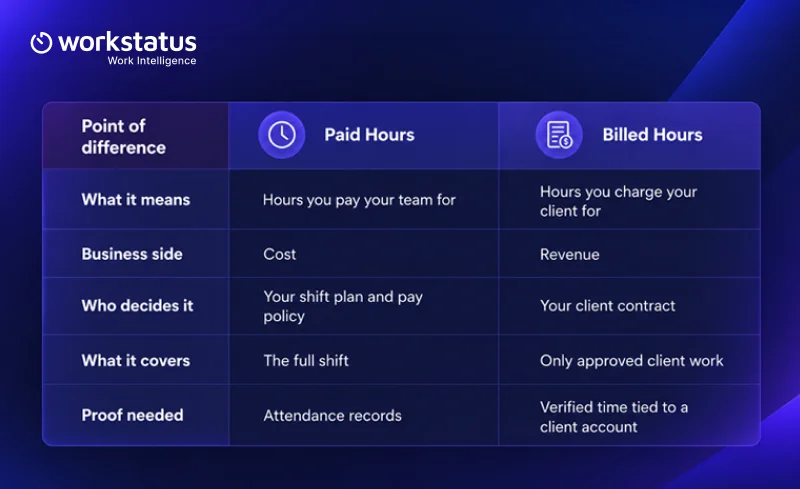
The gap between these two columns is your paid-to-billed hour gap. Some of it is normal. The rest is margin you can win back.
What the Gap Really Costs
One lost billable hour per agent per shift can add up fast.
Example: A 150-agent team works 9-hour shifts for 22 days a month. At $12 per hour, one lost billable hour per shift costs:
- 3,300 unbilled hours per month
- $39,600 in lost revenue per month
- $475,200 in lost revenue per year
Your payroll stays the same. Your profit reduces.
Now look at it through billable utilization. The same team logs 29,700 paid hours a month.
| Billable Utilization | Billed Hours/Month | Unbilled Hours/Month | Monthly Revenue |
| 80% | 23,760 | 5,940 | $285,120 |
| 85% | 25,245 | 4,455 | $302,940 |
| 90% | 26,730 | 2,970 | $320,760 |
Moving from 80% to 85% utilization adds $17,820 per month without hiring more agents.
Calculate your potential loss using your team size, shifts, unbilled hours, and billing rate using below formula:
agents × shifts a month × unbilled hours per shift × billing rate.
Why the Paid-to-Billed Hour Gap Matters in BPO
In a BPO, labor is your highest cost. So even a small gap per agent adds up fast. Think about it this way. Losing one unbilled hour per shift seems minor.
Now multiply it across every agent on every shift for every client account. That small hour turns into a real hit to your margin.
The gap matters for four big reasons.
1. Your margin depends on it
Your payroll stays the same whether hours get billed or not. So every hour you fail to bill comes straight out of your profit. That is why closing the gap has a direct effect on your BPO profit margin.
Your payroll stays the same whether hours get billed or not. And that payroll keeps getting more expensive.
As per Deloitte Digital’s 2026 Global Contact Center Survey, the average cost of an agent-handled contact rose from $6.70 in 2024 to $7.80 in 2026.
So every hour you fail to bill now costs you more than it did two years ago.
2. Your clients expect proof
Clients want proof of their hours. Weak records cause disputes that delay payment.
3. Growth makes it worse
A new client account or a fast seat ramp adds more agents. If the gap already exists, scale makes it bigger.
4. You cannot fix what you cannot see
Most BPOs log attendance in one tool and client work in another. So nobody sees the full picture until month-end. By then, the lost hours are hard to trace. Time tracking software that keeps both in one place helps you catch the gap while it’s still small.
The good news? Once you see the gap clearly, you can start to close it.
Where Do BPOs Lose Billed Hours?
Billed hours rarely vanish in one place. They leak at each step between a paid shift and a client invoice.
It helps to picture that journey as six steps:
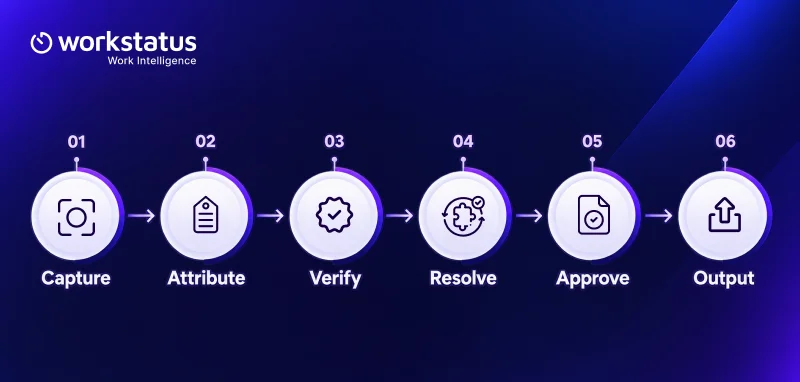
A leak at any step means fewer hours reach the invoice. Here is where each leak usually happens.
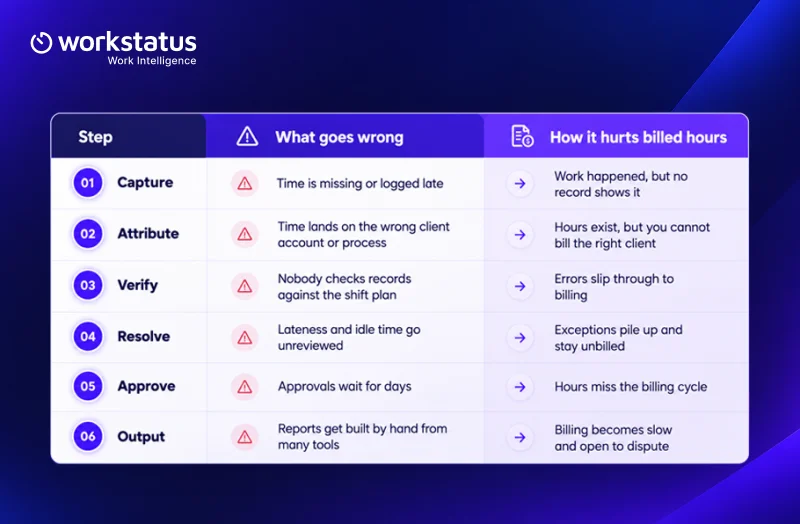
Two of these leaks deserve a closer look.
- The attribution gap. This is the space between the time you captured and the time you linked to the right work.
- Approval lag. This is the delay between when work happens and when a manager approves it.
Other common leaks include:
- Long gaps between calls or tickets
- Agents placed on queues with low volume
- Overtime that the client contract does not cover
- Shared machines that make it hard to tell who did what
Many of these leaks fall under call center shrinkage. This means paid time when agents are not available for client work. Breaks and absences add to it. Training time does too.
How to Measure the Paid-to-Billed Hour Gap
You now know where hours leak. The next step is to put a number on it. These five checks show you how big the gap is and where it sits.
Running these checks by hand can take days. You pull hours from one tool and billing data from another. Then you try to make the two matches before the month-end.
Workstatus puts this work in one place. It links each paid hour to the client account or queue it belongs to. Your managers can review and approve time before billing day.
You see the gap while you still have time to fix it. Here’s how Workstatus can help:
1. Compare paid hours with billed hours
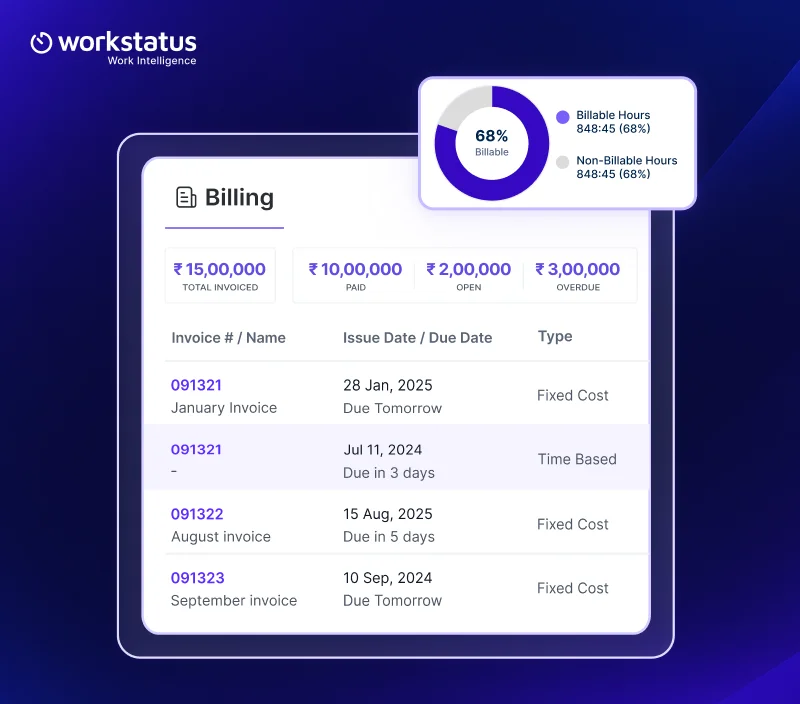
Start with one client account and one pay period. Take the total paid hours for that team. Then take the total hours you billed the client. The difference is your gap for that account.
2. Identify recurring time gaps
One bad day is noise. A gap that repeats is a pattern. Look for gaps that show up again and again.
3. Measure idle and non billable hours
Not every unbilled hour is a problem. Training and huddles are planned. Idle time and long waits are not.
- Planned non-billable time: Time your team needs to learn and plan.
- Avoidable lost time: Time lost to waiting or late starts.
The second group is where you can win back the most hours.
4. Track billable utilization by team
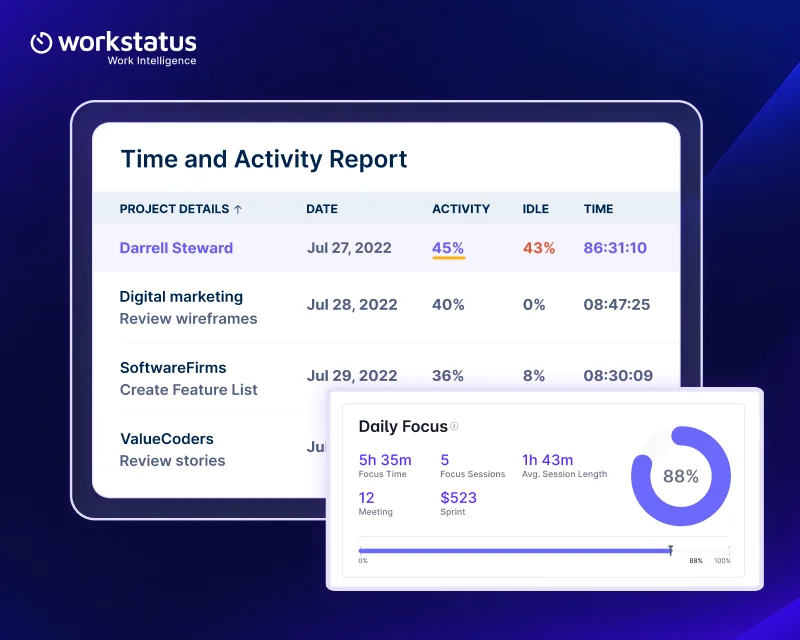
Next, find your billable utilization for each team. Divide billed hours by paid hours. The result is your billable utilization rate.
This quickly shows you which teams turn paid time into revenue well. It also shows which teams need attention.
5. Compare hours across clients and queues
Finally, line up your numbers across client accounts and queues. Some accounts will convert paid hours into billed hours better than others. Ask simple questions:
- Which client account has the widest gap?
- Which queue has the most idle time?
- Does the gap grow on certain shifts?
The answers tell you exactly where to act first.
How BPOs Can Convert More Paid Hours Into Billed Hours
Measuring the gap shows you the problem. So a clear plan matters. These six moves help you close it, one shift at a time.
1. Reduce avoidable idle time
Idle time is paid time with no client work in it. Some of it is normal. Some idle time comes with the job. But when it keeps showing up on the same queues and shifts, that’s a sign. Start there and dig into the reason.
- Is call volume lower than the plan expected?
- Are agents waiting on system access?
- Do handovers between shifts take too long?
Workstatus shows idle time by team and by shift. So your managers can spot the pattern early and fix the cause.
2. Improve workforce utilization
Workforce utilization means how much of your team’s paid time goes to useful work. Better utilization means fewer wasted hours on the payroll.
You can improve it when you:
- Move agents from quiet queues to busy ones
- Cross-train agents so they can cover more than one process
- Plan training for low-volume hours instead of peak hours
3. Balance workloads across shifts
Some shifts run short on staff. Others have agents waiting for work. Both cost you money. Compare workload with headcount for each shift. Then shift people to match real demand.
BPO workforce management software shows workload and headcount for each shift side by side.
4. Reduce unnecessary overtime
Overtime raises your paid hours. But your client may not pay for it. Check your contract before you approve extra hours. Then ask two simple questions:
- Does the client contract cover this overtime?
- Would a better shift plan avoid it?
Put attendance and overtime in one view. Then managers can spot which extra hours the client will pay for before they approve them.
5. Capture missed billable hours
Sometimes your team does billable work that never makes it to the invoice. The work was real. The record was not. This often happens when:
- Agents forget to log time on a second queue
- Time lands on the wrong client account
- Approvals wait so long that hours miss the billing cycle
A billable hours tracker catches this time during the shift. Workstatus links time to the right client account as work happens. Managers then approve it on time, which closes the attribution gap and approval lag.
6. Improve billing accuracy
Accurate billing protects both your revenue and your client relationship. Approved records make billing faster. They also make disputes rare. When a client asks where the hours went, you can show them.
With Workstatus, every billed hour traces back to a captured shift. It links to a client account and carries a manager’s approval. So your billing report comes straight from records you already trust.
Conclusion
Paid hours show what your workforce costs. Billed hours show what it earns. The gap between them is where BPO margin quietly leaks. That gap does not close on its own.
It closes when every paid hour follows one clear path. You capture it. You attribute it to the right client account. You verify it and approve it on time. Then it flows into an accurate bill.
Try this with just one client account this week. Check how many hours you paid for and how many you billed. Even one gap can point you to bigger savings across your BPO.
FAQs
1. What is the difference between paid time and billed time in a BPO?
Ans. Paid time is every hour you pay your agents for. Billed time is only the approved client work you can charge for.
2. Why is billed time always lower than paid time?
Ans. Agents get paid for breaks and training. Clients do not pay for that time, so the two numbers never fully match.
3. How do you calculate billable utilization?
Ans. Divide billed time by paid time for the same team and period. The result shows how much of your payroll turns into revenue.
4. What causes BPOs to lose billable time?
Ans. Idle time and late approvals are common causes. Time logged against the wrong client account also slips out of billing.
5. How can Workstatus help close the gap?
Ans. Workstatus ties every shift to the right client account or process. Managers can then verify and approve time before the billing cut-off.