
Table of Contents
Your delivery team looks fully loaded. Timesheets come in complete. Projects are running. Nobody is sitting idle. Then the month closes, and the margin on a client project lands below plan.
Nothing obvious went wrong. The team worked hard. The client got the work. Still, the numbers do not match the effort. This happens because a full day and a billable day are two different things.
Your team can spend eight hours on client work and still produce far fewer hours that reach an invoice. The question worth asking is simple. Out of every hour you pay for, how many hours actually reach a client invoice? This piece is written for IT services firms of 50 to 500 people running several client projects at once. Answer that one question, and you can recover paid hours you already pay for.
Busy Doesn’t Always Mean Billable
Three types of time run through every project-based service business. People mix them up, and that is where the confusion starts.
- Busy time is any time your team spends working. It includes everything from client calls to laptop updates.
- Productive time is time that moves real work forward. It may be internal work that never reaches a client.
- Billable time is time attached to a client project that you can invoice with confidence.
All billable time is productive. Not all productive time is billable. That gap is where the margin quietly goes. Billable hours vs actual hours is the comparison that matters, because your team can work a full day and still invoice far less than that day.
That gap is not just theoretical. As per SPI Research, billable utilization fell to 66.4%, the lowest level in the study’s 19-year history.
The figure comes from 509 service firms covering more than 245,000 employees. It shows how much paid capacity sits outside billable work.
One day on a client project
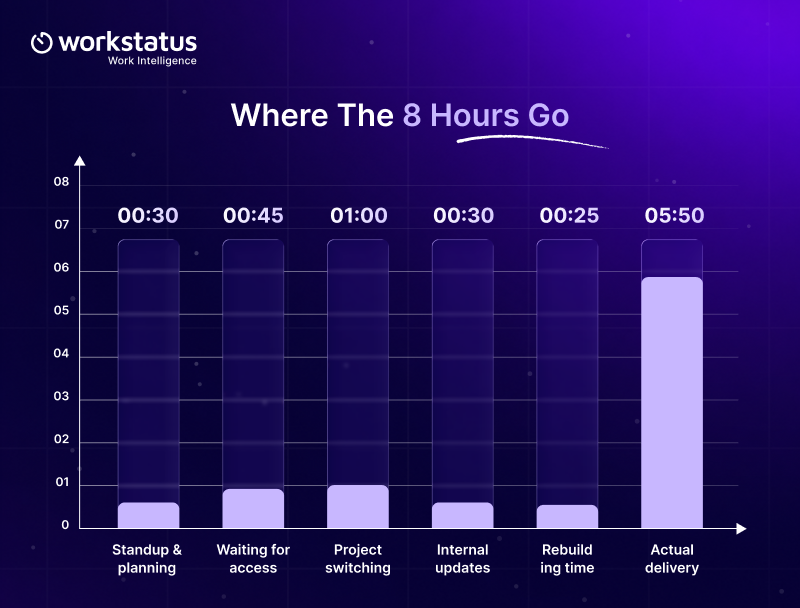
Take a developer on an eight-hour day for a single client engagement.
- 30 minutes for standup and daily planning
- 45 minutes waiting on client access to a test environment
- 1 hour switching between two other projects
- 30 minutes on internal updates and status reporting
- 25 minutes rebuilding yesterday’s hours from memory
- The rest goes into actual delivery work
The day is full, but the billable hours are not. Some non-billable time is necessary. A standup is work. So is a review. So is a team discussion. The problem is when the same non-billable time keeps happening every week without adding much value.
Where Billable Hours Disappear
Lost billable hours rarely come from people slacking. They come from the way work gets captured and attributed.
- Unattributed Time: People log hours against a day instead of a project or a client. The work happened. The record cannot prove which engagement paid for it, so your billing substantiation falls apart the moment a client disputes the invoice.
- Waiting on Approvals or Access: Your engineer needs a client login. Your consultant needs sign-off on a document. The clock keeps running while a delivery stalls, and nobody logs the stall.
- Context Switching Across Projects: A person moving between three client accounts in one day loses time on every switch.
- Admin and Timesheet Reconstruction: When people fill timesheets on Friday for the whole week, they guess. Guessed hours are hard to defend when a client questions an invoice.
- Coordination and Status Reporting: Internal syncs and update calls keep the account running. They also sit outside the billable line unless you build them into the contract.
- Rework and Scope Creep: You deliver the work twice and bill it once. Small unpriced additions turn into hours that never appear on the invoice.
- Bench and Schedule Gaps: Time between engagements is paid capacity with no work attached to it.
- Travel and Site Waiting: For field and on-site work, the drive and the wait at a customer site are real paid hours. They often go unrecorded and unrecovered.
Each source looks minor on a single day. At month-end, they add up into the gap between what you paid for and what you invoiced. Every one of these leaks stays invisible until each hour carries a work unit.
That is the gap Workstatus closes. Tracking billable hours against a project for a single day makes each leak visible before month-end.
How to Calculate Your Billable Utilization
Billable utilization tells you what share of paid time reaches a client invoice. To calculate billable hours as a share of paid time, you need two numbers. One is the hours you paid for. The other is the hours attached to client work.
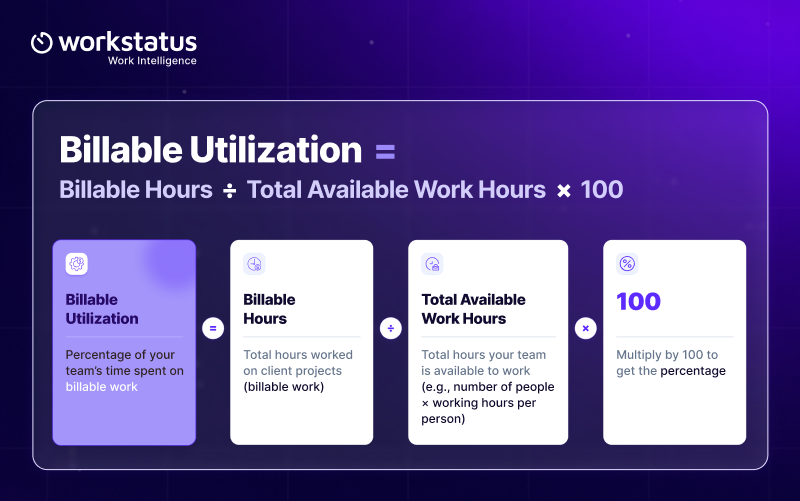
Billable Utilization = Billable Hours ÷ Total Available Work Hours × 100
Run it on a delivery team rather than one person so you see the pattern.
Worked example
Say you have a delivery team of 10 people working a standard month.
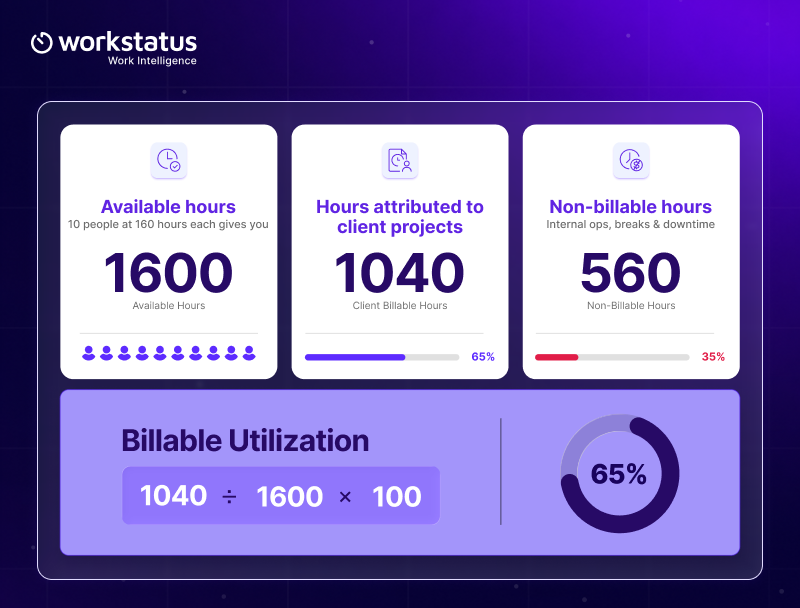
- Available hours: 10 people at 160 hours each gives you 1,600 available hours
- Hours attributed to client projects: 1,040
- Non-billable hours: 560
- Billable utilization: 1,040 ÷ 1,600 × 100 = 65%
Those 560 non-billable hours are not lost work. They are unattributed. Some of it is necessary. Some of it is recoverable.
Look at utilization by project too
A team average hides the leak. One retainer account may run at 80% while a fixed-price project runs at 45%. Pull the same number per engagement to see which project drains the team.
This is the Attribute step in plain language. Capturing the hours is easy. Connecting the hours to the right client project is what makes it usable.
Why 100% is the wrong target
A team at 100% has no room to train, plan, or fix anything. Most service firms aim for a healthy band rather than a ceiling. What matters is knowing your current number and watching it move in the right direction.
What Your Non-Billable Time Is Really Costing You
Non-billable hours are not free hours. You already paid for them. The scale of that capacity adds up quickly.
Annual non-billable hours ranged from 610 to 796 per employee across the professional-services markets measured by SPI Research, depending on the market.
- They Carry Labor Cost: Every unattributed hour still feeds your payroll inputs. It just has no revenue against it.
- They Represent Lost Delivery Capacity: Hours spent waiting on access are hours you could have sold to another engagement.
- They Compound Quietly: One hour of avoidable non-billable time per person per day looks harmless. Across a team of 10, it becomes 50 hours a week. Across a quarter, it becomes a significant share of a delivery month.
- Fixed-Price and Retainer Work Absorbs the Damage Silently: On a time-and-materials contract, extra hours show up as a billing conversation. On a fixed-price or retainer contract, they show up nowhere. The invoice stays the same, and the margin reduces without any warning.
Turn hours into currency
Run this on your own team.
- Take your avoidable non-billable hours for the month
- Multiply by your average blended hourly cost to get the labor cost sitting in that time
- Multiply the same hours by your average billing rate to get the revenue opportunity
The first number tells you what you spent. The second tells you what you could have earned. The gap between them is the case for fixing the process.
How to Find Your Biggest Billable-Time Leaks
Run a six-step audit on one delivery team for one month. Each step maps to the workflow spine that a dependable work record follows.
- Calculate available hours (Capture): Start with total paid work hours for the team. This is your denominator.
- Split billable and non-billable (Attribute): Connect every hour to a client project or mark it as non-billable. An hour with no work unit attached cannot be defended later.
- Categorize non-billable time by cause (Verify): Group the non-billable block into buckets. Waiting is one bucket. Admin is another. Rework and travel each get their own.
- Cost each category (Resolve): Put a number against each bucket. This turns a process complaint into a margin conversation that Finance will act on.
- Confirm the numbers with the person who signs off on time (Approve): Take the split to the delivery manager or operations manager who runs the approval queue.
- Prioritize the fix by financial impact (Output): Rank the buckets by cost and pick the top one or two. Publish the number so the team can see it move.
Do not chase every non-billable minute. Target the time that is unnecessary and repeatable and preventable. The rest is the cost of running a delivery business.
You can run this audit once in a spreadsheet. Billable hours software turns it into a monthly number you can trust.
A time intelligence platform goes one step further and keeps the attribution attached to every hour, so the split never has to be rebuilt.
Turn Billable Utilization Into a 30-Day Improvement Plan
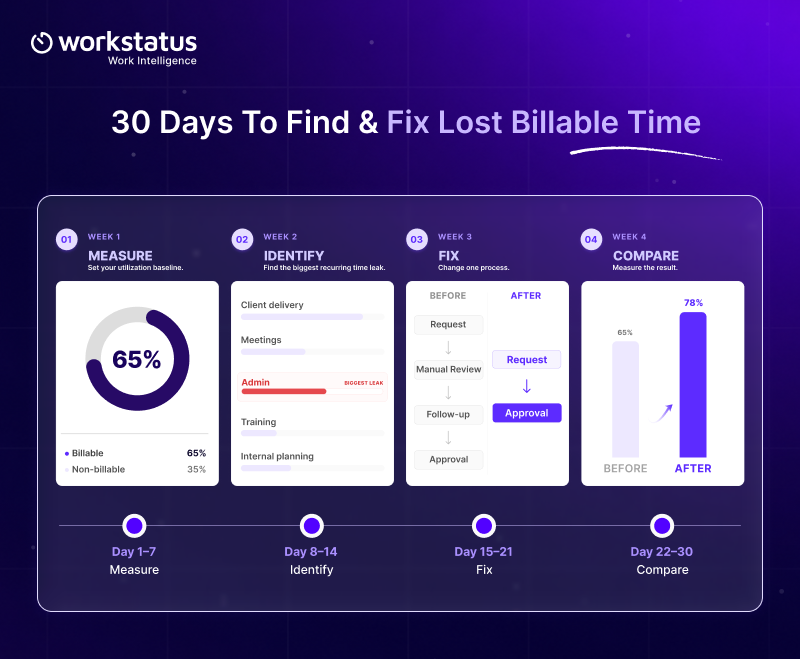
One month is enough to get a real number and move it.
- Week 1:
Measure: Set your baseline across projects. Get utilization for the team and for each engagement. Your time tracking software should give you this without a manual rebuild, as long as every hour is attached to a project. - Week 2
Identify: Find the single largest recurring source of lost hours. It is usually waiting or timesheet reconstruction. - Week 3
Fix: Change one process. Not seven. If approval delays cost you the most hours, set a turnaround rule and stick to it. - Week 4
Compare: Re-measure the same way you measured in week one. Check whether the number moved.
Administrative work is worth measuring as part of that audit. Annual administrative hours increased by more than 18%, rising from 152 to 179 hours per employee, according to SPI Research’s 2025 benchmark.
Metrics to watch
- Billable utilization by person and by project
- Billable and non-billable split
- Approval turnaround time
- Waiting and travel hours
- Rework hours
- Recoverable revenue opportunity
What good looks like after 30 days
You will not fix utilization in a month. You should finish with three things.
- A baseline number you trust for every active project
- One named cause of lost hours with a cost attached to it
- One process change that shows a measurable drop in that cause
If your billable utilization moved by even a point or two and you can explain why, the month worked.
How Workstatus Shows You Where the Billable Hours Go
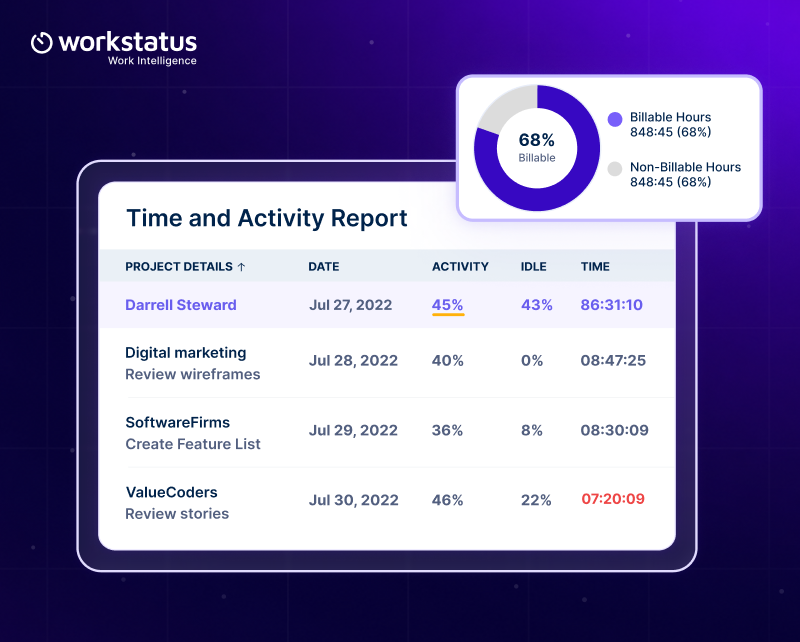
The audit above only works if your records can answer it. Most time tracking tools record the day as one total, so the split you need stays invisible.
Workstatus works as a work intelligence platform, so it is built around the work unit rather than the day.
- Time attaches to a project or a client or a job, so every hour has an owner before month-end
- Every hour lands in a category of its own. Waiting sits apart from the admin. Rework sits apart from travel. You can see which bucket costs the most.
- Automatic time tracking records hours as work happens, so nobody rebuilds the week from memory on Friday.
- Exception review surfaces the odd entries instead of every line, so the person who signs off spends minutes rather than hours.
- Approved hours become the single record everyone works from. Payroll inputs and client invoices both pull from it.
- Approved hours flow straight into the invoice handoff, so nobody rebuilds the billing file.
The result is straightforward. Your billable utilization becomes a report you pull instead of a spreadsheet you build.
Conclusion
A fully booked delivery team can still carry unused billable capacity. Effort and revenue are not the same thing. The first move is not asking people to work harder.
It is understanding where the hours go. Billable utilization gives you that view. It exposes the gap between the hours you pay for and the hours that create revenue.
Once the leaks are visible, you can fix the two that matter and leave the rest alone. Start with one delivery team and one month. One number tells you which leak to fix first.
FAQ
1. How can companies track usage against project budgets in real time?
Link every hour your team logs to a specific client project, then compare it against the project budget as work happens. This way you catch budget drift and unbilled work mid-project, not at month-end when it’s too late to fix.
2. How do you work out billable utilization for a delivery team?
Divide the hours attributed to client projects by the total available work hours, then multiply by 100. Run it per project and per team, because a team average hides the project that is draining you.
3. What is a good billable utilization rate?
There is no universal number, because it moves with your contract mix and delivery model. Set your target from your own three-month trend, then work to improve on it.
4. Do you need software to track billable hours, or is a spreadsheet enough?
A spreadsheet gives you one number once, built from memory and guesswork. Dedicated software gives you the same number every month, with each hour already attached to a project.
5. Why does non-billable time affect fixed-price work more than time-and-materials work?
On time-and-materials, extra hours turn into a billing conversation with the client. On fixed-price and retainer work, the invoice stays flat, and the margin absorbs the loss quietly.