
Table of Contents
Your field team can work a full day without earning a full day. This blog shows you how to find the hours that slip away between jobs and turn them back into billable capacity. Travel takes a share of the day.
Waiting takes another. Scheduling gaps take what is left. None of it looks like a problem while it happens. A technician drives to a site. A customer runs late. A part does not arrive.
Each moment feels small and reasonable. By Friday, all of it lands in one number on your timesheet: hours worked. That number tells you the team showed up. It does not tell you what those hours earned.
So here is the question worth asking. How much billable capacity does your team lose every month without anyone noticing? The rest of this piece walks you through it in three steps.
First, you find where the time goes. Then you work out what it costs. Then you reduce it. Field service time tracking is what makes all three steps possible, because you cannot fix hours you cannot see.
Where Billable Time Gets Lost in the Field
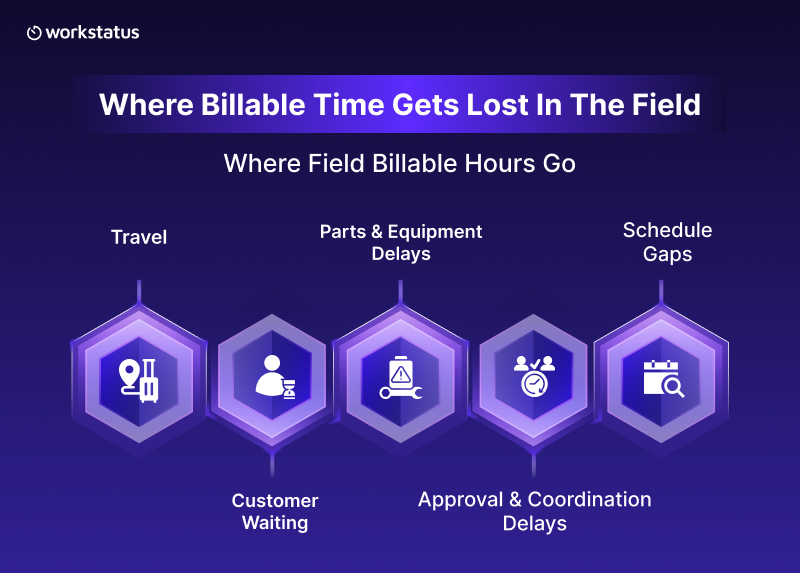
Lost time rarely comes from one big failure. It comes from a handful of small, repeatable ones. Field service time tracking shows you each one separately.
Here is where to look first.
- Travel: Long distances between sites. Backtracking across the same area twice. Jobs booked in the wrong order.
- Customer Waiting: The customer is not home. The gate is locked. Nobody at the site can grant access.
- Parts and Equipment Delays: As per ServiceTitan’s 2025 Commercial Service Market Report, 57% of commercial contractors face issues with parts availability.
- Approval and Coordination Delays: Work pauses while someone waits on a decision from the office, the customer, or another team.
- Schedule Gaps: A cancellation opens a hole in the afternoon. A job finishes early, and nothing fills the space.
Travel takes up a real part of the day. As per Applause’s 2026 State of Home Services Benchmark Report, 14.2% of technicians spend two or more hours a day driving between appointments.
That group loses roughly a quarter to 40% of the shift to non-revenue time. Notice what these have in common. Every one of them happens outside the job itself.
Your technician is available and willing throughout. The delay just does not give them work to do. That is why you cannot fix this by pushing the team harder.
You fix it by removing the friction sitting between their jobs. Field service management software handles the dispatch side of this well.
Fewer tools show you what those gaps between jobs cost you in billable hours.
How Much Is That Lost Time Actually Costing You?
To put a number on it, you need to separate three things that usually get counted as one.
- Available Working Hours: The hours you pay for.
- Billable Hours: The hours you can put on a client invoice.
- Non-billable hours: Everything in between.
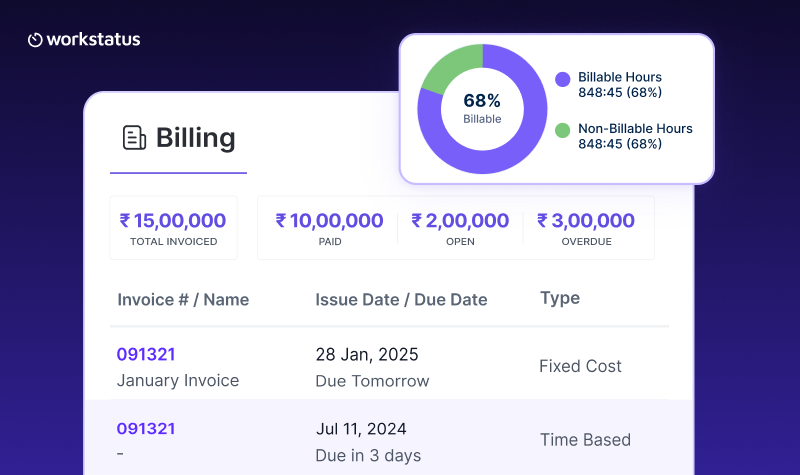
The gap between the first two has a name. Billable utilization is simply the share of paid hours that end up on an invoice.
If a technician is on the clock for eight hours and you can bill for six of them, your utilization for that day is six out of eight. Billable hours tracking gives you that split for every technician, every day.
Now split the non-billable hours one more time, because this is where the real answer sits.
- Necessary non-billable time: Travel you cannot avoid. Required admin. Training.
- Avoidable non-billable time: An extra trip for a missing part. A wait at a site nobody confirmed. A gap after a cancellation with no backup job ready.
Only the second group is money you can recover. Workstatus splits those two groups for you, so you stop guessing which hours were avoidable. Use a simple formula to size the recoverable share.
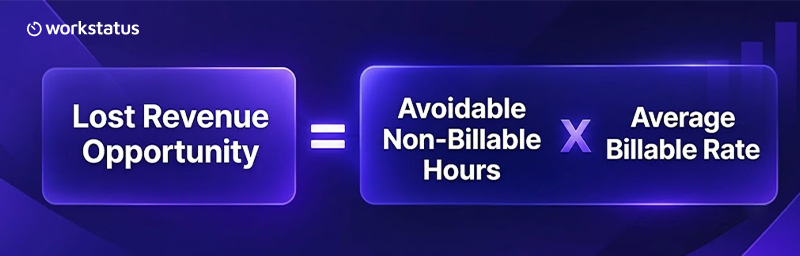
Run it for one technician across one month, and the figure often looks minor. That is the trap. Run it across your whole field team, then across twelve months, and the same figure turns into a serious line item.
A short daily delay repeated by every technician on every working day adds up to weeks of paid capacity you never billed for. The point is not to be precise to the minute. The point is to see that the number exists at all.
A Full Day Doesn’t Mean a Fully Utilized Field Team
“Everyone worked their full shift” is the most comforting sentence in field operations. It is also the least useful. That distinction matters even when demand is strong. As per Jobber’s 2026 Home Service Trends Report, 80% of home service businesses say they are fully booked or close to it.
A technician can be busy from morning to evening and still generate a few billable hours. Busy and billable are not the same thing.
Three ideas help you keep them apart:
- Working time is the hours the person was on the clock.
- Productive time is the hours they spend doing something useful.
- Billable time is the hours a client will actually pay for.
Driving between two sites counts as working time. Depending on your contract, it may even count as productive time. It rarely counts as billable time.
This is why hours worked makes a poor management metric on its own. It measures attendance. Utilization measures capacity.
If you want to know how much more work your current team could take on, utilization gives you the honest answer. Billable hours tracking turns that from a feeling into a number.
How to Reduce Travel and Waiting Time
Once you can see where the hours go, most of the fixes are practical rather than clever.
- Book jobs in a sensible order so technicians move through an area instead of crossing it twice.
- Cut return trips by grouping work that needs the same equipment or the same site.
- Confirm site readiness before dispatch. A short check the day before prevents a wasted visit.
- Verify parts and equipment against the job before the van leaves.
- Clear approval bottlenecks so work does not stall while someone waits for a reply.
- Keep backup work ready to fill the gap when a job cancels or finishes early.
- Record the reason behind every long wait, not just the fact that it happened.
- Review patterns instead of incidents. One late customer is bad luck. The same site running late every month is a process problem.
That last point matters most. Individual delays feel like exceptions, so nobody escalates them. Patterns are what you can actually fix.
And to be clear about the goal here: none of this asks your technicians to work harder. It asks the day to waste less of their time.
Most of these fixes need a record to work from. That is where time tracking software built for field teams earns its place, because field service time tracking ties each hour to a job instead of to a day.
What to Measure to Find Your Biggest Time Leaks
You cannot review everything every week. Pick a short list from your field service time tracking data and watch how it moves.
- Billable utilization
- Travel hours per technician
- Waiting hours per technician
- Average travel time per job
- Schedule gaps
- Avoidable versus necessary non-billable time
- Billable hours generated per field employee
- Estimated revenue opportunity lost
Scheduling is worth benchmarking too. As per Jobber’s 2026 Home Service Trends Report, 15% of home service businesses name scheduling capacity or gaps as an operational challenge.
The same report puts top-performing teams at 80% to 90% labor utilization, measured as billable hours against total available hours. That gives you a number to aim at.
One month of these numbers tells you very little. Three months of them tell you a lot. Trends are what point you to the recoverable capacity.
If travel time per job climbs while job volume stays flat, your scheduling needs attention. If waiting hours cluster around a handful of customers, your pre-visit confirmation needs attention.
The metric shows you the symptom, and the trend shows you the cause.
How Field Service Time Tracking Shows You Where Field Hours Actually Go
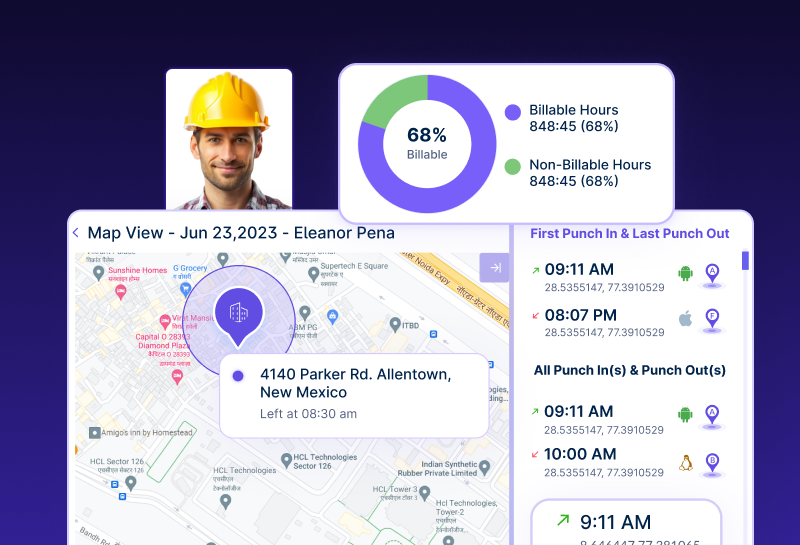
Most of the metrics above are hard to track by hand. A manual timesheet records the whole day as one total.
Workstatus changes what you capture in the first place. Field employee time tracking records the day as it happens, so nobody has to remember it later.
Workstatus follows one simple path. You capture the time, attribute it to a job, verify it, approve it, then output it. Here is what each step gives you.
- Capture: Time gets recorded as the day happens, not written up on Friday.
- Attribute: Every hour connects to a job, a site, or a visit, so travel and waiting stop hiding inside hours worked.
- Separate: Travel and waiting become their own categories. You see them clearly instead of guessing what sat between two jobs.
- Verify: Clock-ins tie to the job location and timing, so you can verify field work and get job and site proof without chasing a technician for details.
- Resolve: A waiting period carries its reason, which turns one-off complaints into a pattern you can fix.
- Approve: The approval queue shows exceptions only, so the person signing off reviews what looks unusual instead of every line.
- Output: Payroll inputs, client invoices, and proof of service all come from the same approved record.
Put those together, and the audit below stops being a project. It becomes a report you pull.
Turn Recovered Time Into More Field Capacity
Recovered hours are not a tidy number on a dashboard. They are jobs you can now take on. That is the real point of field workforce management. Here is what happens when you recover billable hours.
- More billable work from the team you already employ
- Room to grow before you need to hire
- Better margins on the same payroll
- More predictable scheduling
- Fewer wasted trips to sites that were not ready
- Smarter allocation of your strongest technicians
Think of it this way. You have already paid for those hours. Recovering them is not new spending. It is finally using what you bought.
How to Run a 30-Day Field Time Audit
Give yourself one month and answer eight questions.
- How many hours did each technician spend travelling?
- How much time did they spend waiting?
- Why were they waiting?
- How much of that travel was unavoidable?
- Where did schedule gaps appear?
- Which delays repeated?
- How many of those hours were recoverable?
- What are those hours worth at your average billable rate?
Question three does most of the work. It turns a total into a cause, and a cause is something you can change. If you already run workforce management software, most of these answers are sitting inside it.
With Workstatus, the 30-day audit becomes a report you pull instead of a month of spreadsheet work. You cannot fix your biggest field-time leaks until you know where the hours are going.
Conclusion
Travel and waiting look like small operational annoyances. Across a full field workforce, they stop being small. The goal is not to bill every minute of the day.
Some non-billable time is real, necessary, and worth paying for. Field workforce management is about knowing the difference.
The goal is to know which hours you lose, which of those losses you can avoid, and what they are worth to you. Once you can see that clearly, you recover capacity without asking anyone to work a longer day.
Start with the 30-day audit. Your next ten billable hours are probably already on your payroll. If you want that audit to run off a live record instead of a spreadsheet, that is what Workstatus gives you.
FAQ
1. What counts as billable time for a field team?
Ans. Billable time is the time a client agrees to pay for an invoice. It usually covers work done at the job site, not travel or waiting around it.
2. Should we bill customers for travel time?
Ans. That depends on your contract, and many field businesses do bill for some of it. The bigger win is cutting the travel you never planned for, like return trips for a missing part.
3. What is a realistic billable utilization target for field technicians?
Ans. Jobber’s 2026 Home Service Trends Report puts top-performing teams at 80% to 90% labor utilization. Treat that as a ceiling, not a starting point, because your job mix and travel distances shift the number. Set your first target from your own three-month trend, then work up toward the benchmark.
4. How do we tell avoidable waiting from necessary waiting?
Ans. Record the reason every time a technician waits. Once you see the same reason repeat, you know that delays are a process problem you can fix.
5. Can we run the 30-day audit without a tracking tool?
Ans. You can, but you will spend the month building spreadsheets from memory and guesswork. Field service time tracking ties each hour to a job, so you get the same answers as the report you pull.