
Table of Contents
This is a very common challenge faced by architecture and engineering firms. Work happens across designs, meetings, site visits, and revisions
In fact, only 58.5% of projects in architecture and engineering firms are completed on or ahead of schedule, highlighting clear gaps in planning and time tracking.
But tracking for all of these is not easy.
- The time is spent on tasks, but not clearly recorded
- The extra effort is not tracked well, and revisions are increased
- Teams are busy all day, yet the billable hours are unclear
- Without any warnings, the project budgets go over the board
Over time, these challenges lead to poor planning and loss of profit. The smallest of small gaps in time tracking can affect the margins.
This is where you need the right time intelligence software to fix all of this. It gives you a clear picture of how the time is spent across the tasks and projects.
But there are a lot of tools in the market, so it is important to choose one that truly fits your team and the way you work.
In this blog, you’ll explore the best time tracking software for architects and engineers in 2026 and find out which one suits your team the best.
Let’s go!!
Common Time Tracking Challenges in Architecture & Engineering
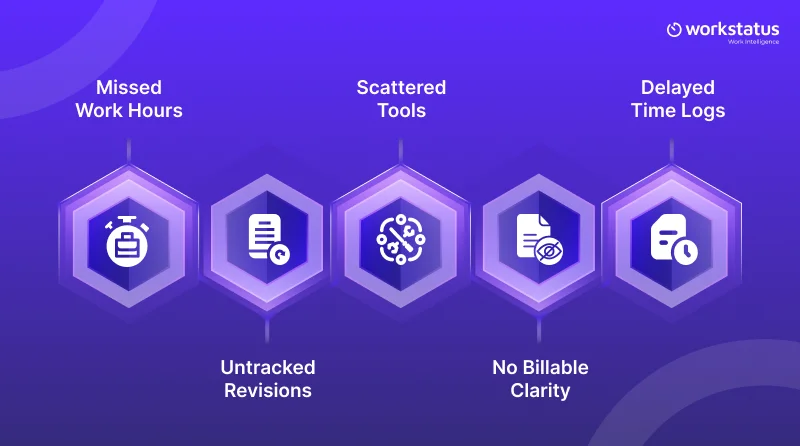
Before starting, let’s just look at the time tracking challenges faced by architecture and engineering firms.
Here are a few of them:
- The time spent on designs, meetings, and site visits is missed
- Revision increase, but the extra effort is not recorded
- There is no single view; work is scattered across the tools
- No separation between the billable and non-billable time
- Teams forget to fill in the log time, which further leads to inaccurate tracking
These small gaps and challenges slowly result in the bigger problems, such as project overruns and reduced profits.
So, it’s important to fix these challenges to start better and clearer time tracking.
Why Time Tracking is Critical for Architecture and Engineering Firms
Time tracking is critical because it directly impacts project control, profitability, and overall efficiency.
After looking at the challenges, one thing is clear that time tracking is not a small task; it directly impacts your projects and profits.
In architecture and engineering firms, time is the biggest cost. If it’s not tracked properly, it becomes very hard to manage projects.
Here’s why best time tracking software for architects is essential:
- It helps to see where exactly time is spent
- It gives you clarity for billable and non-billable time
- It controls the project budgets and avoids overruns
- It gives you clear planning and team productivity
- It shows you a clear picture of how revisions affect effort and timelines
Without the proper time tracking, teams stay busy, but the result is unclear. But, on the other hand, with clear tracking, every hour has a purpose, and every project stays on track.
What Architects & Engineers Should Look for in Time Tracking Software
Now that you know why time tracking matters, the next step is to first look at what exactly architects and engineers should look for in time tracking software.
Here’s what they should look for:
- Easy tracking across tasks, revisions, meetings, and site visits with live location tracking
- Clear and transparent view for billable and non-billable time
- Good ability to track all the extra effort and revisions
- One place to see all projects and team activity
- Easy to use without any extra effort for the teams
- Real-time insights instead of delayed reporting
The end goal is not just to track time, but to clearly understand how time affects projects and profits.
The right time tracking and billing software for architects should make the tracking simple not complex and should help the teams to stay in control.
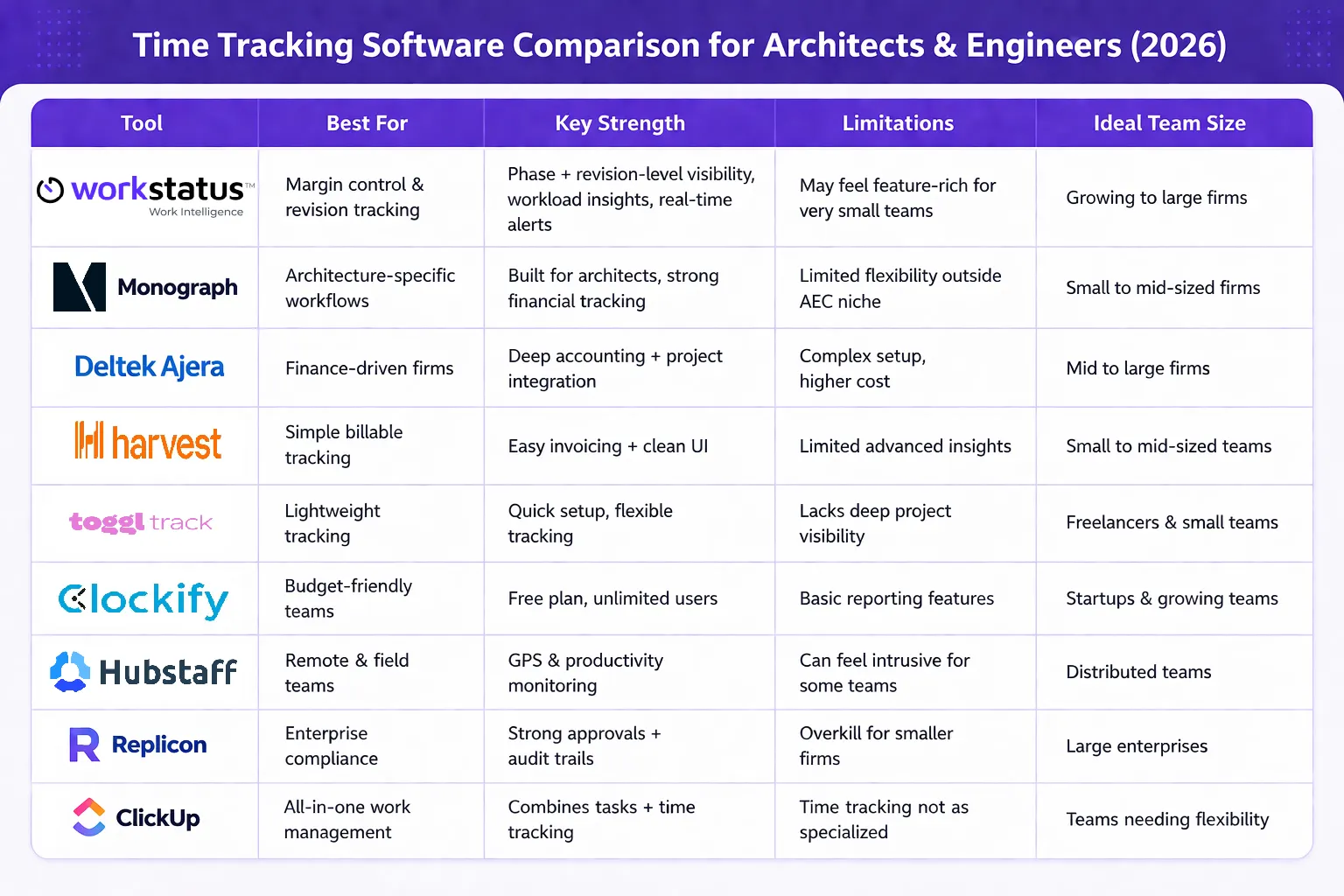
Best Time Tracking Software for Architects and Engineers in 2026
Choosing the right time tracking software for engineers and architects is very important for architecture and engineering firms that rely on billable hours, revision control, and accurate project budgeting.
Below are some of the best tools in 2026 that help firms protect margins and improve visibility.
1. Workstatus
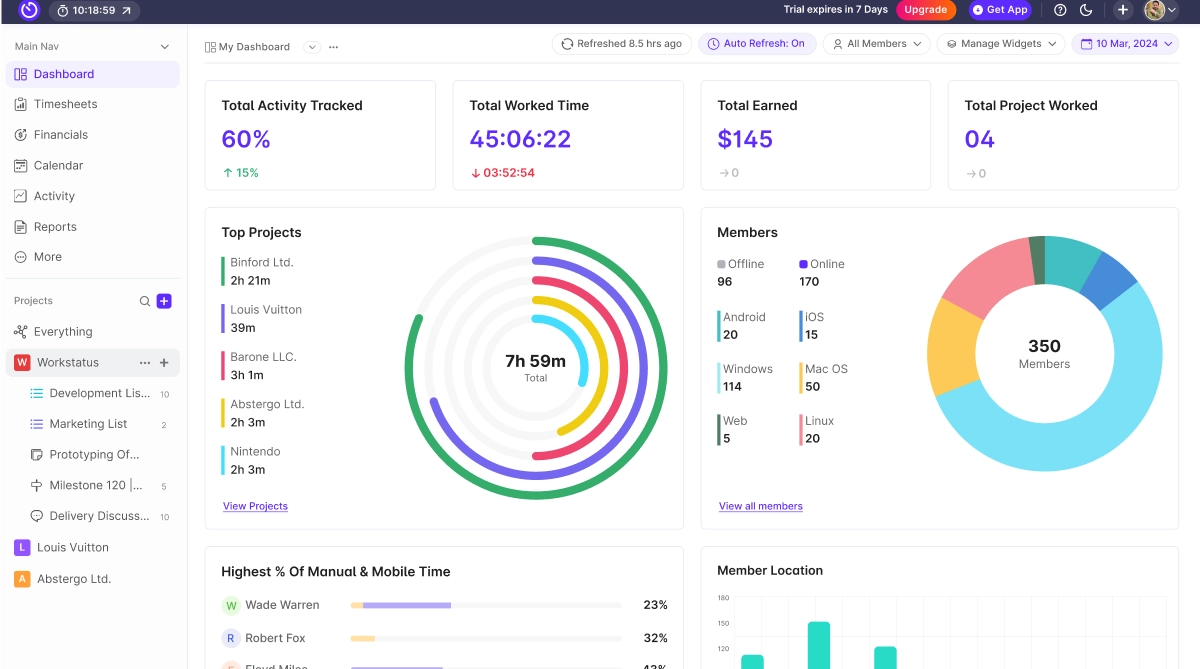
Key Features
- Project and phase-level time tracking
- Revision-level time visibility
- Billable vs non-billable time
- Workload and utilization dashboards
- Real-time reporting and risk alerts
- Centralized reporting across projects and GPS workforce visibility
Benefits
- Capture revision impact before it reduces margins
- Create clear proof for change orders
- Improve billing accuracy across projects
- Prevent project overruns early
- Balance team workload with field service management for steady delivery
Best For: Architecture & engineering firms that want to leverage Work Intelligence to track billable vs non-billable hours, optimize utilization, protect margins, manage revisions, and gain complete visibility into time and project performance.
2. Monograph
Monograph is designed specifically for architecture firms. It focuses on financial visibility and project-based billing.
Key Features
- Budget tracking
- Time and invoicing integration
- Financial dashboards
- Resource planning
Benefits
- Better revenue tracking
- Clear project profitability view
- Improved billing control
Best for: Architecture firms prioritizing finance-first project management and resource planning
3. Deltek Ajera
Deltek Ajera is suited for firms that need strong accounting integration. It combines time tracking with financial and resource planning tools.
Key Features
- Project accounting
- Budget monitoring
- Resource management
- Financial reports
Benefits
- Strong cost control
- Better forecasting
- Improved project margin tracking
Best for: Firms focused on project accounting, budgeting, and financial visibility
4. Harvest
Harvest offers simple and clean time tracking for billable teams. It works well for small to mid-sized architecture and engineering firms.
Key Features
- Time and expense tracking
- Invoice generation
- Basic reporting
- Integrations with other tools
Benefits
- Easy billing process
- Clear billable hour visibility
- Simple setup
Best for: Small to mid-sized architecture & engineering firms that need simple, reliable billable time tracking and easy invoicing
5. Toggl Track
Toggl Track provides lightweight and flexible time tracking. It is best for teams that need simple tracking without complexity.
Key Features
- One-click time tracking
- Project and client tagging
- Productivity reports
- Mobile tracking
Benefits
- Easy to adopt
- Clear time insights
- Minimal setup effort
Best For: Teams that need simple, flexible time tracking with quick adoption and minimal setup
6. Clockify
Clockify is a budget-friendly time tracking solution. It supports unlimited users with basic features.
Key Features
- Free time tracking
- Project categorization
- Basic reporting
- Team management
Benefits
- Cost-effective option
- Good for growing teams
- Simple tracking setup
Best for: Teams looking for a cost-effective time tracking solution with unlimited users and simple setup
7. Hubstaff
Hubstaff focuses on workforce and remote team tracking. It includes productivity monitoring features.
Key Features
- Automatic time capture
- Activity monitoring
- Payroll integration
- GPS tracking
Benefits
- Better accountability
- Improved remote visibility
- Automated payroll support
Best for: Remote and distributed teams that need workforce visibility, accountability, and productivity tracking
8. Replicon
Replicon is designed for enterprise-level compliance and approvals. It supports advanced workflow management.
Key Features
- Approval workflows
- Audit trails
- Compliance reporting
- Advanced billing support
Benefits
- Strong governance
- Reduced compliance risk
- Clear approval processes
Best for: Enterprise firms that need strong compliance, audit-ready tracking, and structured approval workflows
9. ClickUp
ClickUp combines task management and time tracking in one system. It suits firms wanting both productivity and tracking tools together.
Key Features
- Built-in time tracking
- Task and milestone tracking
- Custom dashboards
- Workflow automation
Benefits
- Centralized project control
- Improved team coordination
- Flexible customization
Best for: Teams that want an all-in-one platform combining task management, time tracking, and workflow automation
The right tool choice depends on your firm’s size, billing model, and need for revision visibility.
Focus on tools that protect billable hours, improve workload clarity, and prevent margin leakage.
How Time Tracking Protects Margins in Architecture & Engineering
You have seen the tools now, the real question is, how does time tracking actually help protect your margins?
In architecture and engineering firms, margins don’t drop suddenly. They slip when time and effort are not tracked clearly.
Here is how time tracking protects margins:
- Make sure all billable hours are captured and not missed
- Shows where time is going across projects and tasks
- Helps control budgets and avoid unexpected overruns
- Connects time spent directly with project costs and billing
Time tracking is not only about logging hours, but it’s also about protecting profit, improving project control, and keeping the delivery on schedule.
How to Choose the Right Time Tracking Software for Your Firm’s Size
With the right perspective, it is easier to choose a tool that fits your team and projects. So, here’s how to choose the right time tracking software for your firm’s size:
- Small teams require simple and easy-to-use tracking
- Growing firms need better visibility across projects and teams
- Large teams need workload control and clear reporting
- Multi-project firms need one place to track everything together
- All organisations need billable tracking and revision visibility
The right tool should match your current needs and should support your future growth. It should make your tracking simple and help you scale without any confusion.
Final Thoughts
Time tracking is not just about recording hours; it’s about protecting your profits.
When you clearly track billable time, project phases, and revisions, you avoid missed billing and budget overruns.
Choose the right tool, and time tracking becomes a simple way to stay organized, deliver on time, and keep your margins safe.
FAQs
Ans: Time tracking software for architects records time spent on projects and tasks to improve billing accuracy and project visibility.
Ques: Is time tracking necessary for architects & engineering firms?
Ans: Yes, it is necessary for architects & engineering firms. Here’s why:
- Get real-time visibility into project work
- Track billable vs non-billable time for accurate invoicing
- Optimize team utilization and workload
It ensures better billing accuracy, efficient delivery, and stronger profitability.
Ques: How do architects track billable hours?
Ans: Architects track billable hours using time tracking tools linked to projects and tasks.
- Use the right time tracking tools with project/client tagging
- Log time by phase or task
- Generate reports for billing
This ensures accurate billing and better project control.
Ques: What are the best time tracking software tools for architects?
Ans: Here are some of the best time tracking tools for architects:
- Workstatus → Time Intelligence + utilization + margin insights
- Harvest → Simple tracking + invoicing
- Toggl Track → Easy timer
- Clockify → Budget-friendly tracking
- Hubstaff → Tracking + workforce visibility
The right tool doesn’t just track time; it helps you use it more effectively.
Ques: Why is billable vs non-billable tracking important for architects?
Ans: It helps ensure that all billable work is captured, reduces revenue leakage, and improves project profitability.