
Table of Contents
You close the project. The client is happy. The invoice goes out on time. Then the numbers come back, and the margin is thinner than you planned. Nobody can point to what went wrong. There was no crisis.
Nothing slipped badly enough to notice. The project simply cost more to deliver than it was meant to. This happens on fixed-price projects, on retainers, and on client accounts.
It happens to teams that already track their time. Most of the time it happens for one reason. Hours get spent without ever reaching the work they were meant for. You pay for those hours.
You just cannot point to what they bought. That is margin leakage. It is quiet, it repeats every month, and you usually find it after you can still act on it.
This page helps you put a number on yours. Use the project margin calculator to see what one project actually lost, then use the steps below to find where it went and what to fix first.
Revenue Looks Fine. So Why Is Margin Shrinking?
Revenue is easy to see. You signed the contract, so you know the number. Delivery cost is harder. It moves every week, and nobody sends you an invoice for it.
So you can hit your revenue target and still lose margin. The revenue stayed fixed. The hours did not.
Professional services projects averaged a 10.7% overrun in 2025, according to SPI Research’s 2026 benchmark.
Here is the whole problem in one line:
Revenue → Delivery Costs → Actual Margin
Every extra hour your team spends on a project moves that middle box up. Nothing moves the first box. So the last box shrinks. The tricky part is that these hours rarely look like a problem while they happen.
A developer redoes a screen. An account waits two days for a client file. Someone spends a morning updating a status sheet. None of that feels like margin loss. All of it is.
Margin leakage, in plain terms: profit you lost to work that happened but never reached an invoice.
Where Is Your Project Margin Leaking?
Most leakage comes from five places. You will recognise all of them.
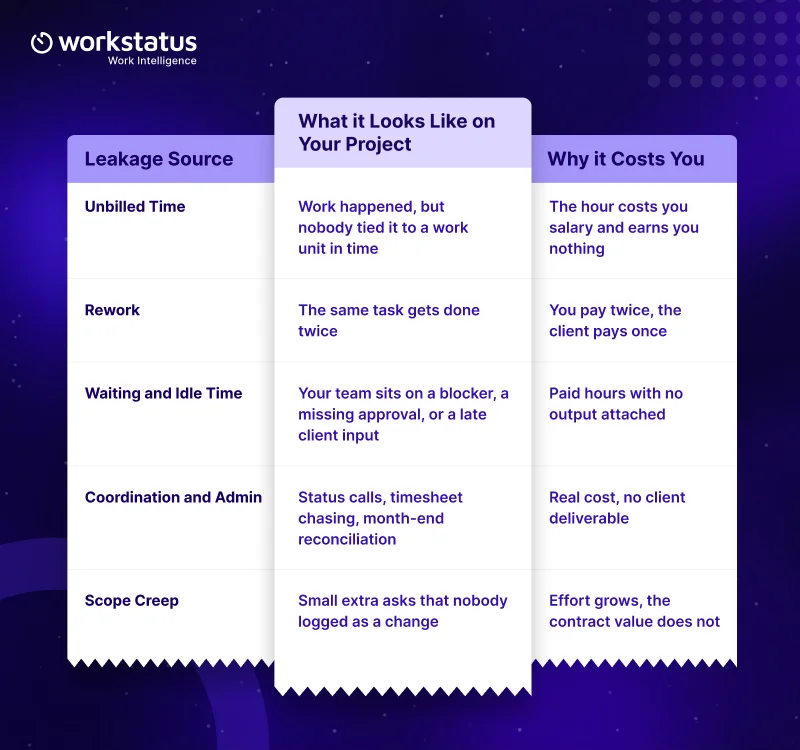
Coordination can carry a surprisingly high hidden cost.
A 2026 Progress Software survey of 355 professional-services firms found that firms spend nearly 20 hours a week on client coordination, translating to a median $60,000 in annual non-billable client-service work.
A work unit is simply the thing an hour belongs to. On a project, it is a task or a phase. On a retainer, it is a client account. On a field job, it is a site visit.
A billable hours calculator can tell you how many hours you billed. It cannot tell you why the rest went missing. When an hour never reaches a work unit, you get an attribution gap.
You know the hour happened. You cannot say what it bought you. That gap is where most revenue leakage starts.
The same problem shows up in agency work: 57% of agencies report losing $1,000–$5,000 a month on unbilled projects and tasks, according to Ignition’s 2025 agency survey.
Project budgeting software sets your plan. It does not follow what happens after the plan meets a real week. This matters most if you run a service business.
If you deliver on time-and-materials, fixed-price, dedicated-team, or retainer contracts, your margin lives or dies on how well hours map to the work you promised.
Project Margin Leakage Calculator
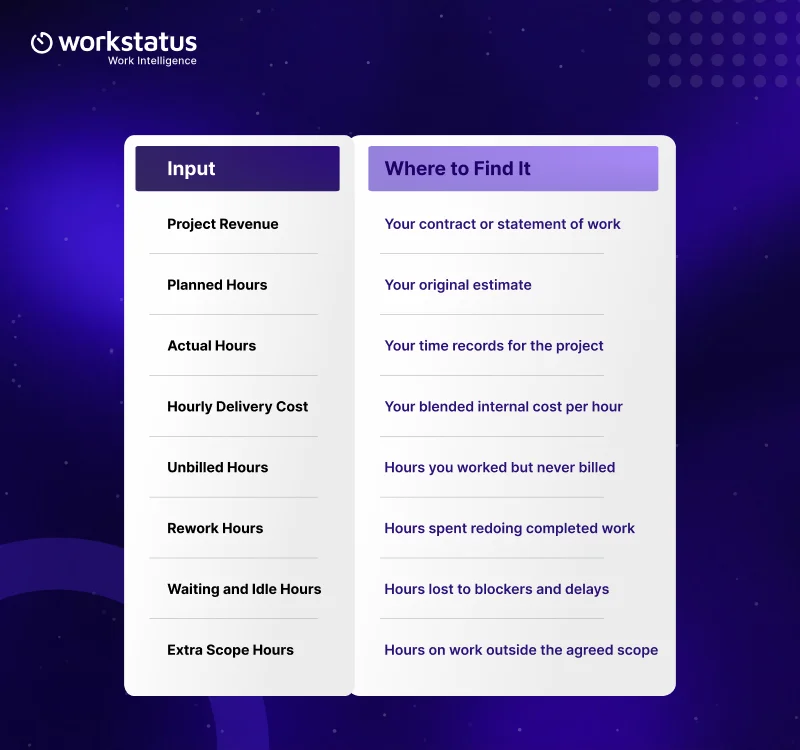
Enter your project to see the gap. It doubles as a project cost calculator, because it shows you what your delivery hours actually cost.
What to enter:
What you get back:
You get what a gross profit margin calculator gives you, plus the leak sitting behind the number.
- Expected margin. What the project should have returned at planned effort.
- Actual margin. What it returns once you count every hour.
- Margin lost. The rupee or dollar gap between the two.
- Leakage percentage. How much of your expected margin disappeared.
- Cost of excess hours. What the overrun cost you in delivery time.
- Potential margin recovery. What you get back if you close the biggest leak.
Run it on a project you already closed. That gives you a clean answer, because every hour is already in.
The Margin Leakage Calculator needs complete records to work, so a finished project gives you the truest picture.
Example: How a Profitable Project Loses Its Margin
Take a fixed-price project worth $50,000. This example is illustrative, so run your own numbers through the project margin calculator above. You planned 500 hours at a delivery cost of $60 per hour.
That puts your planned cost at $30,000 and your expected margin at $20,000. The project actually took 620 hours. Same revenue. Cost now sits at $37,200. Your margin drops to $12,800.
You lost $7,200 without missing a deadline or losing the client.
So where did the 120 extra hours go?
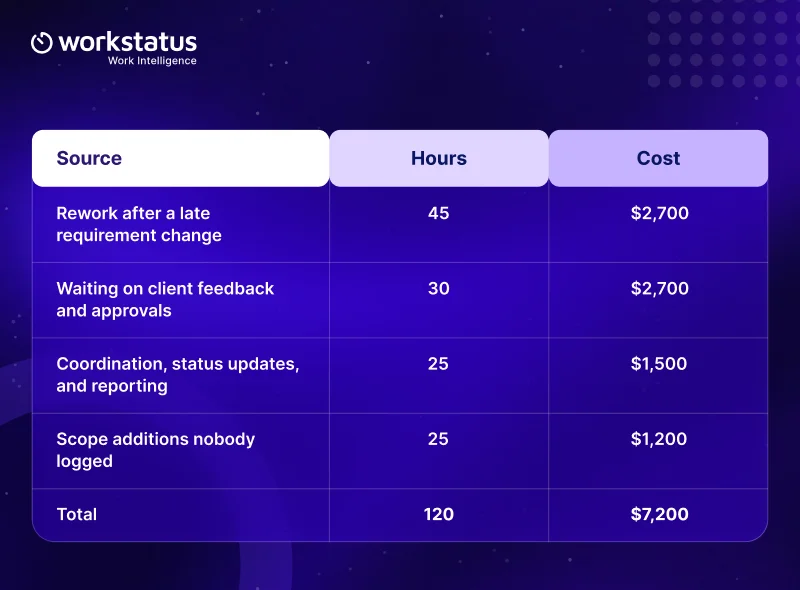
Read that table again and notice something. No single line is dramatic. The biggest one is 45 hours across a multi-month project.
That is how margin actually goes. Not in one event. In small amounts, across a lot of weeks, on work that all felt reasonable at the time.
The same pattern shows up on retainers, on shift-based client accounts, and on field jobs. Only the work unit changes.
How to Stop Margin Leakage
You cannot fix what you cannot see. So start by making the hours visible, then work through them in order. No project intelligence software does this for you on its own.
The order you work in does most of the job. Workstatus builds around a six-step spine. It works whether your work unit is a project, a client account, or a job site.
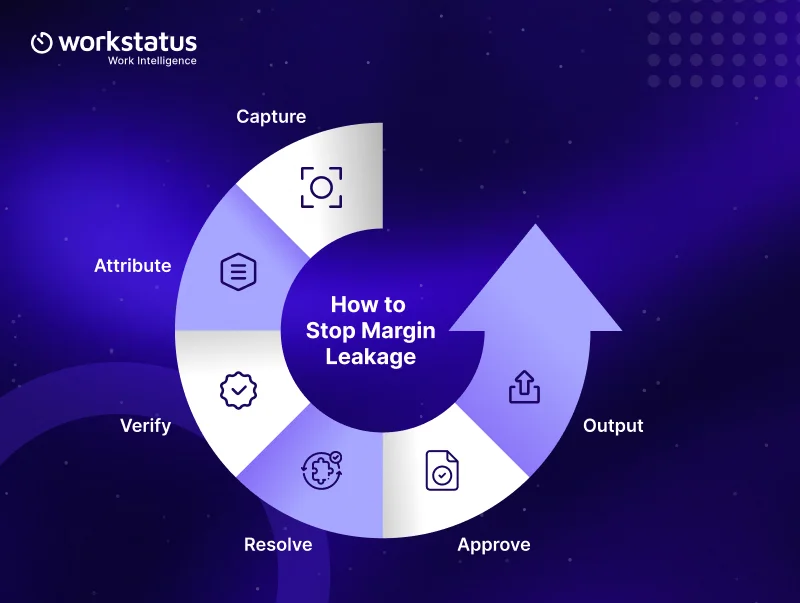
- Capture: Record time as work happens, not from memory at month-end. Hours reconstructed on a Friday afternoon are guesses.
- Attribute: Tie every hour to a work unit. This is the step that closes your attribution gap, and it does more for margin than any other single change.
- Verify: Look at what stands out. A task at triple its estimate. A week with a spike in non-billable hours. An account with more admin than delivery.
- Resolve: Fix the exceptions before they reach a report. A missing entry, a wrong project code, an hour logged against the wrong client.
- Approve: Sign the records off on a fixed rhythm. Long approval lag is a margin problem in itself, because you find out about an overrun after you can still act on it.
- Output: Turn the approved record into what you need next. A client invoice. A payroll input. A delivery review. A proof of work summary the client can accept.
Run that loop weekly rather than monthly. A weekly rhythm is how you prevent project overruns instead of reporting them.
A weekly check catches an overrun while the project still has a runway. A monthly check tells you what already happened.
How Workstatus Helps
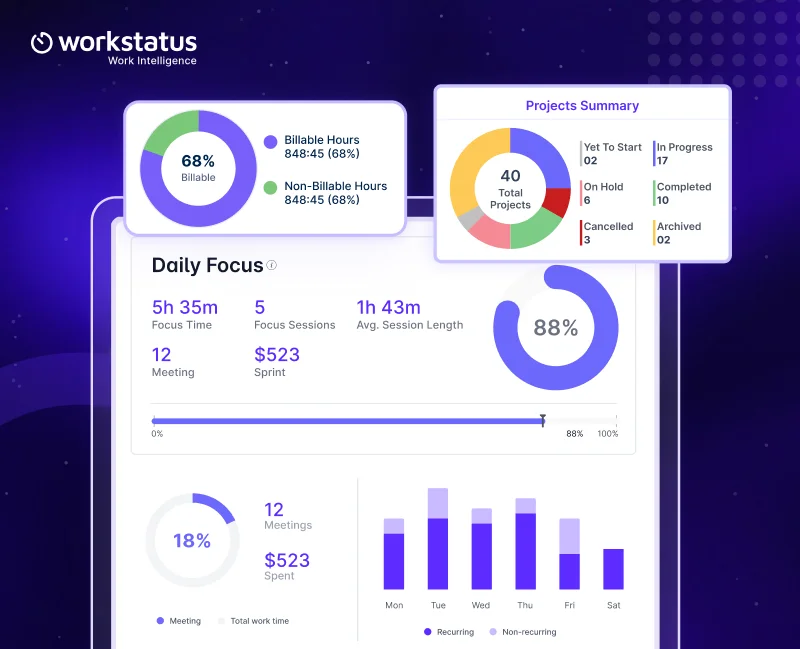
Workstatus is a work intelligence platform for service businesses. It gives you margin visibility on projects while they run, not after they close.
With Workstatus, you can:
- See where your delivery hours actually go, by project, client, or team.
- Separate billable from non-billable time, so your billable utilization stops being a guess.
- Spot an overrun while you can still do something about it.
- Compare planned effort against actual effort on any project.
- Produce a record your client, your finance team, and your payroll process all accept.
It connects to the project management software you already run, so your team does not change how they work to get visibility.
Run a 30-Day Margin Leakage Audit
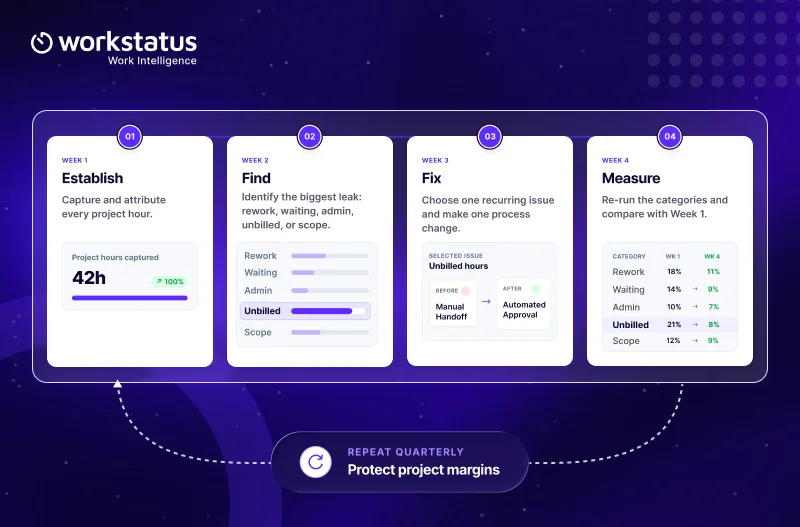
Pick one active project and give it a month. That is enough to find your biggest leak.
Conclusion
Margin does not usually disappear in one big event. It leaks through hours nobody tracked, costs nobody attributed, and work that quietly took longer than planned. The project margin calculator tells you how much you lost.
The weekly review loop tells you where it came from and what to change. Start with one closed project. Find the number. Then decide whether you want to keep paying it.
FAQ
1. What is project margin leakage?
Ans. Margin leakage is profit you lose to work that happened but never reached an invoice. It comes from unbilled time, rework, waiting, admin, and unlogged scope.
2. How does the project margin calculator work?
Ans. Enter your revenue, planned hours, actual hours, and delivery cost per hour. It shows your expected margin, your actual margin, and the gap between them.
3. Which project should I run on first?
Ans. Use a project you already closed, because every hour is in the record. That gives you a clean number instead of an estimate.
4. We already track time. Why is the margin still slipping?
Ans. Tracking tells you an hour happened. Attribution tells you what that hour bought, and most leakage starts in that gap.
5. Does this work if we run retainers or client accounts instead of projects?
Ans. Yes. Only the work unit changes, so a retainer or client account follows the same capture, attribute, verify, resolve, approve, and output loop.