Table of Contents
Your team’s work patterns can reveal more than missed deadlines or falling productivity.
Work pattern analysis helps you understand what slows work down, where employees struggle to focus, and when they need support.
Traditional coaching often relies on periodic reviews and personal judgment. A data-driven approach gives you a clearer picture of daily work habits.
This helps you identify challenges early and guide more focused coaching conversations.
In this article, learn how to use work pattern data to make coaching more effective.
Discover how work patterns can help you address performance gaps, build better work habits, and support your team’s growth.
What Is Work Pattern Data?
Put simply, it’s a record of employee work patterns. It shows how someone’s work time plays out over days and weeks. A timesheet might say Y worked eight hours on Tuesday.
Pattern data tells you what kind of eight hours they were. Maybe they had a clean three-hour stretch before lunch. Or maybe four meetings chopped their afternoon into small pieces.
Those are very different days. Most tools pick up a few common signals:
- Focus time, meaning long blocks of work with no interruptions
- Active hours across the day
- How often someone takes a break
- Hours worked past the planned schedule
- How work moves between tasks and projects
A single day won’t tell you much. Everybody has bad ones. Look for the things that show up week after week.
Why Traditional Performance Reviews Miss Work Patterns
Traditional performance reviews often miss the daily work habits that affect productivity and deadlines.
| Traditional Coaching | Data-Driven Coaching |
| Relies on periodic reviews | Uses ongoing work pattern analysis |
| Depends on personal judgment | Uses measurable work data |
| Identifies issues after they occur | Spots potential issues early |
| Offers broad feedback | Provides targeted, actionable feedback |
| Focuses on past performance | Helps improve daily work habits |
| Follows a one-size-fits-all approach | Supports individual employee needs |
By using work pattern data, managers can move beyond assumptions and provide timely, personalized coaching that helps employees improve.
Types of Work Pattern Data You Can Use for Coaching
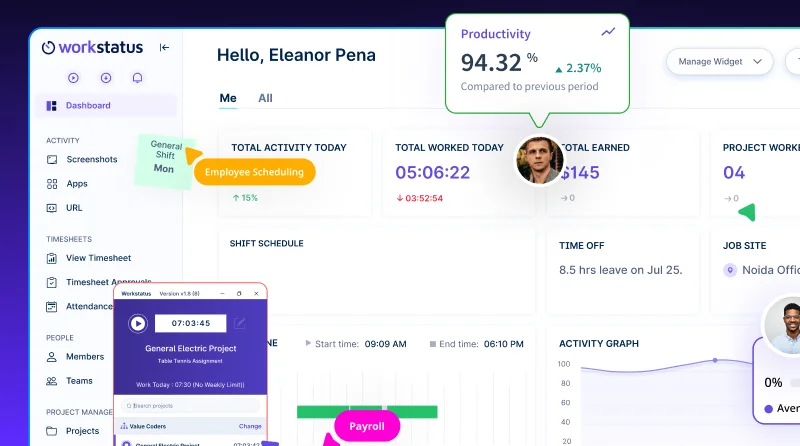
A workforce analytics software can give you dozens of numbers. Workstatus keeps the focus on the ones that help you coach. You really only need four kinds to start.
1. Work Hours and Time Distribution
This is when people work and where those hours go. Planned schedules and real ones rarely match. Things worth noticing:
- A long gap between logging in and starting real work
- A few days that run much longer than the rest
- Admin tasks eating into core work
Say a developer spends most mornings on internal calls. Blocking two morning hours for client work is an easy first fix.
2. Task and Project Activity
Here you’re looking at how work moves. Some tasks go through quickly. Others keep bouncing back for changes.
Is one consultant always over budget on the same client? Look at the scope before you look at the consultant. A loose scope is usually the reason.
3. Focus Time and Work Interruptions
This one measures how long someone can work before something pulls them away.
Picture a KPO analyst who answers every chat ping the second it arrives. Their day looks busy. But they rarely finish anything in one sitting.
Short work blocks and constant app switching are the usual signs. Setting fixed times to check chat can make a real difference.
4. Workload and Overtime Patterns
This shows who’s carrying what, and for how long. It’s probably the most useful one for spotting burnout early.
Watch for:
- People who log off late most days
- Big gaps in workload between teammates
- Weekend work that keeps creeping backA field technician putting in extra hours week after week might be doing everything right.
Sometimes the schedule just sends him to too many sites in one day.
If you plan jobs or BPO shifts with employee scheduling software, compare the planned roster with the hours people actually worked.
How to Identify Coaching Opportunities From Work Patterns
Seeing a pattern takes seconds. Good work pattern analysis takes longer, and it usually needs a conversation or two.
Step 1: Look for Recurring Patterns and Gaps
A late night here and there is normal. A late night every Wednesday is worth asking about. Before you bring anything up, check three things.
- Does it happen most weeks?
- Does it hurt delivery or quality?
- Does it stand out from how the rest of the team works?
Gaps matter too. If a task always gets two days in the plan and always takes four, something in the planning is off.
Step 2: Understand the Reasons Behind Them
This is where a lot of managers go wrong. They see long hours and assume someone is slow or disorganized.
Often the cause sits somewhere else entirely:
- The person has more work than anyone realized
- The task requirements kept changing
- They’re still getting used to a new tool
- Another team keeps sending work back late
You won’t know which one until you ask. Even AI productivity insights can’t answer that part for you. They can flag the pattern, but the reason still comes from the person.
Step 3: Decide Where Support Is Needed
Once you know the cause, you’ll usually know what to do next.
If it’s a skill gap, set up some training or pair them with someone more experienced. If the process is broken, fix the process.
If they simply have too much on their plate, move a few tasks to a teammate. Save habit coaching, like help with planning, for when the habit really is what’s getting in the way.
How to Use Work Pattern Data for Employee Coaching
So you’ve found a pattern, and you have a rough idea why it’s happening. Now comes the conversation.
This is the part many managers find hard. In a Gartner survey from April 2026, only 39% of employees said their manager gives clear feedback on how to grow.
1. Discuss Insights With Employees
Open with curiosity. Something like:
“Your focus time drops a lot on Mondays. What’s usually going on?”
Or: “You’ve been online late most of this month. How’s the workload?”
Then stop talking for a bit. People often know exactly what would help. They just haven’t been asked.
2. Set Personalized Coaching Goals
Agree on one goal, two at most. Anything more tends to fall apart by week three. Make it something you can both check. “Two uninterrupted focus blocks a day” works. “Be more productive” means nothing.
3. Recommend Practical Improvements
Keep suggestions small and tied to the cause you found. A few that tend to work:
- Block deep-work time on the calendar
- Move meetings into one half of the day
- Agree on scope before starting a task
- Hand one or two tasks to a teammate
4. Track Progress Over Time
Check the same pattern again after three or four weeks. Did it shift at all? Small improvements count. When you see one, say so out loud.
Regular check-ins also increase productivity insights over time, because each one adds context to the numbers.
A Quick Coaching Workflow Example
Z manages delivery at an IT services firm. They noticed that one developer’s tasks keep running over their estimates.
In their next one-on-one, the developer mentions that a client keeps dropping new requests in mid-sprint. They agree to route every new request through the project manager.
The project manager then slots those requests into the next sprint. Three sprints later, the developer’s tasks land much closer to their estimates.
The numbers didn’t fix anything here. They just told Z which question to ask.
How Workstatus Helps Turn Work Patterns Into Coaching Insights
Workstatus is a Work Intelligence Platform that helps you understand work patterns and turn them into meaningful coaching opportunities.
Here’s how it can help:
1. Spot performance gaps: Identify where work slows down and needs support.
2. Understand work habits: See how teams spend time across tasks and projects, which apps and websites they use, and how many idle hours they record.
3. Identify workload imbalances: Find team members who may need help managing their workload.
4. Recognize productivity challenges: Use productivity insights to identify frequent interruptions and work patterns that affect focus and performance.
5. Support better work routines: Use activity trends to help employees build more effective habits.
6. Make coaching more specific: Use actual work data to guide meaningful one-to-one discussions.
7. Check progress over time: Compare work patterns to see whether coaching leads to improvement.
Use Workstatus to turn work insights into better habits and help your team perform at its best.
Examples of Work Patterns and Coaching Actions
Here’s a quick reference for four patterns you’ll probably run into.
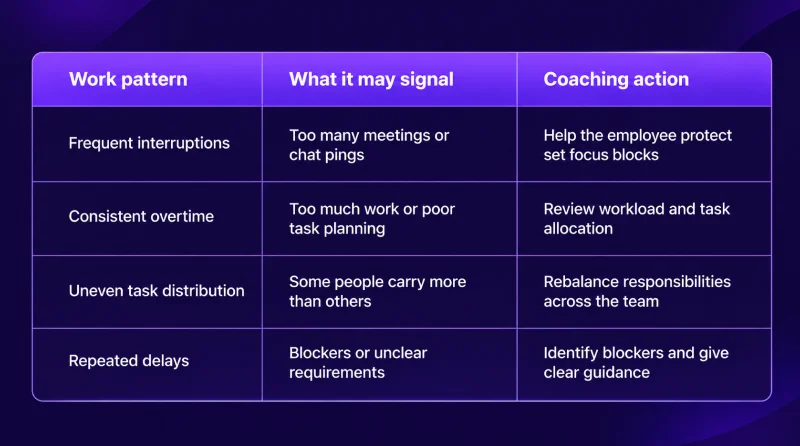
A few real-world versions of these:
- Frequent interruptions: A BPO quality analyst keeps flipping between call reviews and team chat. You agree she’ll check the chat twice an hour. Her reviews start getting finished in one sitting.
- Consistent overtime: An agency account manager works late most nights because she’s handling three tough clients alone. Moving one to a colleague fixes it.
- Uneven task distribution: On an IT services team, the same two developers grab almost every urgent ticket. A weekly rotation spreads them out.
- Repeated delays: A technician keeps finishing jobs late. The parts keep showing up after he’s already on site. Confirming parts the evening before solving it.
How to Use Work Pattern Data Responsibly and Protect Employee Privacy
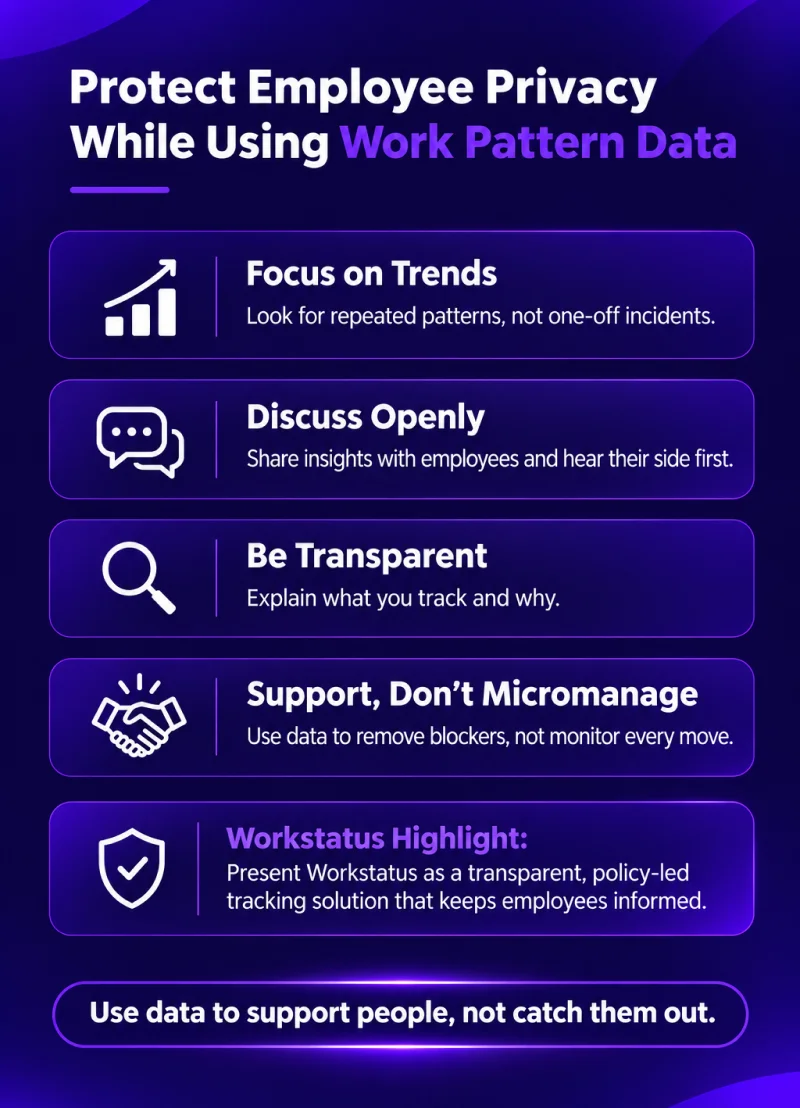
If your team thinks the data exists to catch them out, none of this will work. Employee work patterns are personal. Treat them with the same care you’d want for your own.
1. Focus on Trends, Not Isolated Incidents
A slow Monday is just a slow Monday. One long lunch says nothing. Give it a few weeks. If the same thing keeps showing up, then it’s worth a conversation.
2. Discuss Insights Openly
Let people explain or correct what the data shows. Records miss things. A client call taken on a phone in the car won’t look like desk time.
3. Be Transparent About Data Collection
Tell your team what you track and why you track it. Be specific about how it helps them. A good policy answers four questions:
- What do you collect?
- Who can see it?
- How long do you keep it?
- How does it feed into coaching?
4. Support, Don’t Micromanage
Checking every small thing your team does gets old fast, for them and for you.
The data is there to help you spot what’s slowing work down so you can fix it and plan the next week a little better.
Conclusion
Work pattern data helps you understand what affects your team’s productivity. It shows where work slows down and when employees may need support.
Use these insights to:
- Spot performance gaps early
- Understand what slows work down
- Identify employees who need support
- Set clear coaching goals
- Build better work habits
You should discuss these patterns with employees to understand the real reasons behind them. Review progress regularly to see what improves.
With Workstatus, you get a clearer view of daily work patterns. This helps you make coaching more useful and guide your team towards better habits and stronger results.
FAQs
1. What is work pattern data?
Ans. It’s a record of how your team spends its working time over days and weeks. It shows focus time, breaks, overtime and how work moves across tasks.
2. How does work pattern data help with employee coaching?
Ans. It points you to the real problems your team faces every day. You can then coach on the cause rather than guessing.
3. How often should I review my team’s work patterns?
Ans. A quick weekly look works well for most teams. Bring up a pattern only when it shows up for a few weeks in a row.
4. Will tracking work patterns make my team feel watched?
Ans. Not if you’re open about what you track and why. Share the data with your team and use it to help them.
5. Can Workstatus help me understand my team’s work patterns?
Ans. Yes. Workstatus connects each hour to the project, shift or job it went into, so your coaching starts from clear facts.