Table of Contents
FTE hours show you how much full-time work your team actually puts in. Once you know that number, staffing and budget calls get a lot easier.
Headcount can fool you. Ten people on payroll rarely means ten people’s worth of work.
Maybe two of them work part-time. Maybe one joined for a three-month client project. FTE takes all those hours and turns them into a single number.
You can use your FTE count to:
- Figure out how many people a new client project needs
- Estimate your labor costs
- Check which benefit rules and tax credits apply to you
- Meet the reporting rules in your region
There’s one catch. Your FTE count can only be as accurate as the hours you feed into it.
That’s why many teams use a tool like Workstatus. It records hours as people work, so you don’t rely on memory at month-end.
Below, you’ll learn how to calculate FTE hours in four simple steps.
What Is FTE (Full-Time Equivalent)?
Part-time work is more common than you might expect. As per the US Bureau of Labor Statistics, about 28.7 million Americans worked part-time in the third quarter of 2026.
FTE stands for full-time equivalent. It tells you how many full-time workers your total hours add up to.
In other words, FTE measures the work your team does. The number of names on your list doesn’t decide it.
How full-time and part-time staff count
- A full-time employee counts as 1.0 FTE: They work your full standard week.
- A part-time employee counts as part of 1.0: To find their share, divide their weekly hours by your full-time weekly hours.
Let’s say your full-time week is 40 hours. Someone who works 20 hours a week counts as 0.5 FTE.
Your definition of full-time may change
Most companies pick their own full-time week. For some it’s 40 hours. Others go with 45 or 48.
Government rules may use a different number. The US Affordable Care Act, for example, treats 30 hours a week as full-time when it counts FTEs.
So check which rule applies before you start. The right number depends on why you need the count.
Why Is Calculating FTE Important?
FTE gives you one number you can actually work with. It helps in four main areas.
1. Workforce Planning
FTE shows you whether your team has room for more work. Before you say yes to a new client or project, you can check if the hours are there.
2. Labor Cost Estimation
FTE gives you a solid base for pricing. Multiply your FTE count by what one full-time employee costs you on average.
That makes fixed-price quotes far less of a gamble. It also shows you when a retainer starts costing more than it brings in.
3. Employee Benefits
Many benefit rules look at your FTE count instead of your headcount. That number can decide which health plans you have to offer.
It can also decide whether you qualify for certain small business tax credits. Get the count wrong, and you could miss a credit that should be yours.
4. Compliance
Labor and tax rules often use FTE to decide what applies to your business. These rules vary from country to country.
A correct FTE count helps you file the right reports. And if an auditor ever comes knocking, your records are ready.
How to Calculate FTE Hours
You can work out FTE in four steps. Each one builds on the last.
Step 1: List all employees and their hours
Start by listing everyone on your team. Include full-time and part-time staff.
For each person, write down:
- How many hours they work per week
- How many weeks they worked this year
Part-time schedules often differ. Give each one its own line.
If you can, pull these hours from your time tracking records. Paper notes and memory tend to leave gaps.
Step 2: Define full-time hours
Now decide what full-time means for this count.
- For internal planning: Use your own standard week, like 40 hours.
- For legal or tax filings: Use whatever number the rule sets. The US ACA, for example, uses 30 hours a week.
You’ll also need to decide whether paid leave counts as hours worked. Some rules include it, and some don’t. Whatever you choose, apply it to everyone.
Step 3: Calculate total annual work hours
Next, add up the hours for the full year. Start with your full-time staff:
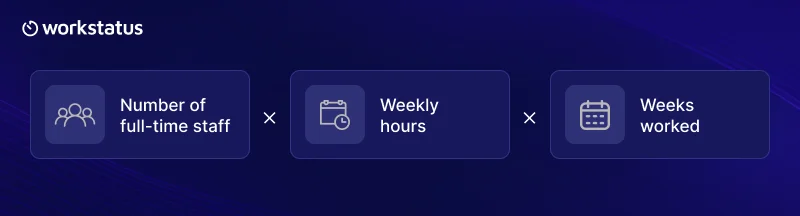
Then do the same for each part-time group. Add those results together.
Finally, add your full-time and part-time totals. That’s your total annual work hours.
Step 4: Divide by annual full-time hours
This last step gives you your FTE count. Here’s the formula:

To get your annual full-time hours, multiply your full-time week by 52.
- 40-hour week: 40 × 52 = 2,080 hours
- 30-hour week: 30 × 52 = 1,560 hours
Each time you calculate FTE hours, stick with the full-time week you picked in Step 2. Otherwise, your numbers won’t line up from one count to the next. Are Your FTE Numbers Accurate?
FTE Calculation Example
Let’s run through the steps with an example. BrightDesk is a small customer support center that handles accounts for several clients.
BrightDesk has 13 people. It treats 40 hours a week as full-time.
Step 1 and Step 3: List the team and total the hours
Here’s how the totals break down:
- Full-time hours: 16,640
- Part-time hours: 3,120 + 1,200 = 4,320
- Total hours: 16,640 + 4,320 = 20,960
Step 2 and Step 4: Divide by annual full-time hours
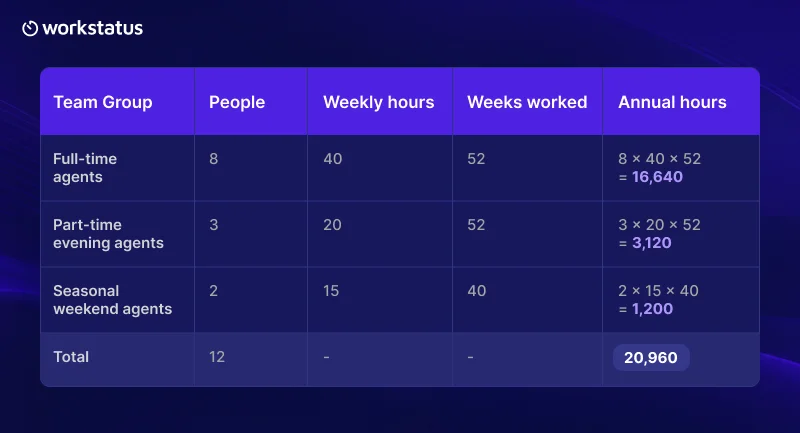
BrightDesk works on a 40-hour week. So one full-time year for them is 40 × 52 = 2,080 hours.
Plug that into the formula:
20,960 ÷ 2,080 = 10.08 FTE
What the result tells you
BrightDesk pays 13 people. Yet the hours they put in equal about 10 full-time agents.
That difference matters when BrightDesk takes on its next client account. It should plan around 10 FTE of capacity. Planning for 13 would stretch the team too thin.
What if BrightDesk needed the count for an ACA check? Then it would use a 30-hour week, and the divisor would drop to 1,560 hours. Always match the divisor to the reason you’re counting.
How Workstatus Simplifies FTE Calculations
The FTE formula is simple. Getting time data you can trust is the difficult part.
Missing timesheets and late entries can skew your count. A single wrong number can throw off your staffing plan or your benefit check.
Workstatus is workforce management software built for service businesses. It keeps your hour data clean across every project and client account. Here’s how that helps.
- Automatic Time Tracking: Workstatus records hours while your team works. It covers full-time and part-time staff alike.
- Centralized Timesheets: Every work-hour record lives in one dashboard. No more merging spreadsheets from different teams or sites.
- Custom Reports: Pull total hours for any period you need. A single week works. So does a quarter or a full year.
- Easy Exports: Export time data and share it with your payroll and compliance teams.
Conclusion
FTE shows how much work your team can handle based on the hours they work. It helps you understand your team’s actual capacity without giving anyone too much work.
With this information, you can plan projects better and decide when to hire more people. It also makes project pricing and benefit calculations easier.
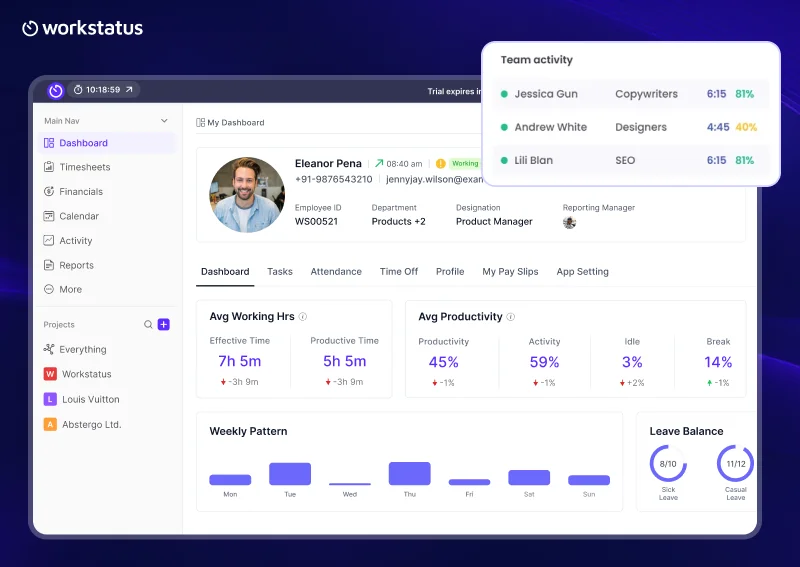
Workstatus makes this process simple. It records your team’s work hours and keeps approved timesheets in one place.
When you need to calculate FTE, you don’t have to check multiple spreadsheets. Just get the hours from one report and use them in the formula.
This gives you a clear picture of your team’s capacity. You can then make better decisions about hiring and work planning.
FAQs
1. What does 1.0 FTE mean?
Ans. It means one person working your full standard week. On a 40-hour week, someone who works 20 hours counts as 0.5 FTE.
2. Do contractors count toward FTE?
Ans. For internal planning, you can include anyone whose hours add to your capacity. For legal filings, most rules count employees only, so check the rule first.
3. Should paid leave count as hours worked?
Ans. Some rules include paid leave, and some don’t. Choose one approach based on why you need the count and apply it to everyone.
4. How often should you recount your FTE?
Ans. For planning, a monthly or quarterly check works well, especially when you add clients or hire. With Workstatus, you can pull fresh hour totals for any period in minutes.