
Table of Contents
Have you ever faced this situation where your project runs smoothly until one design task throws everything off track?
It’s a common reality for architecture teams. You begin with a clear plan, but as the project progresses, things start to shift; client inputs evolve, revisions increase, and timelines begin to slip.
According to the American Institute of Architects (AIA), design changes drive delays and can add up to 10% to project costs.
Here’s how it typically plays out:
- Design changes come often, but extra efforts are not tracked
- Without a single view, time is spent across drawings, meetings, and site visits
- Updates are scattered across the tool, making coordination harder
- Slipping project margins and timelines
This results in a lack of visibility, which makes it even tougher to manage delivery and protect profitability.
So, the real need is not just to manage the projects, but to clearly see the efforts connecting to revisions, timelines, and margins.
But what if we tell you there is a solution that will bring clarity into one place? Yes, the solution is simple; you just need to use the right project management tool.
The things it will do for you:
- Revision Control
- Team Alignment
- Effort Visibility
- Delivery Clarity
- Margin Control
But as you know, there are a lot of project management tools that are best in the market.
Why Architects Lose Margin (And How Software Fixes It)
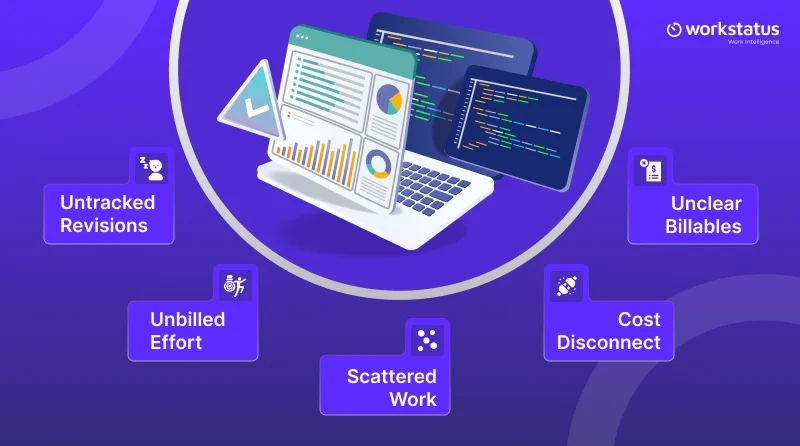
Architects lose margin mainly because effort is not fully tracked, connected to project scope, or converted into billable value.
Let’s look at the core reasons why architects lose margins:
- No extra effort tracked or billed with increased revisions
- Designs, meetings, and site visits are not clearly captured
- There is no single visibility as work is spread across tools
- Change requests are approved, but not linked to the actual project cost
- The actual billable output is not clear and accurate
To fix all these challenges, we need software to fix them, as it solves all these by bringing clarity into revisions, effort tracking, and project visibility, so your margins are protected and not lost.
But before that, let’s learn about the real margin killers.
The Real Margin Killer: Design Revisions & Scope Creep
So if we talk about the design revision and scope creep, they are the biggest reasons that architecture projects lose margins very quickly.
It doesn’t happen all of a sudden; instead, it gets built with every unchecked change. Let’s look at how:
- Revision time increases, but the impact on project margins is not visible
- Time that is spent on CAD work, meetings, and site visits is not accurately measured
- Without any order proof, client change requests are executed
- Extra effort is delivered without any billing or cost recovery
- Despite teams being busy, utilization and profitability are unclear
- Project overruns are only identified at the invoicing stage
This is how margins are lost for architects, so it’s so important for them to get better visibility. And when revisions are captured and changes are approved properly, then only projects stay controlled, and profits are protected.
Now that we know the challenges and what exactly becomes a roadblock, let’s see what architects actually need from project management software for architecture firms in 2026.
Use our project overrun risk calculator to identify margin risks early.
What Architects Actually Need From Project Management Software in 2026
With the architect’s firm growing, managing projects no longer has to be for the timelines. Here is what the architects need from a project management software in 2026:
- Clear tracking of design revisions, and their impact on the cost & time
- Real-time visibility across CAD work, meetings, and site visits
- Stronger change order control to avoid unpaid extra tasks
- A single view of tools, teams, and project updates
- Better connectivity between effort, billing, and profitability
The goal for the architecture is very simple: it is not just to manage the projects, but also to protect the margins while delivering on time.
Design businesses need software built around their unique workflows. Using work management software for design teams helps improve collaboration, manage revisions, and keep projects on schedule while protecting profitability.
With a clear understanding of the problem and what exactly they need from the tool, let’s look out for the best project management software for architects in 2026.
The choice is yours, choose which suits your team and your business effectively. Let’s see.
Best Project Management Software for Architects in 2026
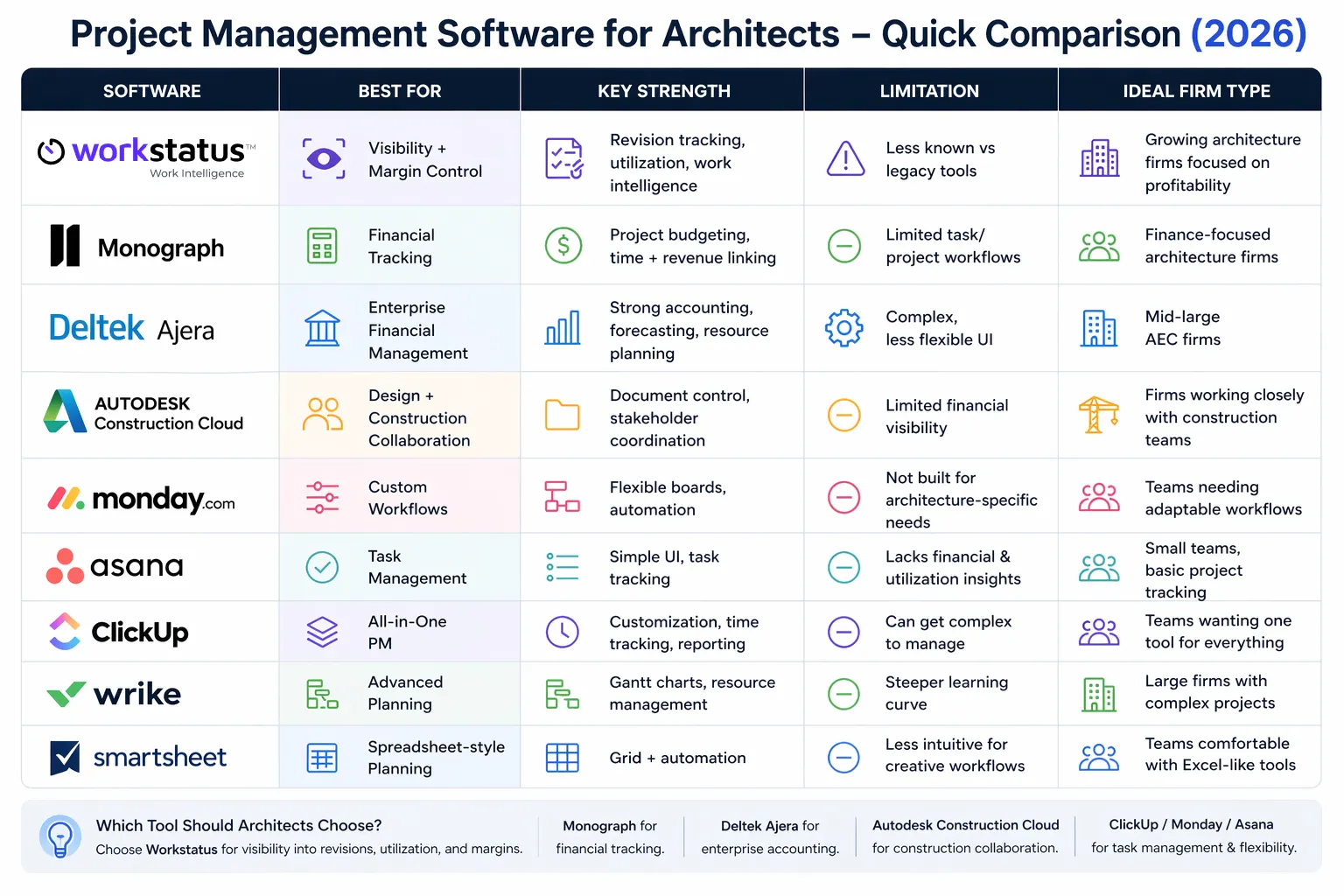
Here are the top curated list of architects project management software in 2026 that you are looking for:
1. Workstatus
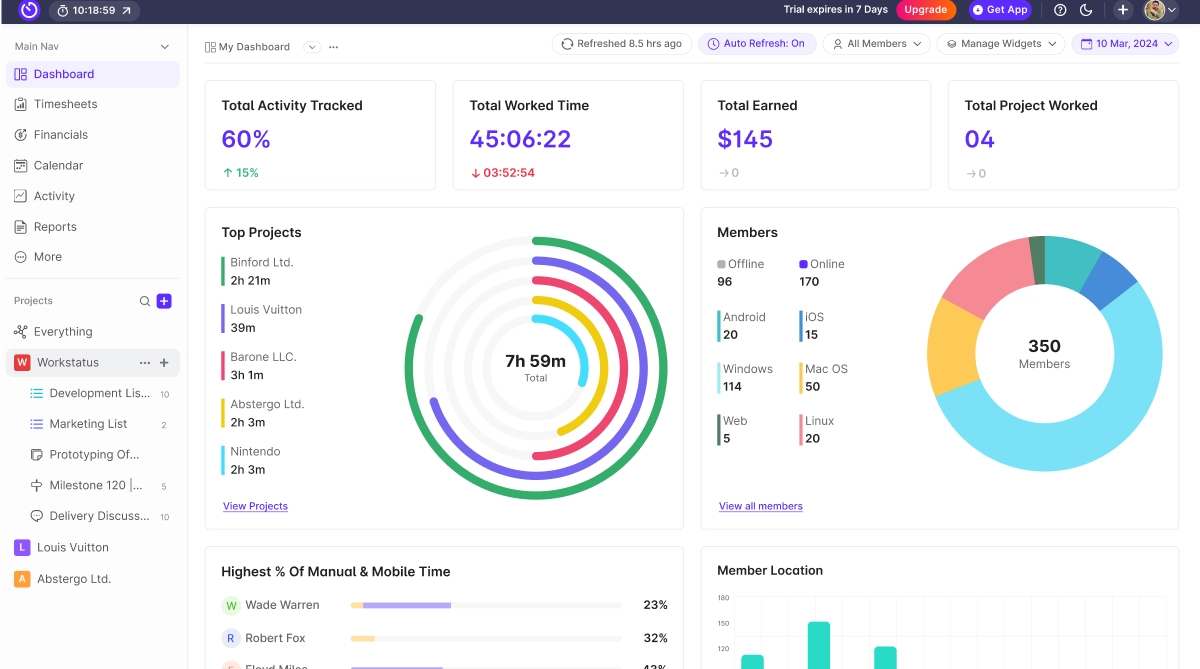
Workstatus is the best architectural project management software for firms who are looking for clear visibility into revisions, efforts, and project performance.
It gives a clear view of how work connects with margins and delivery.
Key Features:
- Multi-layered work intelligence across time, projects, and outcomes
- Clear visibility into team utilization and workload
- Everything in one unified dashboard, such as time, progress, and activity
- Centralized reporting across all the projects
- Real-time tracking of design revisions and projects
- Early indicators for scope changes and delivery risks
Benefits:
- Create a clear proof for the change order and approvals
- Clear view of revision impact before getting affected by project margins
- Prevents scope creep from turning into unpaid work
- Improve on-time and profitable project completion
- Helps in balancing team workload to avoid any delivery delays
In short, Workstatus helps architects move beyond basic task management to control outcomes, scope, and effort.
It brings all the clarity to revisions, improves planning, and at the same time, ensures projects stay both on the schedule and within the margin.
2. Monograph
Key Features:
- Project budgeting tools
- Time tracking and invoicing
- Financial dashboards
- Resource planning
Benefits:
- Clear visibility into project finance
- Better billing accuracy
- Improved budget control
It easily helps them in connecting the time spent with project revenue and works well for financially-focused architect teams.
3. Deltek Ajera
It is a software that is designed for an AEC firm that wants strong accounting and resource management.
Key Features:
- Project accounting
- Budget tracking
- Resource planning
- Financial reporting
Benefits:
- Better control of costs
- Improved financial forecasting
- Stronger management of project margins
It works best for the organisation that first prioritizes reporting and financial structure. It helps in protecting profitability across the projects.
4. Autodesk Construction Cloud
This is a software that gives architecture and design teams the ability to work together in one place. It is well-suited for firms that handle large projects and projects that are closely linked to construction.
Key Features:
- Document management
- Team coordination
- Collaboration tools
- Project Tracking
Benefits:
- Better team communication
- Better control of documents
- No coordination errors
It supports project coordination across the stakeholders and is best used for teams working closely with construction teams.
5. Monday.com
It offers flexible project tracking to architecture teams and focuses well on workflow customization.
Key Features:
- Custom workflows
- Timeline views
- Automation tools
- Team dashboards
Benefits:
- Adaptable to various project types
- Improved task visibility
- Easier coordination
It works well for the teams that require flexible task management, and customization comes under the strongest advantage.
6. Asana
It is a simple task and project management tool that helps the team organize work and deadlines clearly.
Key Features:
- Task management
- Timeline planning
- Progress dashboards
- Collaboration tools
Benefits:
- Better deadline management
- Improved team coordination
- Clear task ownership
It is the best for the team who need structural task organisation. It is so easy and quick to use and takes no effort.
7. ClickUp
ClickUp provides an all-in-one project management solution. It combines task tracking, time tracking, and reporting.
Key Features:
- Custom task views
- Built-in time tracking
- Goal tracking
- Reporting dashboards
Benefits:
- Centralized work management
- Improved productivity tracking
- Better performance insights
ClickUp is suitable for firms wanting an all-in-one system. It offers flexibility and detailed customization.
8. Wrike
Wrike is designed for teams that need advanced project planning. It supports structured workflows and enterprise needs.
Key Features:
- Gantt charts
- Resource management
- Custom workflows
- Performance reporting
Benefits:
- Better planning control
- Improved resource allocation
- Enhanced reporting visibility
Wrike works well for larger firms managing multiple projects. It supports structured and scalable workflows.
9. Smartsheet
Smartsheet combines spreadsheet-style tracking with project management tools. It suits teams comfortable with grid-based project views.
Key Features:
- Grid and Gantt views
- Workflow automation
- Reporting dashboards
- Collaboration tools
Benefits:
- Familiar interface for planning
- Easy workflow setup
- Improved visibility into tasks
Smartsheet works well for teams that prefer spreadsheet-style control. It blends flexibility with structured project tracking.
Choosing the right software depends on your firm’s size, complexity, and need for revision control.
Focus on tools that protect margins, control scope, and provide real delivery visibility; not just task tracking.
Understanding the ROI of Margin Protection
For architecture and design firms, small margin leaks add up fast. Uncontrolled revisions, scope creep, and rework quietly reduce project profit.
- Fewer unpaid revisions improve project budgeting and margins
- Clear change order proof increases billable recovery
- Early risk visibility reduces costly rework
- Balanced workload improves team productivity
- On-time delivery protects client trust and repeat work
Even a small improvement in revision control can protect a large part of your profit. When margins are protected early, growth becomes steady and predictable.
From Tasks to Proper Project Records
In 2026, architecture firms need more than task lists and timelines. They need clear project records that protect scope, revisions, and profit.
- Track revisions clearly, not just task updates
- Record scope changes with proper approval history
- Link the time spent to the project stages and deliverables
- Maintain documented proof for client change requests
- Keep a clear record of progress and decisions
Tasks help teams stay organized. Proper project records protect margins, reduce disputes, and support long-term growth.
Final Thoughts
Traditional project tools help organize tasks. Project intelligence helps protect outcomes in real time.
As architecture firms grow, clear visibility into revisions, scope, and workload is essential to protect margins and timelines.
With the right architectural project management software, firms can prevent delays early, control change orders, and deliver with confidence.
FAQs
Ques: Why isn’t task tracking alone enough for architects?
Ans: Because tasks do not show revision impact, scope creep, or margin risk.
Ques: How does better visibility protect project margins?
Ans: It helps catch extra work, delays, and scope changes before profit is affected.
Ques: Why is revision tracking important for AEC firms?
Ans: It prevents unpaid work and creates proof for change orders.
Ques: Can better workload visibility improve delivery speed?
Ans: Yes. Balanced workload reduces delays and rework.
Ques: What is the biggest sign a firm needs better project control?
Ans: When projects finish, but margins are lower than expected.